Capturing passwords with Wireshark
SecurityLab
Everyone who starts using Wireshark and seeing the extensive functionality asks the question, can Wireshark intercept passwords? Answer: yes!
Wireshark can capture not only passwords, but any information transmitted over the network - usernames, email addresses, personal information, images, videos, and more. As long as we can capture network traffic, Wireshark can capture passing passwords. But the question is - what passwords? More precisely, passwords from which network protocols can we intercept? Let's take a look in this article.
Network protocols with plain text
So how is it possible that Wireshark can intercept passwords? This is because some network protocols do not use encryption. Such protocols are called plain text protocols. And since clear text protocols do not encrypt communications, all data, including passwords, is visible to the naked eye. Anyone who can see communication can eventually see everything.
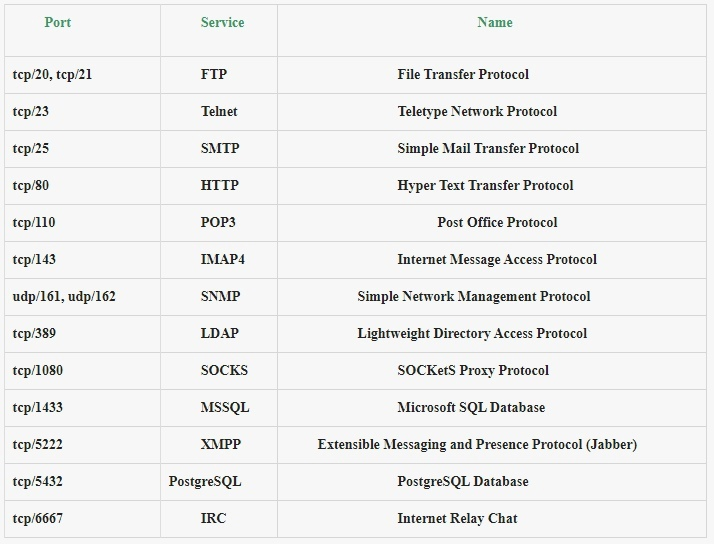
The following table lists some of the more popular clear text protocols still in use today, as well as some other protocols that provide clear text authentication:
Capture FTP password
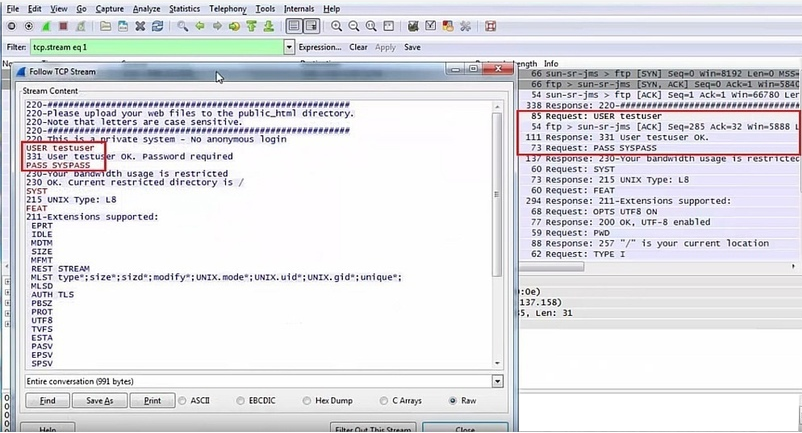
The File Transfer Protocol (FTP) appeared in 1971 and commonly uses ports tcp/20, tcp/21. Although it is a very old protocol, some organizations still use it in their networks. FTP is a plain text protocol, so a well-trained attacker can very easily intercept FTP credentials using Wireshark. The following screenshot shows an example of an FTP password obtained using Wireshark:
Extract Files from FTP with Wireshark
Because FTP is a plain text protocol, we can also capture the actual data transferred over this protocol. We can extract all files (like images, documents, audio files, etc.) from the network using Wireshark.
Telnet Password Capture
Telnet protocol using port tcp/23
It is used primarily for administrative purposes and is notorious for being insecure. Since there is no encryption, there is no privacy or protection against eavesdropping. However, Telnet is still used today.
There are many kinds of devices that use telnet as a protocol for administration. For some devices, telnet is the only option that has no options (for example, no SSH or HTTPS web interfaces available). Because of this, it is very difficult for systems to completely get rid of it. Telnet is simply possible to notice on:
- Network equipment (routers, switches ..)
- Video conferencing systems (such as Cisco TelePresence)
- Access control systems (e.g. access card readers)
- Storage systems and tapes
- Printers and imaging devices
- Legacy IP Phones
- Mainframes
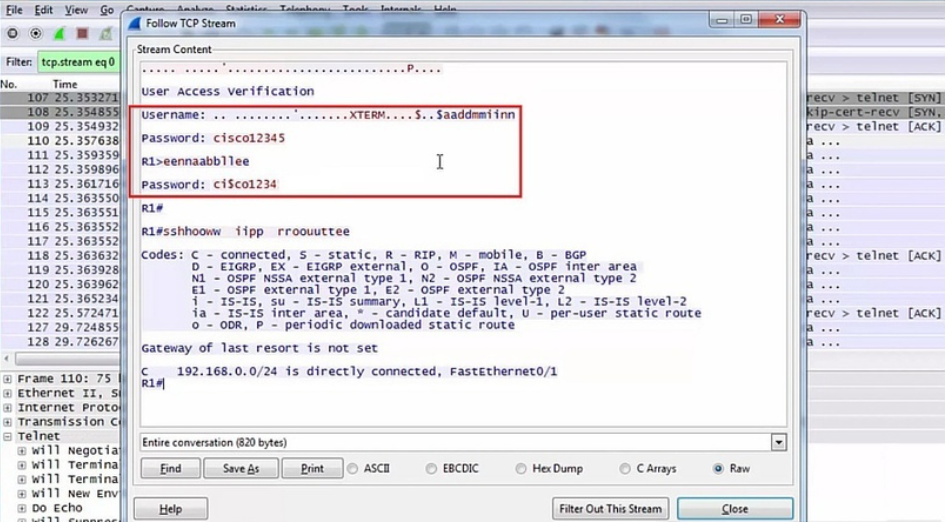
Since telnet is a simple text-based protocol, a well-positioned adversary will be able to eavesdrop on the exchange of information and intercept everything, including passwords. A sample telnet connection with a captured password can be seen in the following screenshot:
SMTP Password Capture
The Simple Mail Transfer Protocol (SMTP) has also been used for many decades. It uses port tcp/25, and although there is a safe alternative for port tcp/464, port tcp/25 is now open on almost every mail server due to backwards compatibility.
Most servers on port tcp/25 require the "STARTTLS" command to initiate SSL/TLS encryption prior to any authentication attempt. however, mail servers in some organizations still support plain text authentication over an unencrypted channel. This is mainly due to legacy systems on their internal networks.
When someone uses plain text authentication during an SMTP transaction, a well-positioned attacker will be able to view the credentials. All the attacker needs to do is decrypt the base64 username and password. This is because SMTP uses base64 encoding to encode the username and password during the transaction.
In the following screenshot, we can see the captured SMTP credentials using Wireshark and further base64 decoding with Linux base64 utility support:
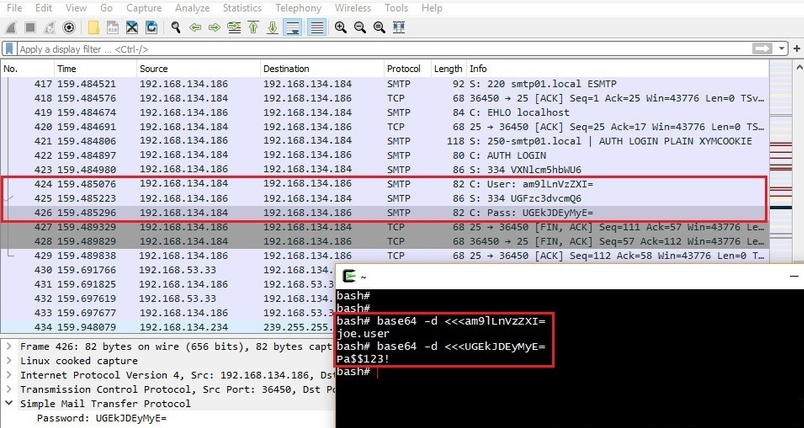
On Windows, we can use the certutil.exe command to decode the captured credentials like this:
echo base64encodedstring >file.b64
certutil -decode file.b64 file.txt >NUL
type file.txt
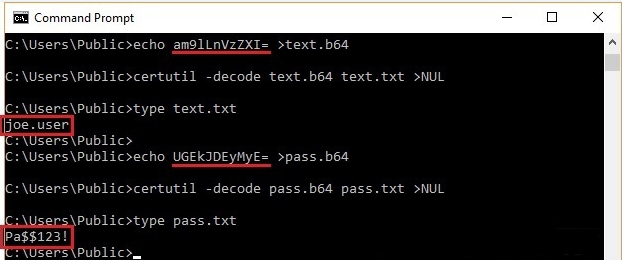
Note that we can also use online tools such as base64decode.org or base64decode. net to decode base64. This is especially true during penetration tests and other aggressive attacks where criticality and confidentiality are of the utmost importance.
Capturing the IMAP4 password
Internet Message Access Protocol (IMAP) is another protocol related to email. It uses port tcp/143 and usually asks for "STARTTLS" commands to start SSL/TLS encryption prior to any authentication attempts. But just like SMTP, some companies still support "simple" authentication over an unencrypted channel. In such cases, authentication is visible to every well potential attacker.
The following screenshot shows the IMAP credentials retrieved from the network using Wireshark:
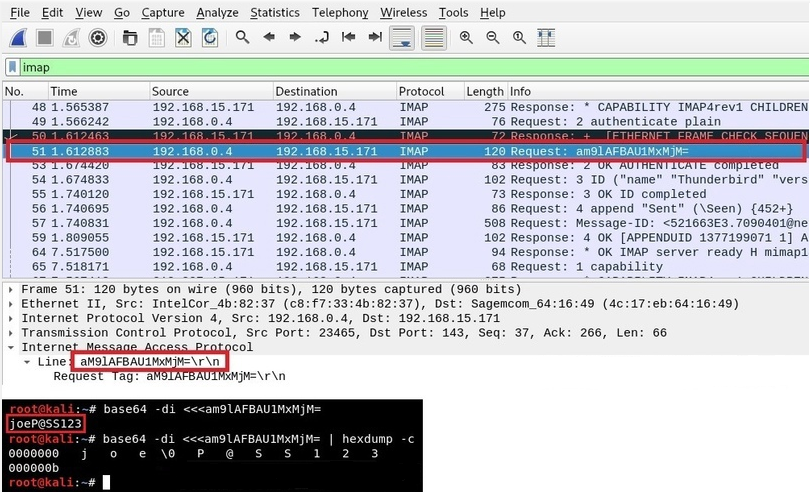
Note that IMAP4 also uses base64 encoding similar to SMTP. Therefore, it is necessary to decode the captured authentication again in order to obtain the username and password in clear text. Notice the NULL byte (\0) between the username and password separating them in the above screenshot.
HTTP password capture
The Hypertext Transfer Protocol (HTTP) also needs no introduction. It normally operates on port 80/tcp, and since it is a plain text protocol, it provides little to no privacy for the communicating parties. Anyone who has the ability to listen to the communication will be able to record everything on this channel, including passwords.
Even though all the major browser vendors have gone to great lengths to keep HTTP usage as low as possible, we can still see HTTP being used on internal networks during penetration tests. Here is an example of the credentials written in the HTTP message in the POST request:
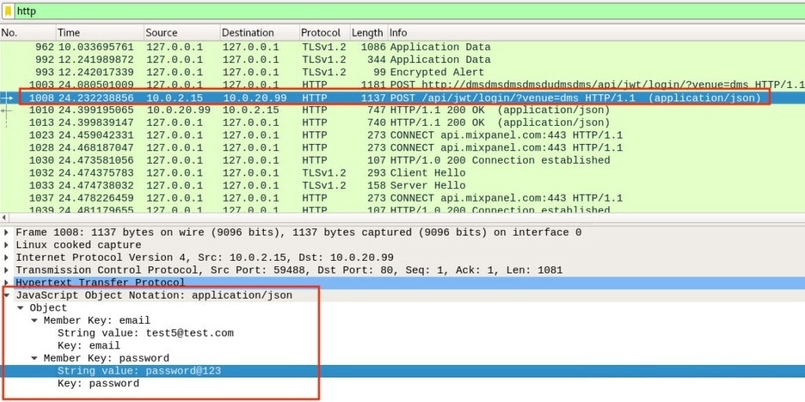
Here is another example of registering basic authentication in an HTTP GET request. Note that the authentication string is again base64 encoded, just like in SMTP or IMAP4 protocols. But in the case of basic HTTP authentication, Wireshark decodes it automatically:
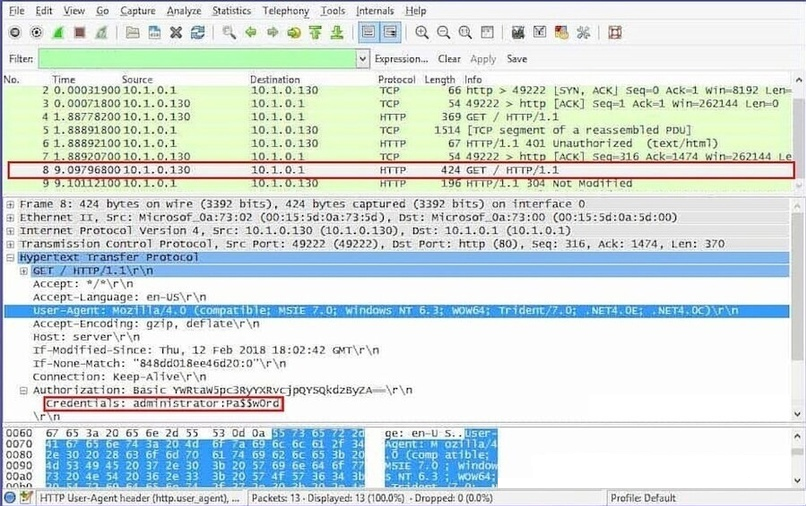
Capturing HTTP session cookies
By eavesdropping on unencrypted HTTP messages, a criminal can still freely intercept session cookies using Wireshark. Receiving a session cookie from the network has exactly the same impact as parsing credentials.
Capturing files from HTTP traffic
Using Wireshark, we can also easily extract files such as images, documents, and audio files from network traffic. Brad Duncan of PaloAlto Networks wrote an excellent article describing how to extract data from various network protocols using Wireshark. There is also a Chaosreader tool that allows you to extract data from a PCAP file.
SNMP Community String Capture
Simple Network Management Protocol (SNMP) usually runs on port udp/161. Its main purpose is to manage and control network devices and their functions. There are 3 versions of the SNMP protocol and the first 2 versions (v1 and v2c) are text based protocols. SNMP uses what is called a community string, which is equivalent to authentication. Therefore, capturing an SNMP community string is almost the same as capturing a credential.
Although the SNMPv3 protocol has been around for nearly two decades, it will take time. Most organizations are still running v1 or v2c on their internal networks. This is usually due to backward compatibility with legacy systems on their networks.
Here is an example of a captured SNMP community string using Wireshark:
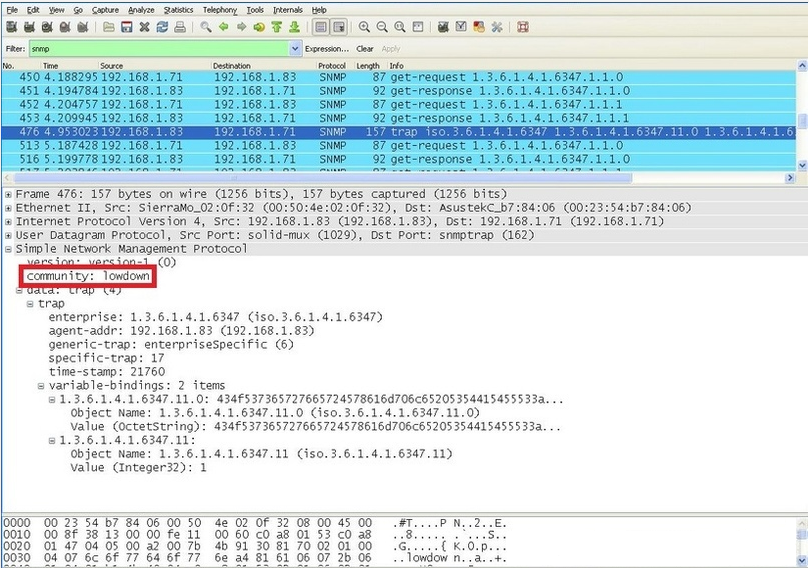
Now an attacker could use the string and collect detailed information about the remote system. This can allow an attacker to learn sensitive information about the system and plan further attacks against it. Note that sometimes the line also allows you to change the configuration on the remote system (read/write access).
Capturing an LDAP password
Lightweight Directory Access Protocol (LDAP) implements a protocol for accessing and maintaining directory information services. It usually runs on port tcp/389 as an unencrypted text service. Therefore, it is susceptible to eavesdropping like any other plaintext protocol.
LDAP can use several authentication methods. The simplest method is called "simple" and is to enter the username and password in clear text. Therefore, anyone with the ability to inspect network traffic can very easily intercept simple LDAP authentication.
Here is an example of LDAP authentication obtained using Wireshark:
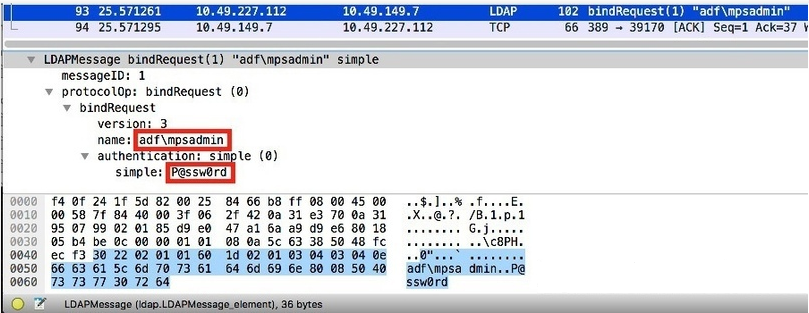
Also, in Windows Active Directory environments, domain controllers typically open the LDAP interface on port tcp/389. Typically, there are several systems on the network that are integrated with Active Directory using the LDAP interface, such as attendance systems, access control systems, printers, etc. In such cases, these systems can allow an attacker to intercept valid domain user credentials via LDAP if they are not properly secured. Check out an example from one of our pentests here.
SOCKS password capture
SOCKS is a very versatile and popular proxy protocol that allows you to forward (or tunnel) any TCP or UDP traffic between a client and a server. SOCKS version 5 also supports authentication. Because SOCKS does not perform any encryption, all data passing through the tunnel is sent "as is". On top of that, if we are able to capture network traffic between the client and server, we can also capture SOCKS authentication.
The SOCKS5 protocol supports several authentication methods. One is a username and password, and because there is no encryption, a well-positioned attacker can intercept it with a packet sniffer.
The following screenshot shows an example of SOCKS5 authentication obtained using Wireshark:
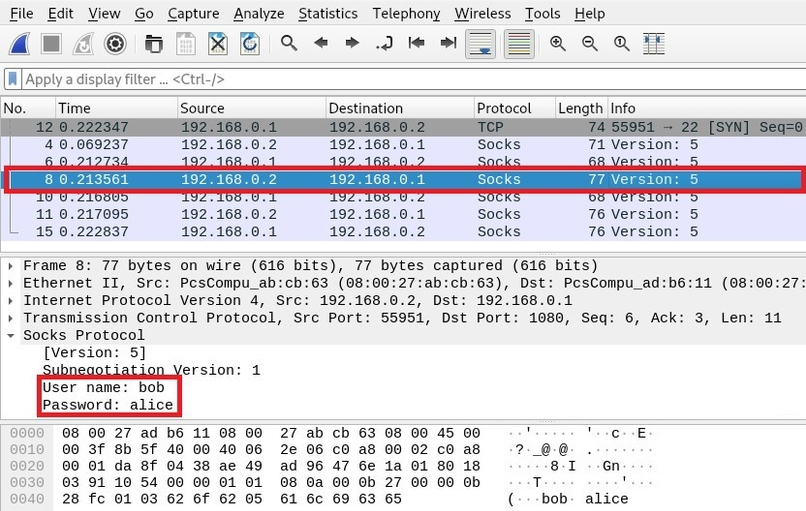
An attacker can now use a SOCKS proxy and gain access to server-side systems.
Capture MSSQL password
Microsoft SQL Server usually runs on port tcp/1433 and this is another service we can capture the password for using Wireshark. If the server is not configured with the "ForceEncryption" option, it is possible to intercept the plain text authentication, either directly or using a downgrade attack. The "man in the middle" can get the MSSQL credentials very easily.
Here is an example of captured MSSQL password of user sa using Wireshark:
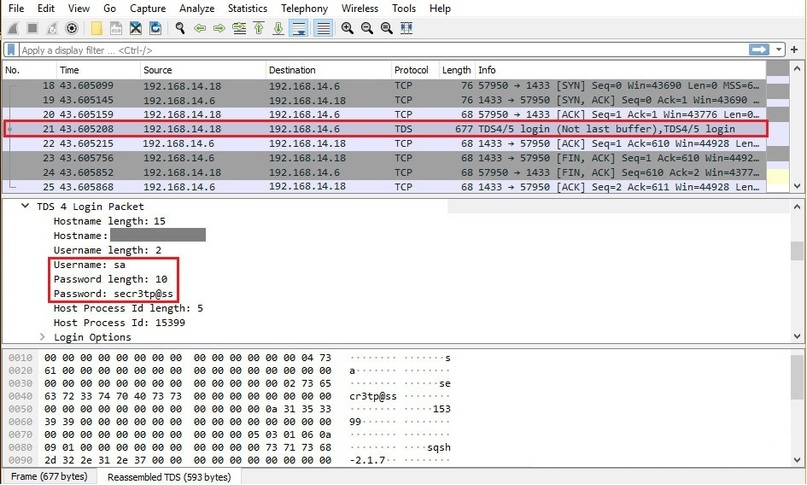
Note that in MSSQL, the "sa" user is the system administrator account - the user with the highest privileges. Therefore, this will have a critical impact, allowing an attacker to take full control of the database server. It can also lead to remote command execution (RCE) via the xp_cmdshell functionality (link, link).
Capture PostgreSQL password
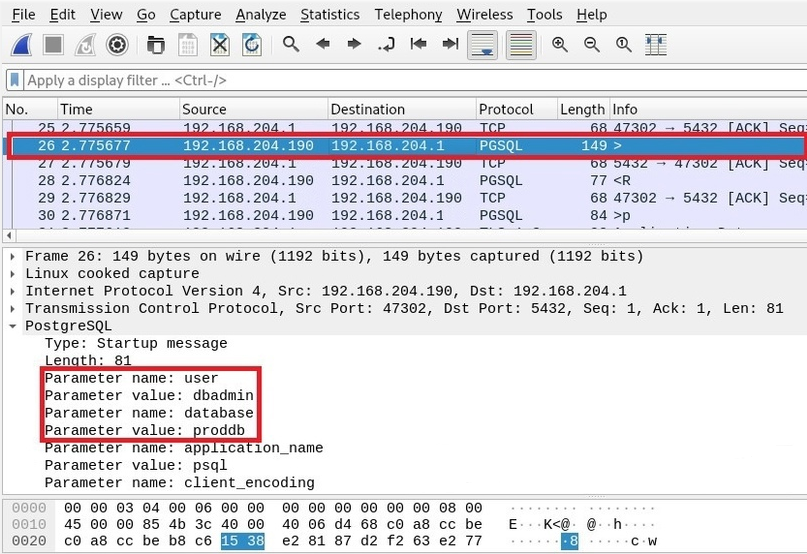
PostgreSQL is another very popular SQL database server. It runs on port tcp/5432 and supports various authentication methods. It is usually configured to prevent clear text authentication, but is sometimes configured to allow it. In such cases, a well-positioned attacker can intercept the username and password, intercepting network traffic.
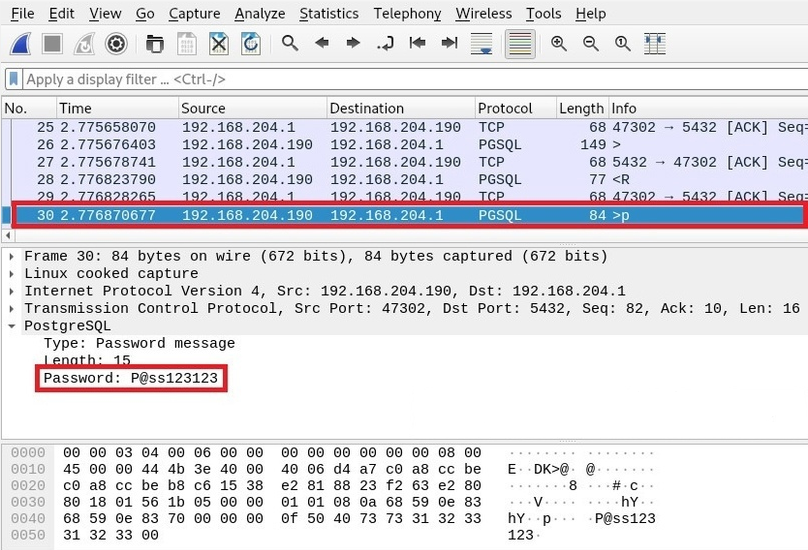
Note that PostgreSQL authentication comes in multiple packages. First comes the username and database name:
In the subsequent network packet, we can also see the PostgreSQL password:
IRC password capture
Internet Relay Chat (IRC) is a chat protocol usually using port tcp/6667. IRC was very popular back in the 90s. Although it is no longer as popular today, some people still use it and it still exists. In addition, malware creators and botnet operators also use it to control their bots. They usually have a private, password-protected IRC server, or a private channel (chat) somewhere on a public IRC server.
Since IRC is a clear text protocol, it is very easy to get the credentials sent over this channel. Here is an example of an IRC password obtained using Wireshark:
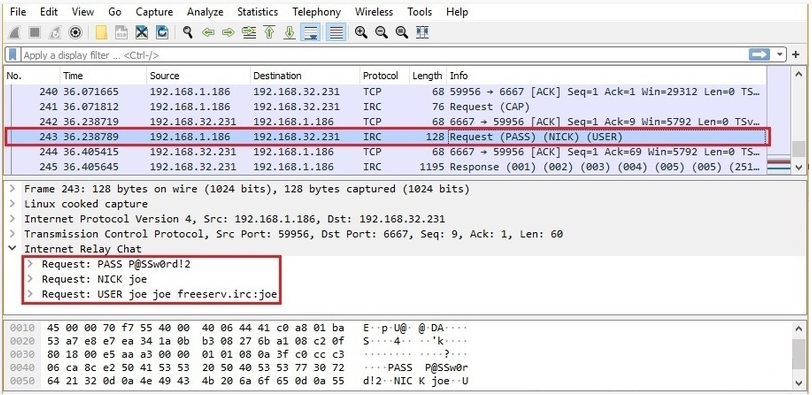
With these credentials, we were now able to connect to a password-protected IRC server.
OSPF Password Capture
Open Shortest Path First (OSPF) is a routing protocol for IP networks. The most common is OSPF version 2, which was specified in 1998. This protocol is commonly used in very large networks and in the backbone networks of various service providers (eg ISPs).
OSPF supports several authentication methods, one of which is plain text. In such a case, a well-positioned attacker who can eavesdrop on the communication can sniff the OSPF password from the network using Wireshark:
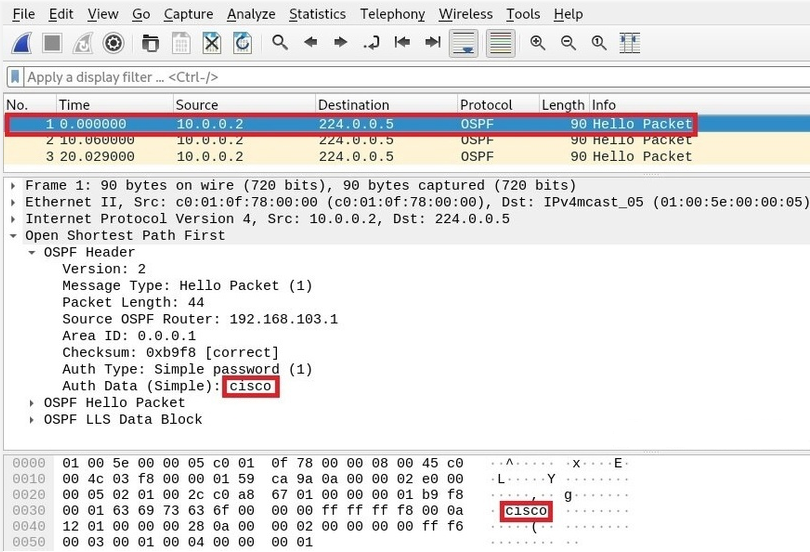
An attacker can now send false route advertisements, redirect network traffic flows, or disrupt services (connectivity).
BFD Password Capture
The Bidirectional Forwarding Detection (BFD) protocol is used to provide diagnostic information between two connected systems. It is typically used in conjunction with routing protocols such as BGP or OSPF to quickly detect link failures. This protocol is commonly used in very large networks and in the backbone networks of various service providers (eg ISPs).
The BFD protocol supports several authentication methods, one of which is also plain text. In such a case, a well-positioned attacker who can eavesdrop on the communication can sniff out the BFD password from the network using Wireshark:
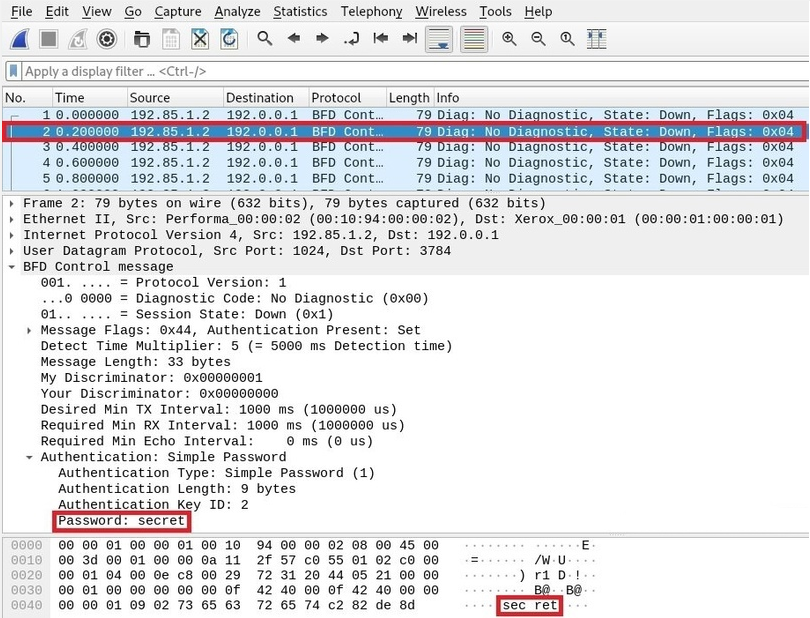
An attacker can now send false diagnostic information and potentially break services.
STUN Authentication Capture
Session Traversal for NAT (STUN) is a set of methods for performing NAT traversal. It is commonly used by various audio, video, messaging and other real-time interactive communication systems (eg VoIP telephony). An attacker can easily intercept the STUN password using Wireshark.
Here is an example of a captured STUN authentication using Wireshark:
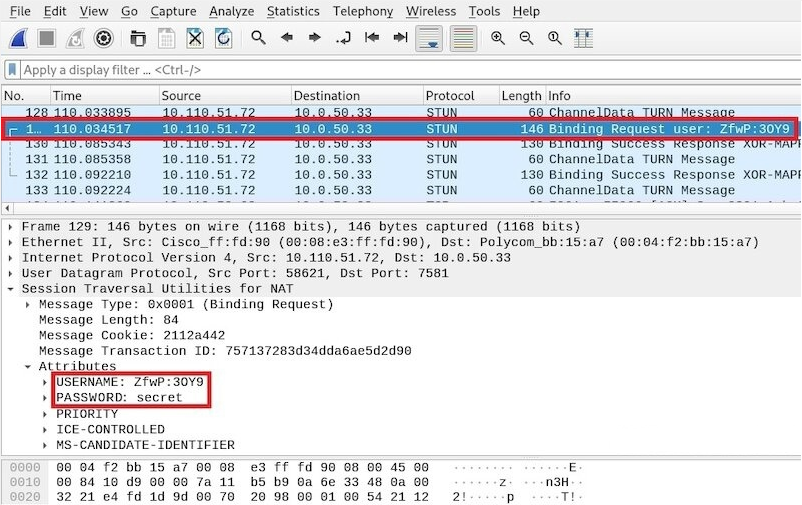
An attacker can now traverse NAT and potentially create channels to access internal systems from outside.
The best approach to capturing passwords
While capturing passwords with Wireshark may look effective, it's not very practical during penetration tests. This is because we have to check each packet with our own eyes to find the passwords.
A much better approach is to write the network traffic to a PCAP file using Wireshark (or Tcpdump, Dumpcap, Tshark or similar tool) and then process the PCAP file offline using automated tools like Ngrep, Ettercap or others.
Capturing passwords with Ngrep
Ngrep (network grep) is one of our favorite tools when it comes to quick network analysis. This is similar to grep (or findstr.exe on Windows), but for the network layer. Ngrep allows you to search through network traffic and find any string or pattern. It supports regular expressions as well as hex expressions (binary strings). Ngrep was written by Jordan Ritter.
Here's how we can use Ngrep to search the PCAP file:
ngrep -I file.pcap -q -i "pattern"
- -I (read PCAP file)
- -q (quiet mode)
- -i (case insensitive match)
Here is how we can sniff passwords with Ngrep from a PCAP file:
ngrep -I file.pcap -q -i ‘pass=|pwd=|log=|login=|user=|username=|pw=|passw=|passwd=|password=|pass:|use
r:|username:|password:|login:|pass |user |auth'
Here is another example of using Ngrep with an additional regex pattern borrowed from here:
ngrep -I file.pcap -q -i ‘[&\s?]
(?:login|user(?:name|)|p(ass(?:word|wd|)|w|wd))[\s:=]\s?([^&\s]*)'
Although Ngrep is very powerful, it is not the best solution for collecting passwords. Not every network protocol uses an easily comparable authentication format (eg username = something or password = something, etc.). In addition, we are also likely to get a lot of noise (false positives) with our templates. After all, we won't be able to match all the passwords we wrote down above with Wireshark.
Capture passwords with Ettercap
The Ettercap project is another tool we can use to collect passwords. This is a comprehensive man-in-the-middle attack package specifically designed to intercept passwords from network traffic. Ettercap was originally written by Alberto Ornaghi and Marco Valleri.
Ettercap supports a range of network protocols, not just text-based ones - it also supports many binary network protocols. It can recognize many authentication methods and sniff out not only passwords, but also password hashes, which can later be cracked using hashcat, john the ripper, or a similar tool.
Here's how we can sniff passwords with Ettercap from a PCAP file:
ettercap -T -q -r file.pcap
- -T (text interface only)
- -q (quiet mode)
- -r (read PCAP file)
Ettercap automatically detects interesting parts of packets - no need to provide it with any additional arguments. Here is an example of a captured PostgreSQL password using Ettercap:
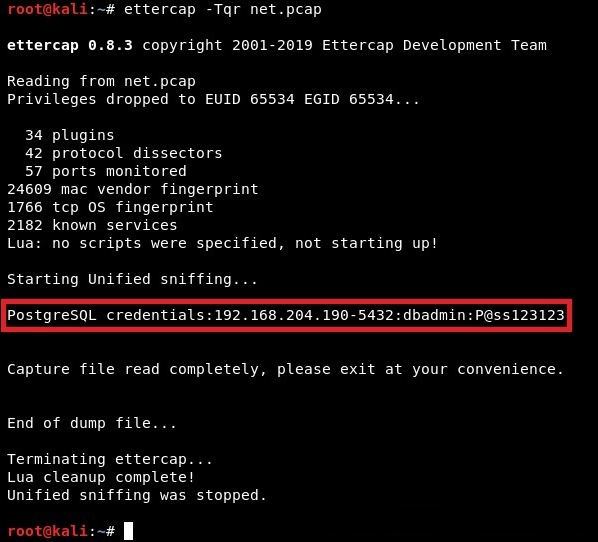
Unfortunately, in our experience, Ettercap sometimes fails to recognize credentials. Unfortunately, this is also true for the latest version of Ettercap (0.8.3). On the other hand, no other tool can recognize hashes and output them in a hackable format to, for example, crack them with John the ripper.
Capture passwords with Tshark
Tshark is probably the best solution for automatically capturing passwords from the web. Even though it can create a lot of noise, Tshark is the least likely to miss something because it uses the same libraries and dissectors as Wireshark. This means an unprecedented number of supported protocols.
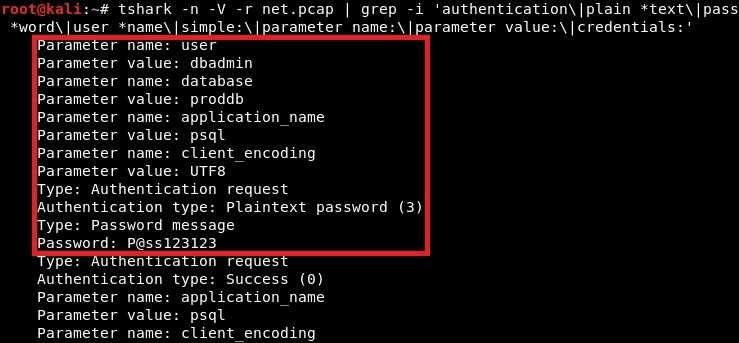
This is how we can sniff passwords with Tshark from a PCAP file. We simply pass it to the grep command and look for patterns related to authentication:
tshark -n -V -r file.pcap | grep -i 'authentication\|plain *text\|pass
*word\|user *name\|simple:\|parameter name:\|parameter value:\|credentials:'
- -n (disable name resolution)
- -V (verbose mode / expand all fields of the package)
- -r (read PCAP file)
Here is an example of the same captured PostgreSQL password, but this time using Tshark:
Creating Firewall Rules with Wireshark
While Wireshark cannot block a network connection, it can help us create firewall rules for our firewall. Based on the traffic we're watching, Wireshark can generate a firewall rule for it. All we have to do is just select the package we want to block and go to the menu:
Tools -> Firewall ACL Rules
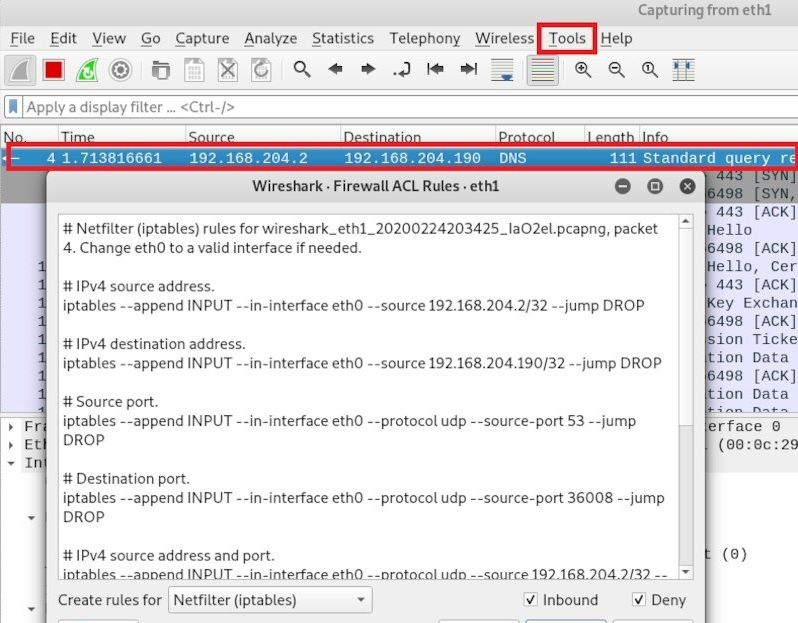
We can now copy and paste the selected rules directly into our firewall. Wireshark supports the following firewall syntax:
- Cisco IOS (Standard/Advanced)
- IP filter (ipfilter)
- IP Firewall (ipfw)
- netfilter (iptables)
- Packet filter (pf)
- Windows Firewall (netsh)
End

⚡️Telegram channel - link
📺YouTube channel - link