Can Virtual Staging Help Me Get More Offers the First Weekend?
I still remember the first time I saved a friend $2,400 in physical staging fees. She was a realtor, staring at a vacant, echo-filled living room that looked like a cold, cavernous dungeon on camera. She was about to hire a staging company to haul in velvet sofas and mahogany tables, but I looked at her and said, "Wait, Find out more did you reshoot the photo first?"
That was the turning point. After 200+ hours of testing over a dozen AI platforms, I’ve learned that virtual staging isn’t just a cheaper alternative to physical furniture; it is a tactical weapon for your listing launch strategy. If you want to drive high traffic and secure first weekend offers, you need to understand how to leverage these tools without making your listing look like a budget video game.
The Math: Physical vs. Virtual StagingLet’s talk numbers. Physical staging is undeniably effective, but the overhead is brutal. Between inventory rentals, labor, transportation, and the "oops" fee when a sofa doesn't fit through the front door, your profit margin on a listing takes a massive hit. Virtual staging changes the calculus entirely.
While physical staging can run you anywhere from $1,500 to $5,000 depending on the market, virtual staging is a surgical strike on your marketing budget. Here is how the pricing generally shakes out in the industry:
Service Estimated Cost Physical Staging (Full Home) $2,000 – $5,000+ Professional Virtual Staging (e.g., BoxBrownie) $32 – $48 per imageWhen you look at the cost of a single staged image at $32–48, the ROI is staggering. For the price of a nice dinner for two, you can stage an entire main floor, ensuring that buyers scrolling through Zillow or Realtor.com on a Thursday night see a lifestyle they want to buy, not an empty shell they have to imagine.
Photo Realism: Avoiding the "AI Uncanny Valley"Here is where I get grumpy. I have seen hundreds of listings where the virtual furniture looks like it’s floating, or the shadows fall in a direction that defies the laws of physics. If the scale is off—like a miniature coffee table next to a giant sectional—buyers will subconsciously flag your listing as "low effort."
If you want virtual staging results that actually convert, you must prioritize realism. If the furniture looks fake, the buyer wonders what else you are hiding about the house. Always check for:
Shadow Accuracy: Does the shadow fall toward the light source, or is it just a blurry blob under the chair? Furniture Scale: Are the chairs proportional to the window heights? Lighting Temperature: Does the warm glow of the lamp match the natural window light, or does it look like a sticker slapped onto a photo? The "Room That Breaks AI" ListNot every photo is a candidate for virtual staging. Over my 200+ hours of testing, I’ve developed a mental "blacklist" of rooms that usually fail when sent to AI or even human editors:

Which brings me back to my golden rule: Did you reshoot the photo first? Never try to "fix" a garbage photo with virtual staging. You cannot polish a turd, and you definitely can't digitally stage a dark, blurry room into a luxury living space. Get the lighting right in the camera first. If the foundation of the photo is weak, no amount of digital furniture will save it.
The Timeline: Turnaround Times for the Weekend RushReal estate is a game of 48-hour windows. You’re prepping the MLS entry on Wednesday, shooting on Thursday, and going live on Friday to capture the weekend traffic. If your staging provider https://smoothdecorator.com/will-virtual-staging-help-my-zillow-listing-get-more-clicks/ takes 4 days, you’ve already lost the battle.
I measure my own workflow in 30-second increments and 24-hour turnaround windows. When evaluating a staging provider, ask yourself these three things:
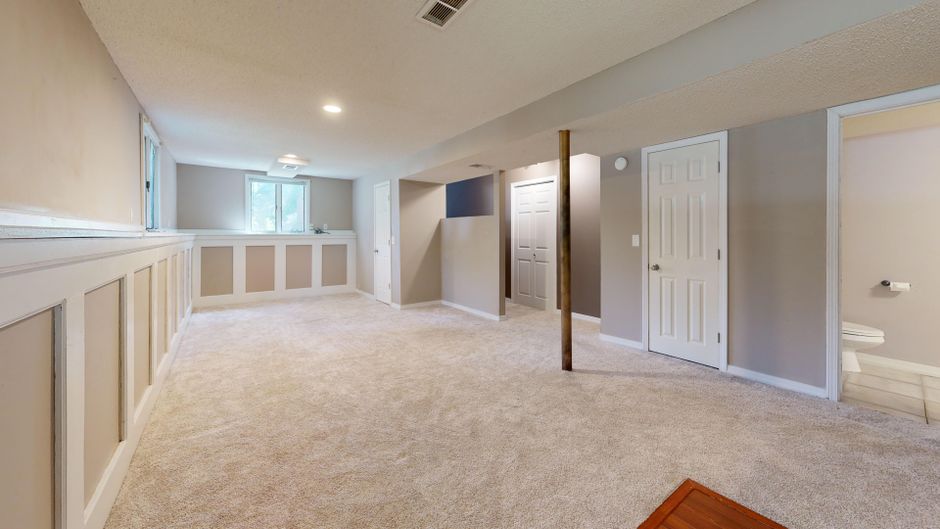
If you launch your listing on Friday without photos, you miss the "new listing" alert surge. If you launch with high-quality, virtually staged photos, you hit the market with authority.
The Ethics: MLS Workflow and DisclosureI see agents try to hide virtual staging all the time. Please, stop. It’s not just a bad look; it’s a potential liability. If a buyer walks into a home expecting a sprawling open-concept living area only to find a cramped, oddly shaped room because you used a deceptive angle in your virtual staging, you have destroyed your credibility.
Best Practices for Disclosure: Use the "Staged" Label: Most MLS platforms have a specific field for this. Use it. Watermark or Caption: Put "Virtually Staged" in the photo description or in the fine print of the listing remarks. Show the "Before": If you are proud of the transformation, show the empty room alongside the staged version. It builds trust. Conclusion: Is It Worth It?Virtual staging is not a magic wand, but it is a massive advantage in a competitive market. When you compare the $32–$48 per image cost against the potential of securing a buyer in the first 48 hours, the math is simple. It provides the visual context that 90% of buyers cannot conjure in their own minds.
Just remember: fix your lighting, reshoot your bad angles, choose a vendor that cares about shadows as much as you do, and always—always—disclose that the furniture is digital. Your goal is to get people through the front door, not to trick them into showing up. Now, go get that listing live.