Calling Native Code from Flutter: MethodChannel vs Flutter Native Bridge
FlutterPulseThis article was translated specially for the channel FlutterPulseYou'll find lots of interesting things related to Flutter on this channel. Don't hesitate to subscribe!🚀
Flutter makes it easy to build beautiful cross-platform apps, but real-world applications often need direct access to native Android or iOS…
From Manual Platform Channels to Zero-Boilerplate Native Calls
Flutter makes it easy to build beautiful cross-platform apps, but real-world applications often need direct access to native Android or iOS APIs — whether it's hardware features, platform SDKs, or existing native code.
Flutter gives us MethodChannel as the official solution.
But today, newer tools like Flutter Native Bridge make this integration far simpler.
In this article, you'll learn:
- How Flutter calls native code using MethodChannel
- Why MethodChannel can become boilerplate-heavy
- How Flutter Native Bridge offers a cleaner alternative
- When to choose each approach in production apps
Why Do Flutter Apps Need Native Code?
Even with Flutter's rich ecosystem, some scenarios still require native access:
- Platform-specific SDKs
- Device information (OS, model, sensors)
- Legacy Android / iOS code
- Performance-critical operations
- APIs not yet available in Flutter plugins
To solve this, Flutter provides platform channels.
Part 1: Calling Native Code Using MethodChannel (Official Way)
What Is MethodChannel?
MethodChannel is Flutter's built-in mechanism for bidirectional communication between Dart and native platforms.
How it works:
- Flutter calls a method by name
- Native code listens for that method
- Native executes platform logic
- Result is returned asynchronously to Flutter
Step 1: Define MethodChannel in Flutter
⚠️ Note: We intentionally avoid naming any helper class
NativeBridgeto prevent confusion with other packages.
import 'package:flutter/services.dart';

class PlatformService {
  static const MethodChannel _channel =
      MethodChannel('com.example.platform');
  static Future<String> getPlatformVersion() async {
    final result =
        await _channel.invokeMethod<String>('getPlatformVersion');
    return result ?? 'Unknown';
  }
}
Step 2: Android Implementation (Kotlin)
class MainActivity : FlutterActivity() {

private val CHANNEL = "com.example.platform"
    override fun configureFlutterEngine(flutterEngine: FlutterEngine) {
        super.configureFlutterEngine(flutterEngine)
        MethodChannel(
            flutterEngine.dartExecutor.binaryMessenger,
            CHANNEL
        ).setMethodCallHandler { call, result ->
            when (call.method) {
                "getPlatformVersion" -> {
                    result.success(
                        "Android ${android.os.Build.VERSION.RELEASE}"
                    )
                }
                else -> result.notImplemented()
            }
        }
    }
}
Step 3: iOS Implementation (Swift)
@UIApplicationMain
@objc class AppDelegate: FlutterAppDelegate {

override func application(
    _ application: UIApplication,
    didFinishLaunchingWithOptions launchOptions: [UIApplication.LaunchOptionsKey: Any]?
  ) -> Bool {
    let controller = window?.rootViewController as! FlutterViewController
    let channel = FlutterMethodChannel(
      name: "com.example.platform",
      binaryMessenger: controller.binaryMessenger
    )
    channel.setMethodCallHandler { call, result in
      if call.method == "getPlatformVersion" {
        result("iOS \(UIDevice.current.systemVersion)")
      } else {
        result(FlutterMethodNotImplemented)
      }
    }
    return super.application(application, didFinishLaunchingWithOptions: launchOptions)
  }
}
Drawbacks of MethodChannel
While powerful, MethodChannel comes with trade-offs:
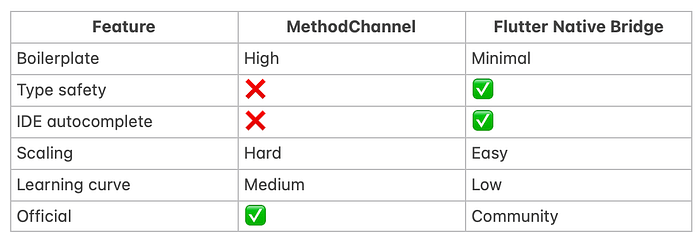
- ❌ Manual method name matching
- ❌ Boilerplate on both platforms
- ❌ No compile-time safety
- ❌ Harder to scale as APIs grow
- ❌ No IDE autocomplete for native methods
This is where Flutter Native Bridge shines.
Part 2: Flutter Native Bridge — A Modern Alternative to MethodChannel
Flutter Native Bridge is a zero-boilerplate bridge that lets you call native Kotlin/Swift methods directly from Dart — without writing MethodChannel code manually.
What Makes Flutter Native Bridge Different?
- ✅ No MethodChannel boilerplate
- ✅ Auto-discovery of native methods
- ✅ Type-safe generated Dart APIs
- ✅ IDE autocomplete
- ✅ Works on Android (Kotlin) & iOS (Swift)
- ✅ No KSP or annotation processors required
Installation
dependencies:
  flutter_native_bridge: ^1.0.0
Android Setup (Kotlin)
Option 1: Expose an Entire Class
@NativeBridge
class DeviceService {
    fun getModel(): String = Build.MODEL
    fun getVersion(): Int = Build.VERSION.SDK_INT

@NativeIgnore
    fun internalMethod() {}
}
Option 2: Expose Individual Methods
class MainActivity : FlutterActivity() {

@NativeFunction
    fun greet(name: String): String = "Hello, $name!"
}
Register (One Line)
FlutterNativeBridge.register(this)
iOS Setup (Swift)
class DeviceService: NSObject {

@objc func getModel() -> String {
        UIDevice.current.model
    }
    @objc func getVersion() -> String {
        UIDevice.current.systemVersion
    }
}
Register in AppDelegate
FlutterNativeBridge.register(DeviceService())
Generate Dart Code
dart run flutter_native_bridge:generate
This creates:
lib/native_bridge.g.dart
Use in Flutter (Type-Safe & Clean)
import 'native_bridge.g.dart';

final model = await DeviceService.getModel();
final version = await DeviceService.getVersion();
✨ No strings. No method names. Full autocomplete.
Runtime Calls (Without Code Generation)
import 'package:flutter_native_bridge/flutter_native_bridge.dart';

final model = await FlutterNativeBridge.call<String>(
  'DeviceService',
  'getModel',
);
MethodChannel vs Flutter Native Bridge
When Should You Use Each?
Use MethodChannel if:
- You need full low-level control
- You're writing a Flutter plugin
- You prefer official APIs only
Use Flutter Native Bridge if:
- You want clean, scalable native calls
- You dislike boilerplate
- You want type safety & autocomplete
- You're building production apps faster
Final Thoughts
MethodChannel is Flutter's foundation for native communication, but it was never designed for developer ergonomics at scale.
Flutter Native Bridge builds on the same concept — without the pain.
If you're starting fresh or refactoring native integrations, Flutter Native Bridge can save hours of boilerplate and reduce bugs significantly.
Read More:
The Dart Number Secrets Every Flutter Developer Should Know (But Most Never Use)Numbers quietly power almost everything inside a Flutter app — smooth animations, sharp UI formatting, pricing screens…
medium.com
Effective Dart (Part 1): Writing Clean & Consistent CodeIf you’re learning Dart or building Flutter apps, you may notice that your code sometimes becomes messy or hard to…
medium.com
🌀 Flutter Didn’t Start as Flutter: The Real Story Behind Google’s Most Ambitious UI Frameworklutter didn’t begin as a mainstream framework. It was born from Google’s internal frustrations, secret projects, and a…m
medium.com