CP/M-86 How To
shark (@maverick)- Create a hard disk image
Tools: PCem and cpm86-1.1-xt.img
1. Create a new virtual pcxt [8088] IBM XT/4.77
2. Create a 8Mb file (Power Shell):
> fsutil file createnew cpm86-11_8Mb.img 8000000
3. Start pcxt virtual machine selecting cpm86-1.1-xt.img at a:
and the new 8Mb hdd file (cpm86-11_8Mb.img).
4. PCXT boot with CP/M-86 v1.1
5. Run hdmaint to create a CP/M partition (Remeber to mark as bootable).
6. Install CP/M-86 to the CP/M partition.
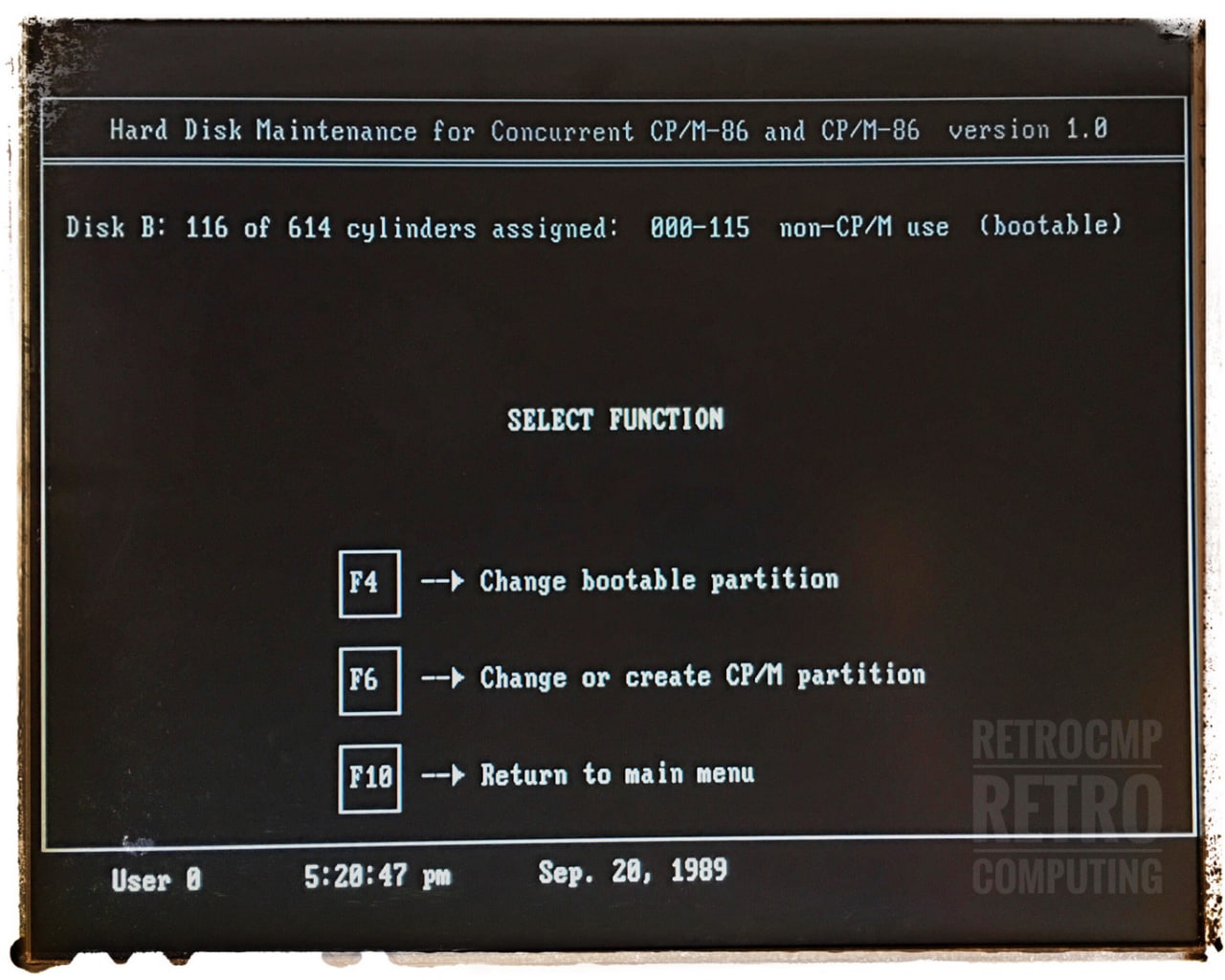
- Commands:
PIP C:=A:*.*[rvw]
- Links:
https://retrocmp.de/software/cpm86/hdmaint.htm
- Step by step:
1. Boot: PC-DOS from floppy
2. SpeedStor: low level formatting (LLF) and MediaAnalysis
3. Fdisk: create (only) 1st partition (4MB)
· I use this partition for test purposes under DOS. Later you only have to reset the boot flag with FDISK or HDMAINT!. The boot manager XFDISK unfortunately only works with a 286 or higher.
4. Format: format c: /s
5. Boot: CP/M-86 (V1.10) from floppy
6. Hdmaint: create 2nd partition (243 cyl, 8.192 KB); more is not supported by CP/M-86
7. Boot: CP/M-86 (V1.10) from floppy
8. Copy CPM.SYS to fixed disk with PIP
9. Hdmaint: make 2nd partition bootable
10. Copy all files and programs to the fixed disk using ...
. . .. 22Disk on my (other) PC
. . .. serial file transfer
- Install Digital Research Concurrent DOS 4.1
sysdisk d:
hdinstal
pip p:=a:*.*[rvw]
Links-Software
-CP/M-86 v1.1 for IBM PCXT
https://winworldpc.com/product/cp-m-86/1x
-CP/M OS
http://www.retroarchive.org/cpm/archive/unofficial/binary.html
-THE CP/M-86 SOFTWARE ARCHIVES *****
http://cpmarchives.classiccmp.org/cpm/mirrors/www.seanet.com/~klaw/files.htm
https://web.archive.org/web/20050212085705/https://www.seanet.com/~klaw/files.htm
-CP/M-86
http://www.z80.eu/blog/index.php?entry=entry120807-180000
-Other CP/M Software
http://www.retroarchive.org/cpm/index.html
-Software made by Digital Research
https://vetusware.com/manufacturer/Digital%20Research/?author=298
-CPMTOOLS (Win32)*****
http://cpmarchives.classiccmp.org/cpm/mirrors/www.cpm8680.com/cpmtools/index.htm
-DOS tools (22DISK) *****
Disk Info 360k - libdsk & cpmtools
https://forums.debian.net/viewtopic.php?t=112244
360k raw to imd: (368,640 bytes)
BIN2IMD <image.img> <image.imd> DM=5 N=40 SS=512 SM=1-9 /2
Disks Definitions - DiskDefs
https://github.com/lipro-pkgs/cpmtools/blob/cpm4l/master/diskdefs
https://github.com/lipro-cpm4l/cpmtools/blob/cpm4l/cpmtools-2.21/diskdefs
Disks
https://inhale.ed.ntnu.no/oldtech/tiki/disks/
Disks - CPM Tools
https://comp.os.cpm.narkive.com/Le9mwvSf/cp-m-tools
The 720 means a disk with 720 KB capacity. Now this will give you an equation with
three unknown variables:
720 = t * s * sz
where z = tracks, s = sectors and sz = size of a sector.
The appropriate way to use mkfs.cpm and put it on an actual disk might be:
> dd if=/dev/zero of=cpm.img bs=720k count=1
> mkfs.cpm -f cpm86-720 cpm.img
> dd if=cpm.img of=/dev/fd0D720 bs=16k
# IBM CP/M-86
# setfdprm /dev/fd1 sect=8 dtr=1 hd ssize=512 tpi=48
diskdef ibmpc-514ds
seclen 512
tracks 80
sectrk 8
blocksize 2048
maxdir 64
skew 0
boottrk 2
os 2.2
libdsk:format ibm320
end
Guides
-Cokbook CP/M-86
http://www.primrosebank.net/computers/cpm/cpm_cookbook_user.htm
-CP/M-86
http://www.bitsavers.org/pdf/digitalResearch/cpm-86/CPM-86_System_Guide_Jun81.pdf
http://www.bitsavers.org/pdf/digitalResearch/concurrent/Concurrent_CPM-86_Users_Guide_Aug82.pdf
-CCPM-PCDOS
http://www.bitsavers.org/pdf/digitalResearch/concurrent/Dahmke_Using_Concurrent_PC_DOS_1986.pdf
Emulation
PCem v17
vDos
> use d: c:\Warehouse
Notes
-Retrowiki - CP/M and PCW
http://retrowiki.es/viewtopic.php?t=200029532
https://www.cpcwiki.eu/forum/nc100-nc200-pcw-pda600/pcw-disk-manager/
http://cpcrulez.fr/emulateurs_UTIL-DSK-spin_DISK.htm
https://github.com/damieng/DiskImageManager
-Exploring CP/M for the PC
-#DOScember - Concurrent DOS, The Forgotten Multiuser / Multitasking DOS