COOKIE (КУКИ)
Для установки куков в антидетект браузерах предусмотрен отдельный пункт, где не требуется установка расширений, и делается всё в 2 нажатия, для получения информации о способах обратитесь к документации Вашего антидетект браузера.
Для установки куков в браузере на движке Chromium(Windows)\Firefox(Windows+Android) используйте расширение Cookie-Editor, скачать и установить его можно из магазина расширений браузера:
Chromium: https://chromewebstore.google.com/detail/cookie-editor/hlkenndednhfkekhgcdicdfddnkalmdm
Firefox: https://addons.mozilla.org/ru/firefox/addon/cookie-editor/
После установки расширения:
- Открываем целевой сайт
- После полной загрузки страницы открываем расширение Cookie-Editor и жмём на кнопку Import:
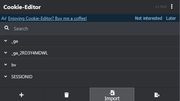
3. Вставляем полученную строку в пустое окно и жмём еще раз Import:
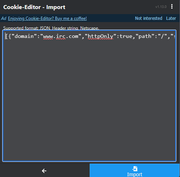
4. Обновляем страницу - Вы прекрасны!
ENG
To install cookies in anti-detection browsers, there is a separate section where no extensions are required, and everything can be done in two clicks. For information on how to do this, refer to the documentation for your anti-detection browser.
To install cookies in a browser based on the Chromium (Windows) or Firefox (Windows+Android) engine, use the Cookie-Editor extension, which can be downloaded and installed from the browser extension store:
Chromium: https://chromewebstore.google.com/detail/cookie-editor/hlkenndednhfkekhgcdicdfddnkalmdm
Firefox: https://addons.mozilla.org/ru/firefox/addon/cookie-editor/
After installing the extension:
Open the target website
After the page has fully loaded, open the Cookie-Editor extension and click on the Import button:
3. Paste the string into the empty window and click Import again:
4. Refresh the page - You're beautiful!