CONVERT Telegram sticker packs to SIGNAL
JinsoRaj
For this method, You need a Desktop with Telegram desktop & Signal Desktop installed in it.
- Send sticker pack link to @Stickerdownloadbot or @DownloadStickersBot. Download the webp zip.Extract to a folder.
 Method to copy sticker pack link in desktop.
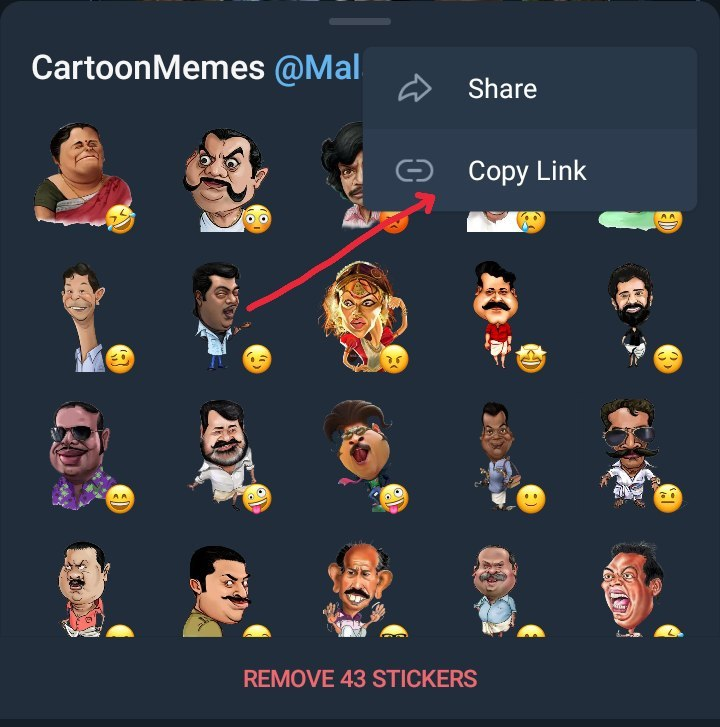 Click 3 dots - Method to copy sticker pack link in mobile app.
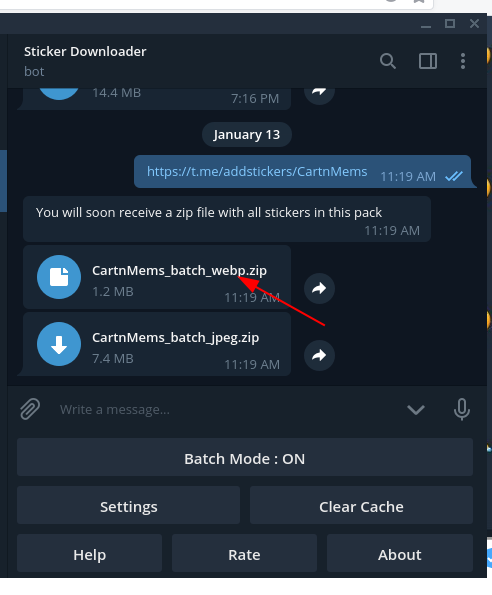 Send pack link to bot. Download the webp zip. Right click the file -> show in folders. Then extract the zip ...
2. Open signal desktop. file -> create / upload sticker pack
 Open signal desktop. FILE -> create / upload sticker pack. A new pop-up window will come.
 Drag and drop all the webp from extracted folder to sticker uploading window
 click next
 Choose appropriate emoji for each sticker & click next
 Give suitable Title & Author name for pack , Click Next -> Upload stickers.
 DONE ! Copy the Sticker pack link and share them with your friends.😈
@AdhesiveStickerBot do the same job from telegram.(Having rate limits / may not work properly)
Find more signal stickers : https://signalstickers.com/