Where to Buy Rotating Proxies? Cheap Bulk Private SOCKS5 and HTTP Proxies
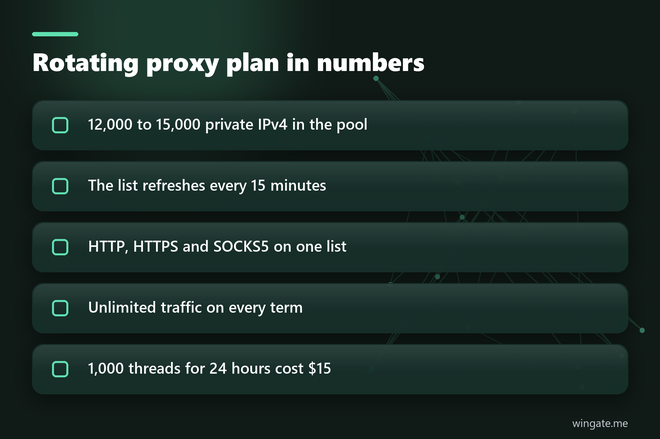
how to get private proxiesBuy rotating proxies by the thread from WinGate. If you are still working out what are private proxies, they are addresses from a pool that a limited number of clients share, and every plan covers all 12,000 to 15,000 of them.
Buy rotating proxies after you find out which unit the seller charges for, since that unit decides what a busy month will cost. Most rotating plans on public price pages are billed per gigabyte, at about $0.16 to $1.50 per GB in November 2026. WinGate bills by thread, meaning one simultaneous connection from your software, and traffic inside that limit is not counted. A day on 1,000 threads costs $15.
The first large invoice usually arrives in the month a crawl starts pulling product images along with the HTML.
Buy rotating proxies: what a plan gives you
Every plan opens the same pool of 12,000 to 15,000 private IPv4 addresses from networks around the world. You never choose a package of 50 or 100 lines, so a buyer who needs proxies in bulk gets the whole pool on the smallest plan. The list refreshes every 15 minutes, so new addresses keep entering a job that runs for hours.
The provider side changes which addresses sit on the list, and your software decides when a request moves to another line. Public pages can take a new address on every request. A job behind a login stays on one address from start to finish, and you set that per task in your own code.
HTTP, HTTPS and SOCKS5 all run on these addresses, so a crawler and a desktop rank checker can read the same list. It reaches you as a link or a file from the dashboard.
Cheap rotating proxies at real traffic volumes
Whether a plan is cheap depends on how much data passes through it. Take a price monitor that loads 200,000 product pages a day at 150 KB each. That comes to about 30 GB daily and 900 GB a month, or $450 at $0.50 per GB. Let the same job load images, so a page weighs closer to 1 MB, and it moves about 6 TB, which is $3,000 at that rate.
On a thread plan both versions cost $190 for the month. At two seconds a page, 200,000 pages a day need about five threads running around the clock, so a job ten times that size still sits far inside the 1,000 thread limit.
- Up to 1,000 threads: $15 for 24 hours, $75 for a week, $190 for a month.
- Up to 3,000 threads: $30 for 24 hours, $180 for a week, $600 for a month.
A one-off crawl fits the $15 day. A monitor that runs every morning belongs on the monthly term, where 1,000 threads work out to about $6.33 a day.
Best rotating proxies for your job: load per address
Put 300 threads on 12,000 addresses at one request per thread every two seconds, and the job sends 150 requests a second. Spread over the pool, one address comes up about once every 80 seconds.
Run those same 300 threads on a list of 20 addresses and each one carries 7.5 requests a second. Sites with rate limits answer that kind of pace with HTTP 429, and your retries then add more requests to the same few lines. When you compare sellers, divide your threads by the number of addresses online at the same moment.
Requests sent at identical intervals look automated even when each one comes from its own address, so add a random pause between them and keep your rate polite on smaller sites.
Rotating proxies for web scraping in Scrapy
Scrapy reads the proxy for each request from request.meta, so a small downloader middleware can rotate across the whole list. Put the class in middlewares.py and the last five lines in settings.py, then run it from the machine whose IP you bound in the dashboard.
import random, time, urllib.request

LIST_URL = "your list link from the dashboard"

class PoolMiddleware:
    lines, loaded = [], 0

    def pick(self):
        if time.time() - self.loaded > 900:
            with urllib.request.urlopen(LIST_URL, timeout=20) as r:
                self.lines = r.read().decode().split()
            self.loaded = time.time()
        return random.choice(self.lines)

    def process_request(self, request, spider):
        if request.meta.get("sticky") and "proxy" in request.meta:
            return None
        request.meta["proxy"] = "http://" + self.pick()

DOWNLOADER_MIDDLEWARES = {"project.middlewares.PoolMiddleware": 350}
CONCURRENT_REQUESTS = 300
CONCURRENT_REQUESTS_PER_DOMAIN = 32
AUTOTHROTTLE_ENABLED = True
DOWNLOAD_TIMEOUT = 20
The middleware rereads your link every 900 seconds to match the 15 minute refresh. Scrapy sends a retried request through the middleware chain again, so a 429 or a timeout goes out on a different line. For a chain of requests that has to keep one address, such as paginated results tied to cookies, set sticky to True and copy the proxy value from response.meta into each following request.
AutoThrottle slows the spider when a site starts responding slowly, and the per domain cap keeps 300 threads from landing on one host. Raise the cap only after the log stays quiet.
Rotating proxies free or paid?
Public lists are the usual first stop, and the addresses in them reach thousands of people on the same day. Many have stopped answering by the time a crawl gets to them. Whoever runs an open relay can also read any unencrypted traffic that goes through it, so nothing with a login should pass there. At 300 threads you would spend the start of every run filtering dead lines, and the $15 day costs less than those hours.
Private proxies list: what lands in your dashboard
The list is plain text with one address per line. IP:PORT is the main format, and IP:PORT:LOGIN:PASS exists for programs with separate login and password fields. Either way the pool accepts connections only from a bound IP, so add your server address in the dashboard first. You can bind two addresses, and they share one thread limit.
Anyone setting up a first job can read how to use a proxy server on the IPv4 page, which walks through the line formats. If your server gets a new IP later, update the binding, because lines stay silent for any address that is not on it.
Private proxies free trial: what to run on it
The free test lasts up to 2 hours on the 1,000 thread plan, and it is given once, before the first purchase. Use it on your real job, since a page that only prints your IP tells you nothing about how a catalog crawl behaves.
- Register in the dashboard and bind the IP of the machine that runs your spider.
- Request the test and open a ticket so an operator can switch it on.
- Paste the list link into LIST_URL and start the spider at the thread count you plan to pay for.
When the spider finishes, Scrapy prints its stats to the log. Read these lines:
- downloader/response_status_count/200 counts the pages that came back whole.
- downloader/response_status_count/429 counts how often a site asked you to slow down.
- retry/count is the work the job had to repeat.
- elapsed_time_seconds tells you whether the run fits the window you have for it.
Buy private proxies with rotation: paying and starting
Pick the thread limit from your concurrency setting and the term from how often the job runs. You buy these proxy servers online in the dashboard with crypto, and access opens right after the payment goes through. Network uptime is 99.9%, and support answers tickets seven days a week if a program refuses a line.