Where to Buy Proxy Servers Cheap? Best Private SOCKS5 and HTTP Proxies
buy proxyBuy proxy servers by thread count: WinGate sells access to a pool of 12,000 to 15,000 private IPv4, and you can buy proxies for a day, a week or a month with unlimited traffic.
Buy proxy servers by working out your load first and paying for that load. A price tracker on 300 threads, a rank checker on 50 and a catalog crawl on 2,000 need very different plans, and a headline price says little until you know which unit it counts. Some sellers charge per address and others per gigabyte. WinGate charges per thread, which is one simultaneous connection from your software.
A buyer who picks a list of ten addresses and points a 200 thread script at it ends up with twenty connections on each address at once.
Buy proxy server access: what the plan includes
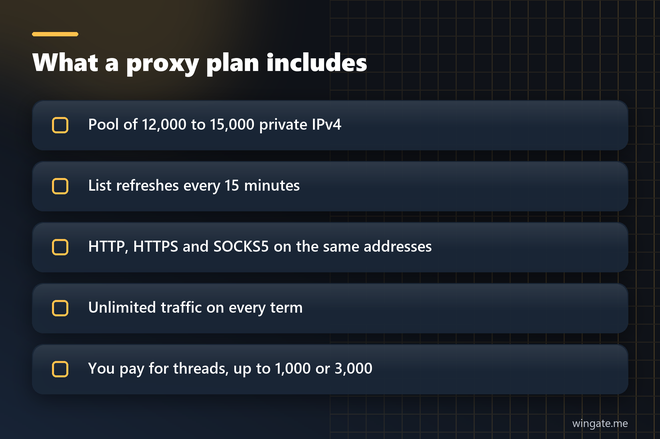
A plan opens the full pool at once. There is no package of 50 or 100 addresses to choose, because every plan covers the same 12,000 to 15,000 private IPv4 from networks around the world. The list refreshes every 15 minutes, so new addresses keep entering your job while it runs. A limited number of clients use the pool.
HTTP, HTTPS and SOCKS5 work on the same addresses, so one list fits a browser profile, a Python script and a desktop program. Traffic is unlimited on every term. A job that pulls 50 GB a day and a job that pulls 500 GB a day pay the same price as long as they stay inside the thread limit.
Your software decides when the address changes. It can take a new line for each request or hold one line for a whole task, and the list itself arrives as a link or a file from the dashboard.
Cheap proxy servers: what each term costs
There are two thread limits and three terms. Up to 1,000 threads costs $15 for 24 hours, $75 for a week and $190 for a month. Up to 3,000 threads costs $30, $180 and $600 for the same terms. Divided by days, the longer terms come out like this:
- Month on 1,000 threads: about $6.33 a day
- Week on 1,000 threads: about $10.71 a day
- Month on 3,000 threads: $20 a day
- Week on 3,000 threads: about $25.71 a day
A one-off crawl that finishes by tomorrow belongs on the $15 day. A tracker that runs every morning is cheaper on the monthly term, where the same 1,000 threads cost less than half the daily rate. Move to the larger plan once your software really holds more than 1,000 connections open at the same moment.
Best proxy servers for your job: count threads first
Thread count comes straight from your software settings. Open the program and read its concurrency value: concurrent requests in Scrapy, threads in a rank tracker or a site crawler, parallel profiles in a browser automation setup. Add the numbers for everything that runs at the same time from your machine.
For price monitoring, the arithmetic takes one line. With 40,000 product pages checked once an hour and a page that takes about 2 seconds, one thread finishes 1,800 requests an hour, so you need about 23 threads. That leaves room on the smaller plan for your rank tracking and a weekly catalog crawl as well.
Then look at the pool behind those threads. Run 500 threads through the full pool and each address carries a small share of the load, which keeps your request rate per IP low on the sites you watch. A list of ten addresses would put 50 connections on each one.
Where to buy proxy servers: questions for any seller
- What does the price count: threads, addresses or gigabytes?
- How many clients use the same addresses?
- Can you run your own software on a test before paying?
- Do HTTP and SOCKS5 come on one plan?
- How does the list reach your program, and how often does it change?
If a seller page leaves the billing unit vague, you will find it out on your first invoice, usually in the month your job runs hardest.
Free proxy server or a paid plan?
Free proxy server lists look attractive until you run them. Anyone can load the same public address, so you share it with strangers and inherit whatever they did on it. Many lines in a public list are already dead when you download it, and an open proxy can read plain HTTP traffic that passes through it, logins included. For work that has to finish on schedule, a private pool at $15 for a full day is the cheaper option once you count the hours spent cleaning lists.
Proxy server list on the test: commands to run
A few terminal commands show how the list from a seller behaves. The pool accepts connections only from a bound IP, so use the machine you entered in the dashboard.
# run from the machine whose IP you bound in the dashboard
LIST="your list link from the dashboard"

curl -s "$LIST" | wc -l

PROXY=$(curl -s "$LIST" | head -n 1)
curl -x "http://$PROXY" https://api.ipify.org
curl -x "socks5h://$PROXY" https://api.ipify.org

curl -x "http://$PROXY" -o /dev/null -s -w "%{time_starttransfer}\n" https://example.com
The first command counts the lines in your list. The next two show which address a website sees over HTTP and over SOCKS5, and the last one measures the time to the first byte through the proxy. Repeat the timing on the sites your job actually visits, because your job will see those timings every day.
Buy proxies step by step
Getting a proxy server online takes a few minutes once the account exists, and the order below is the one that costs you nothing until you are sure.
- Register in the dashboard and add the IP of the machine that runs your software. You can bind two addresses, and they share the thread limit.
- Request the free test of up to 2 hours on the 1,000 thread plan and message support so an operator switches it on.
- Download the list as a file or copy the link, then run your real job on it.
- Pick the thread limit and the term, pay in crypto, and access opens right after payment.
Binding is required in every format. The IP:PORT:LOGIN:PASS line exists for programs that have login and password fields, and it still works only from a bound IP. Support replies in tickets seven days a week if a program refuses a line.
Start the test with the job that costs you the most when it stalls, and read its error count before you choose a term.