Building Sentinel Policies with a TDD Workflow - HashiCorp Solutions Engineering Blog - Medium
HashiCorp Solutions Engineering Blog - MediumBuilding Scalable Test Coverage for Terraform Policy asCode
Overview
HashiCorp Sentinel is an embeddable policy as code framework used to define and enforce fine-grained policy decisions in HashiCorp Enterprise and Cloud products. The “policy as code” model allows Sentinel to be written and versioned like you would programming code, providing all of the benefits that come with a mature software development lifecycle (SDLC).
This blog post will explore how Sentinel policy as code can provide a test-driven development (TDD) experience for Sentinel policy development and lifecycle management in Terraform.
What Sentinel Solves in Terraform
While Sentinel provides policy as code for all HashiCorp Enterprise products, I’m going to focus on its use case for Terraform, HashiCorp’s infrastructure as code platform. As organizations mature in their Terraform practice, they typically run into problems of scale. One such challenge is policy definition and enforcement. Some common questions that our customers askare:
- How does an organization ensure that its best practices are followed?
- How do we stop insecure infrastructure from beingbuilt?
- How do we ensure that modules defined by producers are used by consumers?
Sentinel solves these problems in both Terraform Cloud and Terraform Enterprise. Sentinel policy as code allows for governance in the areas of security, cloud spend, operational practice, and others. Policies can be applied to the entire organization or selected workspaces in a shift-left manner. If infrastructure is not compliant, it simply does not getbuilt.
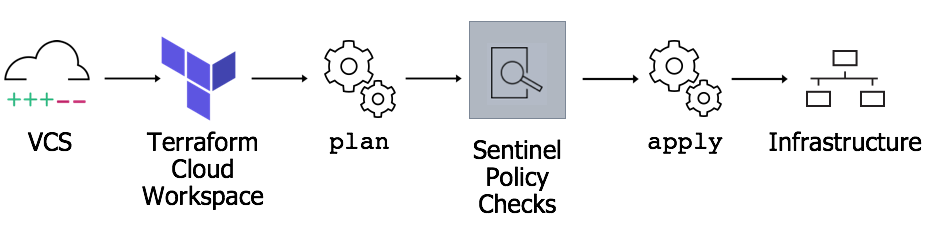
Sentinel performs its governance by inserting itself into the Terraform build pipeline. It takes data from the Terraform plan, state, and configuration as input along with metadata from the Terraform environment itself. Using this data, Sentinel is able to block undesirable outcomes that the Terraform code would otherwise produce.
The remainder of this blog post discusses some advanced Sentinel topics. If you’d like to learn more about Sentinel and Terraform, take a look at the HashiCorp Terraform with Sentinel documentation and the Sentinel documentation
Test-Driven Development
Because Sentinel is a framework and domain-specific language for describing policy as code, you can manage it in the same way you would manage application or testing code. Sentinel code can be developed and maintained using a development lifecycle similar to the lifecycles for your application code. This is where organizations that have used test-driven development can apply similar workflows to their infrastructure code development, and in the case of this blog, to their policycode.
Test-driven development is a development methodology in which tests are written for atomic units of code, such as functions, before the code itself is written. Tests are developed to:
- Verify code functionality
- Ensure that atomic units of code fail how and when itshould
Once the tests are built, code is then written to pass the tests. There are several benefits to test-driven development:
- Lean code: Test-driven development keeps software lean and focused on requirements.
- Test coverage: Developing tests for all code ensures complete test coverage.
- Fewer bugs: Building tests up front allows for earlier and more frequent test execution leading to fewer production bugs.
Because Sentinel code is developed as atomic units and has robust testing capability through the Sentinel CLI, Sentinel policies can be developed using a TDD workflow.
How to Build Test Driven SentinelPolicies
Let’s go through a real-world example workflow for building Sentinel policies in a TDD way. The example will show howto:
- Use real-world use cases to build mockdata.
- Design tests from the mockdata.
- Develop policies from thetests.
- Run the tests using the SentinelCLI.
Choose resources upon which tofocus.
The first step is to choose a resource type to focus on. Focusing on a single resource type produces policies that are simple and easier to maintain. It also increases reusability of thepolicy.
For this example, we will choose Linux virtual machines inAzure.
Pick attributes of the selected resources and determine your standards.
Pick one or more attributes of the resource that you want to restrict and decide what values should be allowed or prohibited. Remember that Sentinel policies can be targeted to specific workloads. The policy that you build doesn’t have to be universal. There can be more than one Sentinel policy governing the same thing. So I can have one policy that allows small and medium sized VMs for middleware applications and another that only allows small VMs for web applications.
For this example we regulate tag usage. We are going to require that our focus resource, Linux virtual machines in Azure, have a tag named Project at alltimes.
Build Terraform code that violates your standard.
Build what you are trying to avoid. This is going to be the test from which we will develop the policy. In other programming languages, tests are typically built using the same language as the tested project. For Sentinel, the first step in building the test code is Terraform.
Here is some sample code that will build a virtual machine in Azure. This is code that we want to fail policy checks because of the lack of tags on the virtualmachine.
Generate mocks from the plans of the violating code.
Terraform builds a plan before performing any build or change actions. This plan contains a view of both the current state of the infrastructure and the planned changes. Sentinel takes this plan data and other environmental data as input when evaluating policies.
Terraform Cloud and Enterprise allow users to generate mocks from Terraform plans. These mocks can be fed to the Sentinel CLI to test policies against various testcases.
We will run a plan against our Terraform code with the Terraform Cloud CLI workflow. This will trigger a speculative plan. The local console output will direct you to Terraform Cloud to view the speculative plan:

The user interface will provide a button to download the mockfiles:

Build tests from themocks
Policy code files are grouped together in policy sets. Tests are stored in a test directory in the policy set directory. Each policy in the policy set has its own folder in the test directory to storetests.
The mocks will be stored in the test directory as well so that they can be shared amongst the policies in the set. The best practice is a parent directory for mocks with child directories describing each mock situation.
The tfconfig, tfplan, and tfstate mock files will have two versions: a legacy version and a second version with v2 in the name. For new policies, the legacy mock files can be removed and the v2 files retained. The sentinel.hcl file can also be removed from the mocks aswell.
For this example, this picture shows the structure for a policy set with two policies, each with tests and sharingmocks:

Now it is time to create the first test. The test is called fail_missing_project_tag.hcl. As described earlier, it will test that the simulated run-time environment will create an alert. The test looks likethis:
There are three key parts of the test case file. The first are the mock and module declarations:
mock “tfplan/v2” {
 module {
  source = “../mocks/vm_resources_untagged/mock-tfplan-v2.sentinel”
 }
}
These entries tell the Sentinel CLI to inject the mock data from the speculative plan into the test. When a Sentinel policy runs against this test, the import tfplan/v2 statement will import the values of our mock file. There will be one entry for each mock file to be imported. Regulating tag usage only requires the Terraform plan data, so only the plan mock file needs to be imported. The module declarations are for module imports. See Sentinel documentation for more information on Sentinelmodules.
The second part of the test file mocks parameters. If the Sentinel policy is going to take parameters, this section of the code mocks a value for those parameters.
Finally in the last section in a test assertion is created. By default, a false value returned by the main rule of a Sentinel policy is a failure. But our first test is a negative test; we want to see failure of the policy. So the test passes if the Sentinel policy fails. The main = false section of the assertion tells Sentinel that a failure of the policy is a successful test of this testcase.
Our first test is ready. We built a speculative plan for the Terraform code that we want to be stopped. We captured metadata about that undesirable code and built a test to inject that metadata into the Sentinel CLI. Now we need to build a Sentinel policy to block the undesirable Terraform code from beingapplied.
Build policies that block the undesirable code andtest.
In the policy set directory, we will build our policy: enforce_tags.sentinel
We won’t go into the details of the policy here. For more information about writing Sentinel policies like this, see these slides. This policy is designed to block various Azure resources including Azure virtual machines that don’t have the Project tag from being built. As we develop the policy, we can test it against our test case to see if itworks.
Download the Sentinel CLI from the Sentinel CLI downloads page and put it in the path of your development machine. The sentinel test command is used to test policies.
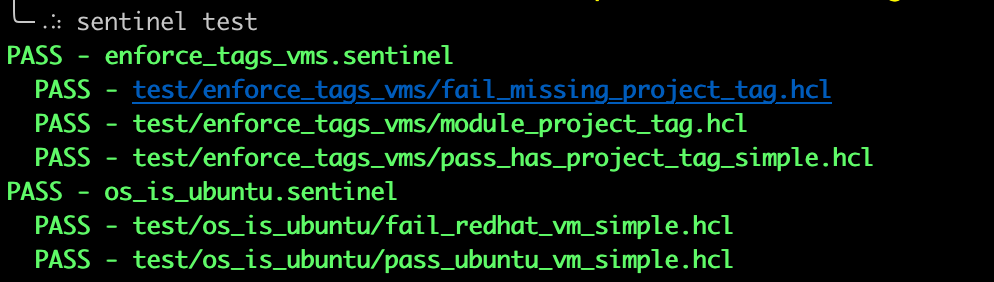
Running sentinel test can run all of the tests for every policy in a policy set or just test a specific policy. As the policy is developed and changes are made, keep running sentinel test to verify that the policy passes all of its test cases. Here we have a success which, because of our test assertion, indicates that the policy would block thebuild.

Build mocks that meets your standards
Now we know that the policy will block undesirable Terraform code. Next, create some mocks that should be allowed. Create some Terraform code that should be allowed to run. Run a plan against this code, generate mocks from the plan, and write a test case for the new mocks. Make the code that is mocked match the kind of code that you expect to see in production. For example, in this example there is a set of positive mocks for simple code building virtual machines directly but there is also a set of mocks built from a module that we expect to be widelyused.
Another way to build new mocks is to alter an existing set of mock files. This is an approach to consider if the changes required for the test case are very small. Be very careful with this approach as editing mistakes can lead to inaccurate testresults.
For these positive tests, do not use the main = false assertion as we want the policy to allow the build. Now there are three tests based on three different code patterns that are all run with sentineltest.

Iterate andBeyond
This seems like a lot of work compared to just writing a policy, running code against it, and seeing if it works. Iteration is where you really reap the benefits of this test driven approach. From this point, any time you want to make a change to a policy, you have a test framework to determine if it will break something. Or determine if a change to a module will break thepolicy.
The mocks that have been built and packaged with the code can be used by other policies and injected into other tests. The more comprehensive the mock data, the more value it will have developing other policies. By doing the test legwork upfront, new policies in the project are better positioned for test coverage.
Finally, the Sentinel CLI testing functionality and storage of tests and mocks in the code repository lends itself very well to automated code integration (CI) pipelines. It would not be too much work to configure a pipeline to run the sentinel test against every policy in the repo on every commit as shown on the Sharing Sentinel Policies Across Multiple Organizations blog post. This would build a solid foundation for an SDLC for Sentinel: truly Policy asCode.
Summary
HashiCorp Sentinel is policy as code. By using test-driven development techniques you can build policy code for Terraform that has rich test coverage, is easy to support, and integrates with modern CIsystems.
For more information about Sentinel testing, please see the Sentinel documentation and Terraform documentation.
If you are looking for a test-driven development experience workflow for Terraform infrastructure code, watch the talk “Test-Driven Development (TDD) for Infrastructure”.
Building Sentinel Policies with a TDD Workflow was originally published in HashiCorp Solutions Engineering Blog on Medium, where people are continuing the conversation by highlighting and responding to this story.
本文章由 flowerss 抓取自RSS,版权归源站点所有。
查看原文:Building Sentinel Policies with a TDD Workflow - HashiCorp Solutions Engineering Blog - Medium