BlobSaverBot Setup
Edo
BlobSaverBot Setup
Edo
Pre Requirements:
iCloud
iTunes
BlobSaver
Perfect, now follow this guide:
- Open BlobSaver
- Connect your device to the PC
- Press 'Read from device' [top right]
- Check 'Specify APNonce' [bottom left]
- Press 'Read from device' [bottom right]
The device will restart (iTunes or other Apple services may open, close them only when finished)
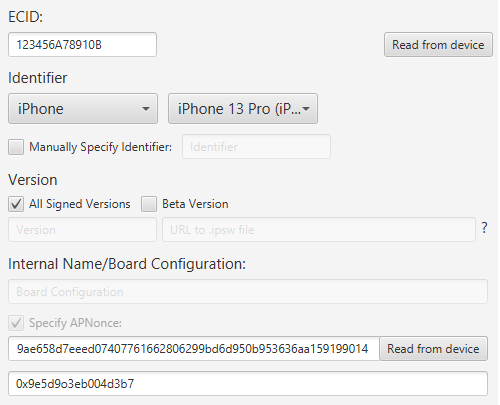 You should have a screen similar to this
- Press 'Save Device' [bottom right]
You can enter any name you want
- Press 'File' [top left]
- Press 'Export Saved Devices...'
- Choose where you want to save the file and then confirm
Now send this file to @BlobSaverBot on Telegram!