Best Web Scraping Tools: Libraries, Frameworks and Desktop Apps
buy proxy serverBest web scraping tools all hit the same wall at volume, the IP limit: feed yours a proxy server list that refreshes on its own.
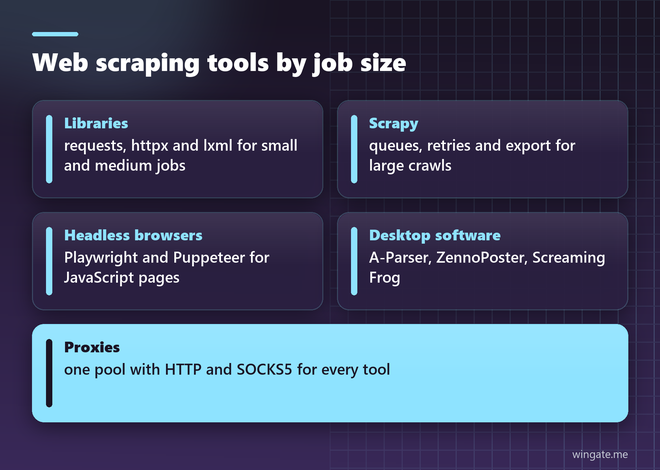
Best web scraping tools differ less in what they can download and more in how much work they leave to you. A library gives full control and needs code for everything. A framework adds queues, retries and export. A desktop app or a hosted service hides the code and charges for the convenience.
Picking the wrong class costs weeks. A team that needs one price list a day can skip Scrapy entirely, while a crawl of five million product pages will not survive in a point-and-click browser extension.
What is the best web scraping tool for your job
Three questions decide it: how many pages a day, whether the pages need JavaScript to show the data, and who will maintain the scraper. Under a few thousand plain HTML pages a day, a short Python script is the fastest route. Millions of pages call for a framework with built-in concurrency. Pages rendered in the browser need Playwright, Puppeteer or Selenium at any volume.
A quick test settles most doubts: fetch the page with curl and search the output for a price or a product name. If it is there, a library is enough and a browser would only slow you down.
Whatever you pick, plan for addresses from day one. Every tool on this list sends requests from one IP unless you give it more, and that IP is the first thing a protected site limits.
Python libraries for small and medium jobs
requests and httpx handle the network, httpx adding async support and HTTP/2. lxml parses HTML at C speed and understands XPath, while BeautifulSoup trades some speed for a forgiving API that copes with broken markup. Together they cover most scrapers that a single developer writes and runs.
A typical stack for a catalog job is requests for fetching, lxml for parsing and the csv module for output, usually under a hundred lines including retries.
The limit of this stack is plumbing. Retries, rate control, deduplication and resuming after a crash are all yours to write, and on a big job that code grows larger than the scraper itself.
Scrapy for large crawls
Scrapy is a full framework: a scheduler keeps the URL queue, downloader middleware handles retries and proxies, and item pipelines tidy and export the data. It runs requests concurrently on its own, so one process can keep dozens of pages in flight.
Proxy rotation fits in a few lines. A request carries its proxy in meta, and the spider can cycle through a list:
import itertools, scrapy

class PricesSpider(scrapy.Spider):
    name = "prices"
    custom_settings = {"CONCURRENT_REQUESTS": 64, "DOWNLOAD_TIMEOUT": 20, "RETRY_TIMES": 2}

    def start_requests(self):
        pool = itertools.cycle(self.proxies)
        for url in self.urls:
            yield scrapy.Request(url, meta={"proxy": "http://" + next(pool)})

    def parse(self, response):
        yield {"url": response.url, "title": response.css("h1::text").get()}
This spider keeps 64 requests in flight, gives up on a page after 20 seconds and retries twice. A retry keeps the proxy stored in meta, so if you want a failed page to go out through another address, add a small downloader middleware that swaps the proxy on error.
How to do web scraping using JavaScript: Puppeteer and Playwright
Puppeteer drives Chrome from Node.js, and Playwright, built by a team that came from Puppeteer, drives Chromium, Firefox and WebKit with one API for Node.js, Python, Java and .NET. Both wait for scripts to run, click through pages and read the final DOM, which is what single-page apps and infinite scroll need. For Python users Playwright is usually the easier start, since one command installs the browsers it needs, and its trace viewer shows what happened when a selector breaks after a site update.
Each browser instance takes hundreds of megabytes of memory, so headless browsers suit jobs where plain HTTP fails. Both accept a proxy at launch, and a separate browser context per proxy keeps cookies and addresses from mixing between sessions.
Web scraping software for SEO and automation
Desktop programs dominate SEO and marketing work. Screaming Frog SEO Spider crawls a site and exports titles, status codes and links, free up to 500 URLs. A-Parser runs ready-made scrapers for search engines and other sources with hundreds of threads. ZennoPoster records browser actions into templates that repeat them across many accounts and proxies.
Thread counts in this software run high. A-Parser and ZennoPoster jobs often use hundreds of threads, and each thread is a separate connection that needs an address of its own.
No-code tools such as Octoparse and ParseHub let you click the fields you want and run the job in their cloud. All of these programs accept proxy lists, and most of them load the list from a file or a link on a schedule.
Web scraping services and APIs
Hosted scraping APIs take a URL and return the HTML, handling browsers and retries on their side. They bill per request, often with a multiplier for JavaScript rendering, so the bill grows in step with your volume.
They make sense for occasional jobs or a single hard target, where building your own browser setup would take longer than the job itself.
Your own tool with a proxy plan priced by threads behaves differently: the cost stays flat whether you fetch a hundred thousand pages a day or ten times more.
Proxies: the part every tool needs
Check two things before connecting a pool: which protocols the tool speaks and how it loads addresses. Browsers and libraries take HTTP, while some desktop software and socket based bots need a socks5 proxy server, so a pool that serves both on one access saves a second purchase.
WinGate runs a private IPv4 pool with 12,000 to 15,000 addresses online during the day across 3,000 to 5,000 networks, and the list behind your link updates every 15 minutes. HTTP, HTTPS and SOCKS5 work on the same access, traffic is unlimited, and plans cover 1,000, 3,000 or 5,000 threads. A free test of up to 2 hours is enough to run your own tool against the list and measure the error rate.