Best Way To Download Course From Our Channel.
CourseInpocket Team
- We will not use the official Telegram app.
- If you use the official Telegram app you will get unexpected error message while extracting zip files. Because the official Telegram app will remove the 7z/zip extension and also rename the file with numbers.
- You need to download unofficial open source Telegram app to download courses easily.
- There are many unofficial Telegram apps but we only recommend Plus Messenger for Android, Unigram for PC, and Nicegram for iOS. Do not use unofficial apps other than them.
- All user data is stored on Telegram servers, these apps only provide you better user experience. They do not store your data.
Read FAQs first given at last of the page
📱Android Users :
• Download and install the latest version of Plus Messenger :
(Not from ❌playstore❌)
🔗 Download from only here
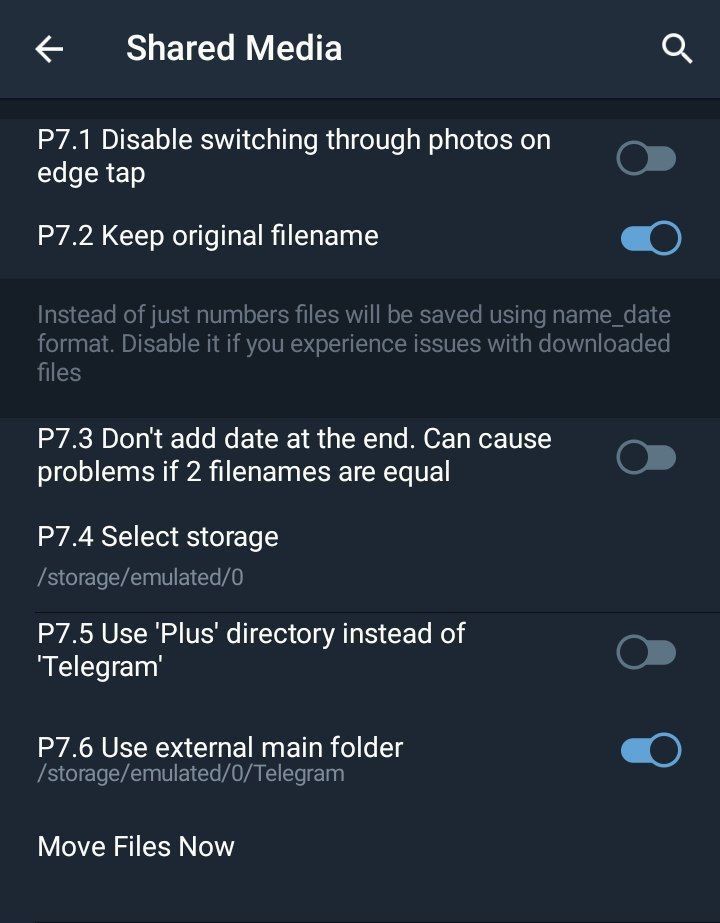
• Now Tic ✅ These Options (From Plus Messenger)
1. Fast Link: 🔗 KeepOriginalFilename
2. Fast Link: 🔗 KeepFilenameEqual
3. Fast Link : StoreInExternalfolder
• Done! Now all you're telegram media will be saved as original name & can be found on Internal-Storage/Android/data/org.telegram.plus/files. (If your phone is showing no data in Android folder than use any other file manager app.)
• You can change this location too click here
🖥 Windows Users :
• Download and install Unigram app
🔗 Telegram Channel : @Unigramappx (Recommended, Just download the most recent file from that channel & install)
• Open ⚙Settings, click on 'Data & Storage' option and select the path where you want to auto save the files.
• After downloading the files, you will not see any option to save the files.
• Now open the storage path that you have chosen to save the files.
• You will get the downloaded files with their original name.
Q. Why do we need to download and install Unigram? Is there a problem with the Telegram desktop app?
Answer: There are many reasons to use Unigram. I mention something important.
1. Unigram is fast and easy to use.
2. Telegram Desktop follows the content restriction very strictly and it will not allow you to save the downloaded file due to the content restriction on the channel.
3. Sometimes Telegram desktop does not show download icon on video files, it is better to use Unigram.
