Best SOCKS5 Proxy Provider: How to Choose and What to Test First
best socks5 proxyBest SOCKS5 proxy provider for your software is the one that passes your own test: compare offers, then buy cheap private proxies only after a trial run.
Best SOCKS5 proxy provider rankings change every month, and most of them are paid placements. A better way to choose is to write down what your software needs from SOCKS5 and test two or three sellers against that list. The whole test takes an evening. Rating pages also tend to skip the details that break real setups, such as remote name resolution or the way the list is delivered.
Start with the software itself: which protocols it supports, how it loads proxies, how many threads it opens and whether it logs in to accounts.
What a SOCKS5 provider should give you
The basics are a host and port, login by username and password or by an IP whitelist, and support for remote name resolution, so programs can use the socks5h scheme and send site names to the proxy. Without remote resolution your own DNS server sees every host the software visits. Ports should stay the same for the life of a plan, or your software settings break every time the seller reshuffles them.
Check next whether SOCKS5 and HTTP work on the same access. Browsers and scraping libraries take either, while messengers, mail clients and bots built on sockets need SOCKS5, so one access for both saves a second subscription. If your software sends UDP traffic, ask the seller directly whether their SOCKS5 relays UDP, because many offers cover TCP only.
Ask about authorization as well: how many IPs you can whitelist, whether the login works from any network and whether you can change the whitelist yourself in a dashboard. A dashboard that shows the plan, the list link and the whitelist on one screen saves you support tickets later.
Best socks5 proxy: the numbers to compare
Put the offers in a table with the same rows: addresses online at once, the number of networks behind them, thread limit, traffic limit, how often the list refreshes and how it reaches your tools. Add uptime and the support response time, since a dead plan on a Sunday costs real money when jobs run around the clock. If a seller does not publish one of these numbers, ask support before buying. How fast and how clearly they answer tells you how support will behave later, when something breaks.
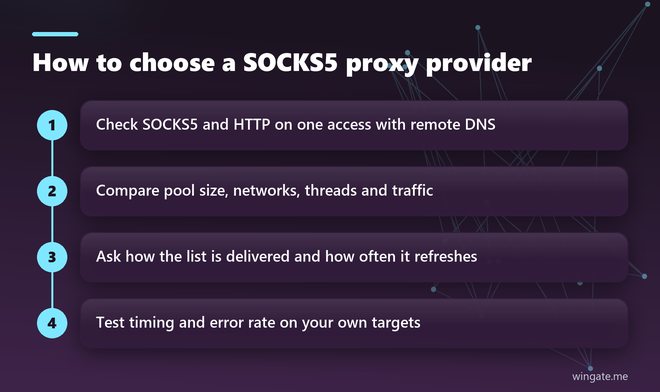
Read the price last, at the same thread count and the same period for every seller. A low monthly figure with a small traffic cap often ends up more expensive than an unmetered plan once your software runs at full speed.
Private socks5 proxy or shared
A private SOCKS5 proxy, or a private pool, goes to a limited group of clients and stays out of public lists. shared private proxies split addresses between a few buyers for a lower price, which is fine for light tasks. For accounts and long scraping runs, the history of an address matters, and a private pool keeps that history in fewer hands. If you consider a shared plan, ask how many buyers use one address and how the addresses are split.
Socks5 proxy list: how it should be delivered
Large plans come as a list, one address per line, in IP:PORT form for whitelisted access or IP:PORT:LOGIN:PASS with credentials. The most convenient delivery is a link that your software reloads on a schedule, so dead lines disappear and new ones arrive without manual downloads. Make sure the format matches what your tool expects: a list with logins loaded as plain IP:PORT looks exactly like a dead list.
Ask how often the list behind the link changes. Every 15 minutes is a good pace for scraping and automation, since tools that reload the link always work with addresses that were online minutes ago.
How to test a SOCKS5 provider in ten minutes
Two commands tell you most of what you need. The first measures connection time and total time through the proxy, the second checks that Python sees the proxy address with remote name resolution:
curl -x socks5h://LOGIN:PASS@IP:PORT -s -o /dev/null \
  -w "connect %{time_connect}s  total %{time_total}s\n" https://example.com

pip install "requests[socks]"
python3 -c "import requests; print(requests.get('https://api.ipify.org', proxies={'https': 'socks5h://LOGIN:PASS@IP:PORT'}).text)"
Run the timing command against the sites your software actually works with, ten times in a row, and look at the spread. Times that jump from half a second to ten seconds point to an overloaded server. Then load the full list into your real tool at half the planned thread count and watch the error rate for half an hour. Repeat the timing test at a busy hour, because an overloaded provider shows itself in the evening more than at night.
Free socks5 proxy list or a paid plan
Free SOCKS5 lists are scraped from open ports and shared by thousands of users. Many lines die within hours, speed depends on whoever runs the relay, and the relay owner sees where you connect. Under daily load they break down quickly. For accounts and payments they add a risk you do not need, since whoever runs an open relay can log what passes through it.
Where WinGate fits
WinGate runs a private IPv4 pool with 12,000 to 15,000 addresses online during the day across 3,000 to 5,000 networks, and the list behind your link refreshes every 15 minutes. SOCKS5, HTTP and HTTPS work on one access, traffic is unlimited, plans are counted in threads, and access works through up to two IPs bound in the dashboard, with an optional login and password in the line for software that has those fields. The site states 99.9% network uptime and ticket replies within 24 hours, seven days a week. SOCKS5 comes at no extra cost on every plan, and the list can be downloaded as a file or used as a link from the dashboard.
Plans start at $15 for 24 hours with up to 1,000 threads, and the free test lasts up to 2 hours, enough to run both commands above and a real batch of work.