Beginner's guide
Mɪɴᴀᴛᴏ (ध्रुव) 💫Since you're here, I'm assuming that you're new in the World of Custom ROMs.
I'll try to keep things as simple as I can. And i won't explain the things, I'll just mention the steps.
So, The first thing you need to do is Unlock BOOTLOADER.
I'll mention every steps to make it easy for you.
UNLOCKING BOOTLOADER
Before going ahead make sure that you have all your data Backed-up. Because you might loose your data after Unlocking Bootloader.
STEP 1 :
- The first step is to enable USB debugging on the Xiaomi phone. For this, go to Settings → About Phone → Then Tap MIUI version 5-7 times to enable Developer Options.
STEP 2 :
- Now Back to Settings → Then Enable Sync options → Now Tap on Mi Cloud → Then Scroll down and Turn on Find Device option → Scroll Up and tap on Sync Details.
STEP 3 :
- Then click on Sync All Items. This will sync all your items.
STEP 4 :
- Next go Settings → Additional settings → Developer Option. Now, Tap on Developer Option → Then Turn on the toggle button OEM Unlocking and USB debugging options.
STEP 5 :
- Then Turn on your mobile data. Keep in mind, you have to turn on mobile data from the same SIM from which you have created your Mi account.
STEP 6 :
- Now you have to Tap on Mi Unlock status. And then tap on the Agree button. After that, you have to tap on “Add Account and Device“.
STEP 7 :
- Then, Power off your Xiaomi Mi/Redmi device.
STEP 8 :
- Once done, boot your phone into the Fastboot mode. To go into fastboot mode, Press Volume Down and Power Button simultaneously for a couple of seconds.
STEP 9 :
- Once you enter Fastboot mode, connect your Xiaomi phone to the Computer/PC via USB cable.
- Download the Mi Unlock Tool to your PC and extract it. (To download, see the download section)
- Now open the extracted folder, then open “miflash_unlock” and select “Agree”.
STEP 10 :
Next Sign in with your Mi Account, which was connected with your phone
STEP 11 :
- Then Click on the ”Unlock” Button.
Then Follow the on-screen Instructions.

Congrats, 🙂 you have successfully unlocked the bootloader on the Xiaomi phone.
Main chances are you won't get any Waiting time. In any case if you see any waiting time, like this
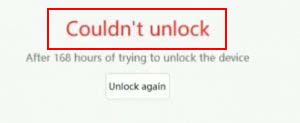
Then you have to wait for 168 hours, which will be approximately 1 week or seven days. Ofcourse you can use your phone.
How to confirm whether your Bootloader is Unlocked or not ?
If you want to confirm the unlocked status and you want to check if your device is unlocked successfully or not, follow the steps given below.
- First, go to Settings App.
- Then Tap ”Build Number” 7-8 times to enable Developer Options.
- Once Developer options enabled, Again go to Settings.
- Now go to Additional Settings → Developer Options.
- Then tap on Mi Unlock Status.
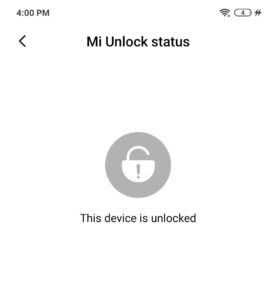
- Now, here you will see the message ”This device is unlocked”.
- That’s It 🙂
As you can see in this picture.
NOW The next step is to Install Custom Recovery.
STEPS :
Step 1 :
First of all Enable USB debugging on your android phone. To enable USB debugging go to Settings >> About >> Software >> Build Number Now tap 6-7 times on Build so that Developer Mode is turned on.
STEP 2 :
Now, go back to the Settings tab and go to Developer Options, and enable the USB Debugging option
STEP 3 :
Now you need to Setup ADB and Fastboot on your PC / Laptop. Follow the steps shown below.
- Download ADB and Fastboot Tool
- Extract It and Run It
- Next Press Y/Yes to install ADB and Fastboot or N/No to skip
- Press Y/Yes to install ADB system-wide or N/No for current user only
- Again Press Y/Yes to install Drivers or N/No to skip
- Continue Driver installation
STEP 4 :
Connect your Android Phone to the PC with the original USB cable.
STEP 5 :
Open the ADB folder and move TWRP.img file to ADB Folder.
STEP 6 :
Now open CMD by pressing Shift Key + Right Mouse Click.
STEP 7 :
Once the command window is open type the following command.
COMMAND 1 --> adb reboot bootloader
COMMAND 2 --> fastboot devices ( To check whether your device is connected or not)
COMMAND 3 --> fastboot flash recovery <Drag and Drop the file here>
STEP 8 :
- Wait for some time until the flashing process is complete. Once done, type next command to boot into system.
- Now do fastboot reboot