BIGFATOTP™️
@𝗢𝗧𝗣𝗕𝗢𝗧 | @𝗕𝗜𝗚𝗙𝗔𝗧𝗢𝗧𝗣 | @𝗕𝗜𝗚𝗙𝗔𝗧𝗖𝗛𝗔𝗧
➖➖➖➖➖➖➖
Lets start with getting you on board on how to operate and use our very unique product. We recommend that everyone read this before trying to use the bot, to increase your overall knowledge about the product you're about to use. It'll probably be a little difficult in the beginning, but after reading our beginner tutotiral, few tests on your own VOIP number (Not any works, we recommend skype) and real victim attempts, you'll be up to speed on how to use the bot!
➖➖➖ TABLE OF CONTENT ➖➖➖
- WHAT'S AN OTP BOT & A SPOOF PANEL?
- HOW THE SPOOF PANEL & OTP BOTS WORK
- POWER OF SPOOF PANELS
- INTERFACE EXPLAINED
- BASIC LICENSE BUTTONS
- ALL CURRENTLY AVAILABLE SPOOF PANEL BUTTONS
- ENTER BOT BUTTONS EXPLANATION
- CALL SETTINGS EXPLAINED
- OTHER SETTINGS
- MODES EXPLAINED
- CALL DETAILS EXPLANATION
- RESULT BOX
- DIFFERENT RESOURCES TO USE
- VOIPS
- COMMAND LINE CALLING GUIDE
- WORDLIST EXPLANATION
➖ WHAT'S AN OTP BOT & A SPOOF PANEL? ➖
To begin with an OTP bot is an caller robot that calls your targeted phone number with either custom made or premade phone call scripts, that is read by an professional AI voice. The original purpose of OTP bots was to gain access of peoples OTP's for login into full access or not full access logins to different services like payment services, brokerage accounts and even bank accounts. But since we invented SPOOF PANEL we can do so much more than this, we can now also capture credit cards, bank account numbers, fullz and more. It is powerful because you can now basically spam normal phone numbers (or preferred - fullz), to gain credit card information and go directly into an OTP to bypass 3D verification (VBV, MCSC, etc). This is incredibly powerful because it's one of the highest forms of verifications in modern anti fraud card security. We truly recommend that you purchase the SPOOF PANEL feature!
╭ 1.The Base Script (Different Modes)
┣ 2. OTP Script (Or 2FA, CC, AN, SSN, DOB, ZIP, ETC)
╰ 3. The Exit Script (Different Modes)
➖ HOW THE SPOOF PANEL & OTP BOTS WORK ➖
With spoof panel as explained, you can capture more than just an OTP code. How we achieve this; as we do it on web live panels, is to put the victim into a ''pause/wait'' scene saying that we are verifying your information; while you on your point of view, get asked what you do like to prompt the victim with next. When you prompt for anything; what it does, is play a pre-made script that is tied to that button. All our prompts, comes with an validation system, so if the victim did NOT write the correct amount of digits on any prompt. For OTP it's 3-9 digits, for credit card it's 16 digits (It also has an built in CC validator during the call!), for CVV 3-4 digits, etc.
➖ POWER OF SPOOF PANELS ➖
Now that you understand the basics, of how it works, we can go into the power of this. You can now, without any spamming experience, start collecting credit cards and other digit input information (text input will soon be implemented too), without knowing how to host a page, worry about antibots, or any other knowledge! All you really need now with our OTP bot, is a phone number lead (fullz too) and you can basically start making money out of nothing!
➖ INTERFACE EXPLAINED ➖

╭ 1. HEADER
┣➖➖➖
┣ 2. SUMMARY
┣➖➖➖
┣ 3. STATUS
┣➖➖➖
┣ 4. INSTRUCTION
┣➖➖➖
┣ 5. BUTTONS
┣➖➖➖
╰ 6. CONNECTION
➖ 1. HEADER ➖
This is just the header for the user interface, it'll say CALL SUMMARY only.

➖ 2. SUMMARY ➖
Consider this summary like a terminal that is reporting to you the history of statuses.

➖ 3. STATUS ➖
The status is telling you the CURRENT status of the call, if user is prompted to supply maybe an input or awaiting to receive an prompt for example.

➖ 4. INSTRUCTION ➖
To every status there is a fitting instruction that explains to you how you should proceed for user friendliness.

➖ 5. BUTTONS ➖
Whenever victim has input anything, the status changes saying the user is awaiting input and your buttons will show up with instruction asking you to choose what to prompt next. This means that you can keep prompting for OTP's or choose to end the call. If you have Spoof Panel feature, you can prompt for next prompt you want to capture.

➖ 6. CONNECTION ➖
Showcasing if the call is connecting to the victim, is online with the victim or if the victim is offline.

➖ BASIC LICENSE BUTTONS ➖
📍 OTP: Captures OTP to anything, 3-9 digits (Included in basic license)

📟 2FA APP: Captures the 2FA authenticator 30 seconds code (Included in basic license)
#TIP You can ask for OTP again and again, aslong as the target is supplying them. The script for OTP changes after the first time, so that you can capture OTP multiple times.
❌ END CALL: When clicked, you'll start playing the specific mode exit script. If you're few seconds into exit script, you can consider the job successful.


It's important to know that right now at least, there is no specific API response for declining call and not picking up call. It's good to keep this in mind!
➖ ALL CURRENTLY AVAILABLE SPOOF PANEL BUTTONS ➖

📍 OTP: Captures OTP to anything, 3-9 digits (Included in basic license).
📟 2FA APP: Captures the 2FA authenticator 30 seconds code.
🧍 SSN: Captures the Social Security Number, 9 Digits.
📆 DOB: Captures the Date Of Birth, 8 Digits.
💳 FULL CC: Captures the full Credit Card information, Expiration Date and CVV in one button, with CC validator built in.
💳 CC: Captures the Credit Card information, 16 digits, with cc validator built in. We recommend to only use this button if you're trying to repair a CC, otherwise use FULL CC.
📆 EXP: Captures the Expiration Date, 4 digits. We recommend to only use this button if you're trying to repair a CC, otherwise use FULL CC.
🔒 CVV: Captures the CVV, back of card, 3 or 4 digits. We recommend to only use this button if you're trying to repair a CC, otherwise use FULL CC.
🏦 ATM PIN: Captures the bank card ATM PIN, 4 digits.
🔢 AN: Captures the Account Number for the victims Checking Account, 5-17 digits.
🔢 RN: Captures the RoutingNumber for the victims Bank Account, 5-17 digits.
👨 MEM ID: Captures the Member ID of the victims whatever Member ID that could be applicable, 5-17 digits.
🌎 ZIP: Captures the ZIP on file, for whatever service is applicable, 5 digits.
❌ END CALL: When clicked, you'll start playing the specific mode exit script. If you're few seconds into exit script, you can consider the job successfull.
➖ ENTER BOT BUTTONS EXPLANATION➖

╭ 📞 START A CALL
╰ Press this button to start a call after you have set your settings.
╭ ⚙️ CALL SETTINGS
╰ This button allow you to customize your settings for your calls.
╭ ⚠️ USER GUIDE
╰ Here you'll find our USER GUIDE that everyone should read.
╭ 🥷 PRIVATE METHODS
╰ If your pockets are deep, you can purchase private money making methods here.
╭ 📩 RESULT BOX
╰ This is where all your calls gets saved, that ends with the outcome of an capture.
➖ CALL SETTINGS EXPLAINED ➖

☑️ DUALPHISH
DualPhish is another revolutionizing feature that sends an SMS to the victim letting them know about the phone call they're about to receive. Another feature no other bot has; you saw these here first and this feature will increase your pickup rate.
#TIPS: The scripts does NOT say what specific phone number we've sent the OTP code to, we choose to have it this way in case of a dilemma where the victim is picking up on one number, but receiving the OTP on a different number.


☑️ SPOOFING
Our bot is capable of spoofing the number into any number you choose. This means that you can impersonate any company you do like, and it'll show up on your victims phone when they are receiving the phone call. Backed by a main and backup trunking and SIP server to ensure a near 100% uptime.

☑️ VERIFICATION PROMPT
This feature is for people that do you like victim to press #1 to proceed the phone call. The script will read up an ''scare'' scenario, where the victim has to press #1 to cancel this ''scare'' scenario. For example, that someone is attempt to withdraw your crypto and you have to press #1 to cancel. We have set this call setting up to verify the call eitherway if they press #1 or #2, this setting is a preference setting for some users.

➖ OTHER SETTINGS ➖
☑️ INTERNATIONAL SPOOFING
For $200 a month you can purchase the ability to call internationally. You'll not be able to call beyond USA and Canada. Keep in mind though, that SPOOFING DOES NOT WORK FOR INTERNATINOAL CALLING! Also DUALPHISH doesn't work.
☑️ CUSTOM SCRIPTS
Unfortunately we didn't have time to finish the custom script feature before launch. As you can see the bot is gigantic, and at some point we had to launch as we have worked for multiple months to perfect what you're seeing. So expect a little time for us to implement this feature in an impressive way. In the meanwhile, please do listen to our very well made scripts through Skype or an real number.
🔄 CUSTOMER SERVICE / PGP MODE
Like custom scripts, we didn't have the time to finish this feature aswell. We'll within very short time have these features included in the main licenses, free of charge.
➖ MODES EXPLAINED ➖

🏦 BANK = This mode we recommend you to use if you have CC, NFA/FA bank logins, etc. If you have have Spoof Panel, we recommend you to just call fullz (dead NFA/FA paypals are super great), to spam just as phone number leads, collect FULL CC into OTP, or utilize any other button for spoof panel together with leads as if you are spamming.
Chase, Bank of America, Navy Federal Credit Union, ''Bank'', Etc...
📱 NFC = This mode is used to link Apple Pay, Google Pay, Samsung Pay, or any other NFC service.
Apple Pay, Google Pay, Samsung Pay, Amazon Pay, Etc...
💰 PAY. SERVICE = Self explanatory...
Paypal, Venmo, Western Union, Cash App, Skrill, Payoneer, Etc...
💳 PAY. GATEWAY = Self explanatory...
Stripe, Square, Authorize.net, Clover, Shopify, Etc...
📈 BROKERAGE = Self explanatory...
Robinhood, eToro, SoFi, Moneylion, eToro, Fidelity Investments, Etc...
🛒 STORE = Self explanatory...
Walmart, Ebay, Target, Best Buy, Amazon, Nordstrom, Coscto, Etc...
📞 CARRIER = Self explanatory...
AT&T, Verizon, T-Mobile, Sprint, U.S. Cellular, Etc...
📧 EMAIL = Self explanatory...
Gmail, Outlook, Yahoo, ProtonMail, Yandex, iCloud, Etc...
₿ CRYPTO EXCHANGE = Self explanatory...
Coinbase, Binance, Gemini, Kraken, Crypto.com, Uphold, Etc...
🧰 CRYPTO HARDWARE = Self explanatory...
Trezor, Ledger, Safepal, D’CENT, SecuX, Etc…
💬 SOCIAL MEDIA = Self explanatory...
FaceBook, Snapchat, Instagram, LinkedIn, YouTube, TikTok, Twitter, Etc…
☁️ CLOUD SERVICE = Self explanatory...
Google Cloud, Dropbox, AliBaba Cloud, OneDrive, iCloud, Etc…
➖ CALL DETAILS EXPLANATION ➖

1️⃣[1/6] Selected Mode: This question is where you choose what mode you want to select. The mode determines what type of script the call will start with and what it will end with.

2️⃣ [2/6] Service Name: This is where you input what Service/Platform will be mentioned within the mode script you have choosen. So if you choose bank mode and input ''Chase'' for example here, then your DualPhish SMS (If you have it activated) and the script on the phone call will mention ''Chase'' inside the script.
#TIP You can input just ''Bank'' on BANK MODE if you are using for example Spoof Panel feature and don't know the targets bank (I recommend dead PP logs, because you know what bank they use).

3️⃣ [3/6] Victim Name: Here you will write the name of the person you're trying to call. It's not necessary to have both first name and surname.
#TIP If you don't have the targets name for some reason, you could input ''Dear Customer''. Then the DualPhish SMS (If activated) and scripts would work.

4️⃣ [4/6] Victim Phone: This is where you input the phone number of the target you're trying to call. It'll validate and reformat your number into our accepted format for you.
#TIP For international users: If you forget country code on this question, it'll assume it's an USA number!
5️⃣ [5/6] Spoof Caller ID: This question will only show up for users who activate Spoof Call. You can either manually input the phone number you want to spoof, or utilize our inline buttons list of already fetched and tested service spoof numbers. They have all been tested on USA real phone numbers to ensure that the letters are being shown on the targets phone. So if you pick for example Bank of America, it'll show up as Bank of America on the targets phone (With letters depending on carrier!).
#TIP Like always, we recommend that you test it on preferably an real USA number before making real calls on high value targets. Incase of updates or bugs. It's always advised to use Spoof feature which is free for all users! If you wish to get shorter queue times, you can rent a private server soon!
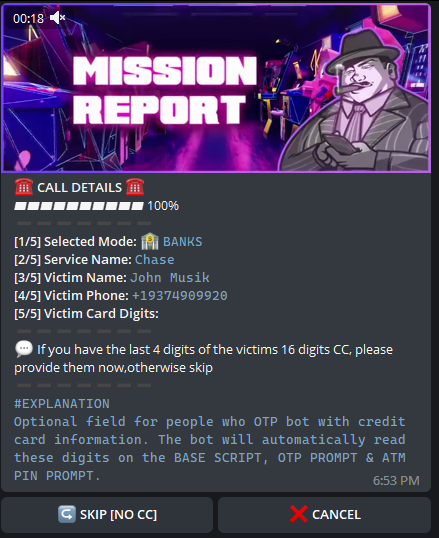
6️⃣ [6/6] Victim Card Digits: This question will only show on BANK and NFC MODE. We recommend you to input this ONLY if you are trying to process a SPECIFIC card. It'll mention the last 4 digits of the card on base script.
#TIP If you have Spoof Panel feature, it'll mention the 4 last digits of the card on BASE SCRIPT, FULL CC, CC, EXP, CVV & ATM PIN. As mentioned before; only utilize CC, EXP, CVV buttons if you're trying to repair a specific part of a CC you already have. Otherwise utilize FULL CC button always.

➖ RESULT BOX ➖

This feature was made for....
➖➖➖➖➖➖➖➖➖➖➖➖
WORK IN PROGRESS BEYOND THIS POINT
➖➖➖➖➖➖➖➖➖➖➖➖
➖ COMMAND LINE CALLING GUIDE ➖
Command line
For those who prefer a classic command line OTP bot or just want to simply copy and paste to call more efficiently, we have developed an easy, call command system.
In order to utilize our call command system, please do:
/call <type> <service name> <victim name> <victim number> <card digits*> <spoof number*>
VARIABLES WITH THE * ARE OPTIONAL!
VARIABLE EXPLANATIONS:
Type - type is the type of call that you want to utilize in your call, what module you want to use depending on who you’re trying to target.
apple
banks
carrier
crypto
cryptohw
brokerage
payments
store
cloud
social
payprovider
These are the available types that you will be able to utilize in your call.
Service name - this is the name of the service that you’re trying to impersonate, depending on the type you chose this can be Wells Fargo, chase, coinbase, etc
Victim name - self-explanatory, it’s the name of the victim that you’re trying to attack.
Victim number - The phone number of the victim that you’re trying to attack.
Card digits (OPTIONAL) - The last four digits of the victim credit card in order to increase legitimacy. Only used in mods utilizing it like bank or NFC.
Spoof number (OPTIONAL) - The phone number you want to appear to the victims phone, only use this if you spoofing purchased. NOTE: If you plan on utilizing spoofing without card digits, please enter '' instead of the last 4 digits of CC.
Example of usage:
/call apple "Some Random Store" "Random Guy" +15435435355 - NO SPOOF & NO CC
/call apple "Some Random Store" "Random Guy" +15435435355 5555 - NO SPOOF & CC
/call apple "Some Random Store" "Random Guy" +15435435355 5555 +11234567899 - SPOOFING WITH LAST 4 OF CC
/call carrier "Some Random Store" "Random Guy" +15435435355 '' +11234567899 - SPOOFING WITHOUT LAST 4 OF CC
➖ DIFFERENT RESOURCES TO USE ➖
Crypto Log, Bank Log, CC, Fullz & NFA logs & FA Logs
➖ VOIPS ➖
(11/08/2022)
SKYPE:
DUALPHISH 🟢
NO SPOOF 🟢
SPOOF 🟢
TEXTNOW:
DUALPHISH 🔴
NO SPOOF 🟡 (HANGS UP BUT GOES TO VOICE MAIL)
SPOOF 🔴
TEXTPLUS:
DUALPHISH 🔴
NO SPOOF 🔴
SPOOF 🔴
GVOICE:
DUALPHISH 🔴
NO SPOOF 🔴
SPOOF 🔴
SCRIPTS EXPLANATION
➖ WORDLIST EXPLANATION ➖
OTP = One Time Passcode, needed to login to different platforms, make changes to accounts, or to confirm charges / transfers.
Prompt = It's when you trigger the bot to read a specific script to capture specific information or task from the victim.
Reprompt = Is when you basically do another prompt, for example you prompt for Credit Card first, and then reprompt for OTP. Or OTP, to OTP, to OTP, etc.
Validation = Ensures that the capture is an valid capture and not an made up one.
CC = Credit Card.
EXP = Expiry date of the Credit Card.
CVV = The three or four digits on usually the back of the card.
2FA = 2 Factor Authentication, like Google Authenticator, Ledger, etc.
MEMBER ID = Some platforms uses member ID, different lengths and only digits. Could be an login, or whatever!
AN and RN = In USA, bank accounts uses Account Number and Routing Number system to transfer between accounts.
NFC = Near Field Communication, allows two devices like a phone and payment terminal to talk to each other.
ZIP = A 5 digit postal code used by the USPS in the United States, a code for the area that the address is in.
CARRIER = Telephone service provider, handles calls, SMS and internet data for cellular devices.
DOB = Date of Birth.
VOIP