How to use AnyDLBot ?
AnyDLBot
Introduction
I can upload files from URLs to Telegram remotely.
I will upload files upto 2000 MB. This limit is set by Telegram, I can't do anything about it.
This bot helps you to quickly upload remote stream files to Telegram using URL, without wasting your bandwidth.
Sometimes filename may be wrong, to override auto filename just pass filename along with url seperate them using a pipe.
for example: https://www.gmail.com/mail/help/images/logonew.gif | google.gif
If you are looking for YouTube Upload/Download try our bot @oiTubeBot
Supported Sites
✅ any (not geo-restricted) direct (stream) link
✅ zippyshare
✅ MX Player Movies, without DRM
✅ hotstar, without DRM
✅ sonyliv, without DRM
✅ TamilYOGI.VIP
✅ MDisk Links
(BEWARE: it is only for personal USES, reFRAiN from uploading the contents in PUBlic chaNNeLs)
✅ Google Drive
Google Drive links (in the format, https://drive.google.com/file/d/XXXYYYZZZ/view )
The Google Drive links needs to be publicly available, or if you cannot make the links public, the link should be sharable with vahdamirhs@gmail.com with "Download and View Permission".
✅ rename Telegram Files
Settings
📂 Forced as Documents
This mode will upload all links, or rename existing Telegram media, only as Telegram Documents.
📺 As Native Media
If the file_name ends with any of the following extensions, it will be uploaded as that type of media (Photo / Video / Audio / Voice Message)
M4V MP4 MOV FLV WMV 3GP MPEG WEBM MKV MP3 M4A M4B FLAC WAV AIF OGG AAC DTS
🔩 BONUS ✨ 🎊
If 📺 As Native Media, is selected as your Upload Mode
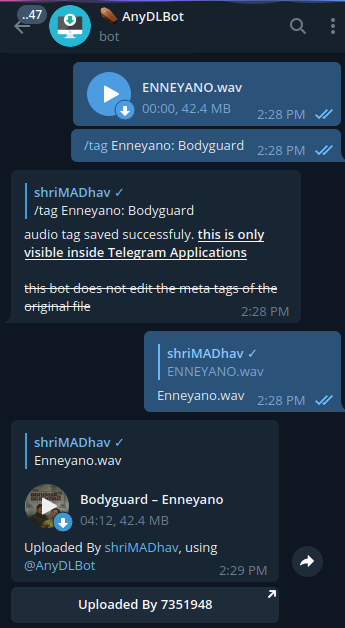
1️⃣ you can use /tag command to set custom Title and Performer tags, for your Audio Uploads, if the file name ends with MP3 M4A M4B FLAC WAV AIF OGG AAC DTS.
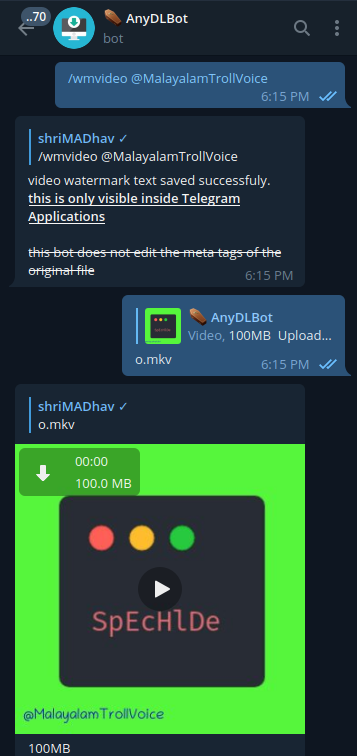
2️⃣ you can use /wmvideo command to set a custom watermark text, only for Video Uploads, if the file name ends with M4V MP4 MOV FLV WMV 3GP MPEG WEBM MKV.
Custom Thumbnail
You can set custom thumbnail, by simply sending a Photo, and replying /savethumbnail command, It will be used as thumbnail for all future uploads till you do /clearthumbnail.
No thumbnail will be applied by default for the uploads.
For the video uploads, thumbnail will be auto generated, if no custom thumbnail is applied.
By default all the uploads are set as native media. You can change them in /settings.
Feature Requests: 👉 https://t.me/SpEcHlDe/1343