Antidetect 3 Patreon Premium Edition
August version CHANGELOG (EN)In this article, you can see with a list of changes that await users in Antidetect 3 Patreon Premium Edition - August.
Previously, the Antidetect 2 and Antidetect OWASP projects used the VirtualBox 5.2.2 codebase, dated November 17, 2017. The creator of VirtualBox, Oracle, gradually made changes to VirtualBox and released new versions, however, it was not possible to use the code base from new versions of VirtualBox in the Antidetect project due to outdated architectural features of the code, however, with the release of Antidetect 3, now all the changes and innovations are available, that Oracle adds to its product are added to Antidetect.
Is it worth upgrading from the Antidetect PPE April project (based on version 5.2.2) to the Antidetect PPE August project (based on version 6.1.26)?
Many users of the Antidetect project are in no hurry to update to the new version of Antidetect 3 and remain on the final release of the previous version - on the release from April 2021, and this is a gross mistake.
The number of vulnerabilities that Oracle has fixed in the VirtualBox code in 4 years is huge, and more than twenty are critical, in addition to what Oracle has fixed, Vektor T13 also fixes vulnerabilities aimed directly at protecting against user identification and protecting against virtual machine detection. To ignore this is to put yourself at risk. Let's see why it is necessary to upgrade to the new version of Antidetect 3:
- Antidetect Patreon Premium Edition April is in the public domain, you can search it on Google and you will find about 20 links to this software.
- For the release of the new project Antidetect 3, Antidetect Patreon Premium Edition April, Vektor T13 was officially published, you can download it from the link: http://e.pc.cd/e82otalK
- Antidetect Patreon Premium Edition April has uncontrolled randomization of hardware (run msinfo32 inside a virtual machine, take a picture of the data and then turn off the machine and then turn it on again - in msinfo32 all data will be new) for this reason, there are many bans.
The user logs in from a new device every time, but the cookies are always the same ... mystic. - To prevent the automatic installation of Nvidia drivers in Antidetect Patreon Premium Edition April, a "bug" was used with a non-existent video card model 1122, in the hardware manager you can see that the vileokard has an index:
PCI \ VEN_10DE & DEV_1122
Where is the 1122 idi of a non-existent video card. - More than 20 critical vulnerabilities fixed by Oracle
- More than 50 critical vulnerabilities have been fixed by Vektor T13, a few of them are described below.
- Low speed and stability of Antidetect Patreon Premium Edition April
This list can be continued for a very long time, but it is better to spend this time at work :)
Changelog from VirtualBox:
- VMSVGA: fixed VM screen artifacts after restoring from saved state (bug #20067)
- Storage: Fixed audio endianness for certain CUE sheet CD/DVD images.
- VBoxHeadless: Running VM will save its state on host shutdown
- VBoxManage: Fix OS detection for Ubuntu 20.10 ISO with unattended install
- Linux Additions: Fixed mouse pointer offsetting issue for VMSVGA graphics adapter in multi-monitor VM setup (6.1.24 regression)
- Storage: Fixed starting a VM if a device is attached to a VirtIO SCSI port higher than 30 (bug #20213)
- Storage: Improvement to DVD medium change signaling
- Serial: Fixed a the guest missing interrupts under certain circumstances (6.0 regression, bug #18668)
- Audio: Multiple fixes and enhancements
- Network: Fixed connectivity issue with virtio-net after resuming VM with disconnected link
- Network: Fixed UDP GSO fragmentation issue with missing 8 bytes of payload at the end of the first fragment
- API: Fixed VM configuration for recent Windows Server versions
- Extension Pack: Fixed issues with USB webcam pass-through on Linux
- Host and guest driver: Fix small memory leak (bug #20280)
- Linux host: Support Split Lock Detection feature of recent Intel CPUs (bug #20180)
- Linux host and guest: Support kernel version 5.13 (bug #20456)
- Linux host and guest: Introduce support for SUSE SLES/SLED 15 SP3 kernels (bug #20396)
- Linux host: Installer will not attempt to build kernel modules if system already has them installed and modules versions match current version
- Windows host: Fix DLL signature validation to work better with an invalid certificate
- Guest Additions: Fixed crash on using shared clipboard (bug #19165)
- Linux Guest Additions: Introduce support for Ubuntu specific kernels (bug #20325)
- Solaris guest: Increased default memory and disk sizes
- EFI: Support network booting with the E1000 network controller emulation
- EFI: Stability improvements (bug #20090)
Changelog from Antidetect:
- Added ability to select motherboard socket
(description below) - Added emulation of RAM slots
(description below) - Fixed a bug in which the drivers inside the virtual machine, when watched through HEX, indicated belonging to VirtualBox
(description below) - Added display of information about hardware to the registry
HKEY_LOCAL_MACHINE\HARDWARE\DESCRIPTION\System\BIOS
(description below) - Added new hardware configurations
- AntiOS updated to version 3.6.0
Now, let’s take a look at the critical updates that will critically impact your work.
Added ability to select motherboard socket
This feature simplifies manual selection of hardware, based and grouping it according to the type of motherboard socket, you can find it in the DMI tab of the Antidetect menu

Added emulation of RAM slots
An extremely important vulnerability that was present in all versions of Antidetect prior to the release of Antidetect 3 PPEAugust.
Emulation of RAM slots, its model, manufacturer and serial number was not used in VirtualBox and is an exclusive feature of Antidetect 3.
It is difficult to find a computer without RAM, given that RAM, namely its serial numbers, are often used in licensing systems. Take a look at the screenshot and you can see what the information about your RAM looks like:

You can check the RAM info using the PowerShell console and WMI using the command:
Get-WmiObject win32_physicalmemory | Format-Table Manufacturer, Banklabel, Devicelocator, Capacity, Serialnumber -autosize
A simple test for the presence of memory slots helps to identify the use of a virtual machine, and this vulnerability is critical for operation.
To change the parameters of the RAM, a separate block was created, you can find it in the Antidetect menu - the Misc Hardware tab.
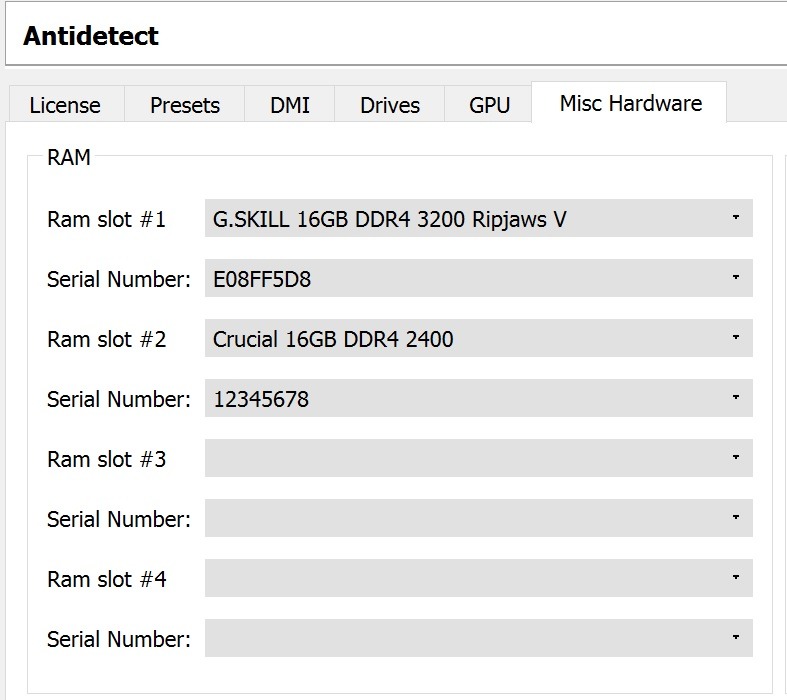
You can set from 1 to 4 sticks of RAM, but pay attention to the amount of RAM that you set.
Fixed a bug in which the drivers inside the virtual machine, when watched through hex, indicated belonging to VirtualBox
Quite an unpleasant bug that existed all the time and in all versions of Antidetect up to Antidetect 3 PPE August.
The essence of the bug lies in the fact that when compiling the drivers, the compiler added information about the product to the drivers and other system files that were used inside the virtual machine, as a result of which the virtual machine could easily be detected.
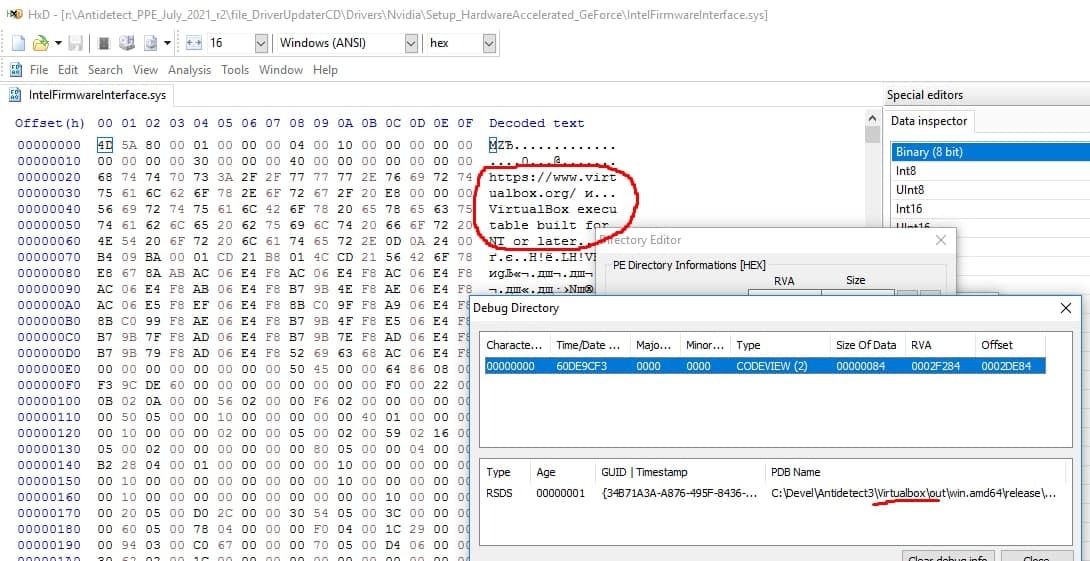
Any application can use this vulnerability to detect the use of a virtual machine if you are using an old version of Antidetect 2 or Antidetect OWASP
Added display of information about hardware to the registry HKEY_LOCAL_MACHINE\HARDWARE\ DESCRIPTION\System\BIOS
This bug, like the previous ones, is present in all old versions of Antidetect, and although it will seem insignificant to most users, believe me, it is of critical importance for everyone who works with web resources.
In the Windows registry at
HKEY_LOCAL_MACHINE\HARDWARE\DESCRIPTION\System\BIOS
there is information about the Motherboard, BIOS and the system, but only on real machines, this information is absent inside the virtual machine.
The critical importance of this information can be assessed by the access of the Google Chrome browser to it. You can see this information on the page:
chrome: // sync-internals /
Tab - Sync Node Browser, section - Device info
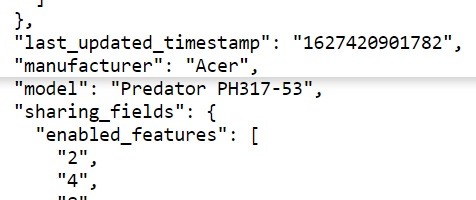
Also, the information from this section is used to generate bug reports, system reports, user profile reports, and the absence of this information in the user report is an anomaly and a gross error that leads to the use of additional user verification methods.
Each user can independently check the absence of this information when using outdated versions of the Antidetect project.