Announcing Vize 1.0.0: The Figma-to-Flutter Bridge for Responsive UI
FlutterPulseThis article was translated specially for the channel FlutterPulseYou'll find lots of interesting things related to Flutter on this channel. Don't hesitate to subscribe!🚀
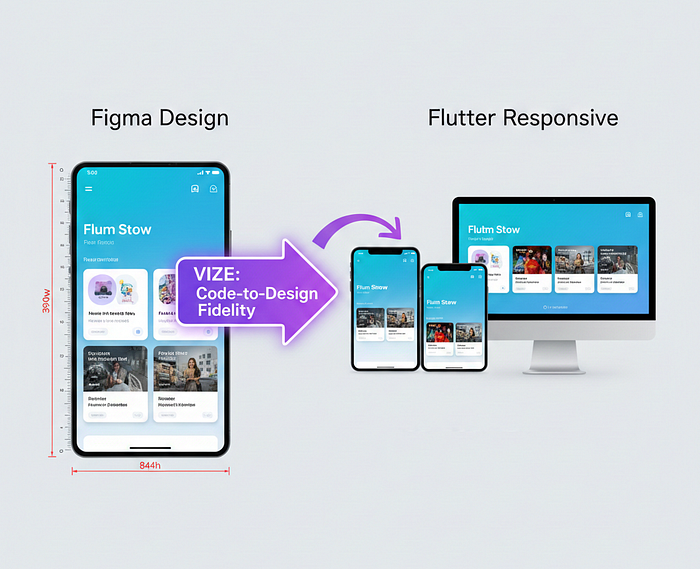
Hey everyone! 👋🏽 I'm super excited to share that Vize 1.0.0 just dropped!
If you've ever pulled your hair out trying to make a Flutter…
Hey everyone! 👋🏽 I'm super excited to share that Vize 1.0.0 just dropped!
If you've ever pulled your hair out trying to make a Flutter app look exactly like the Figma design on every phone, tablet, and desktop you know the struggle. From fixed pixels that blow up on bigger screens, to padding that feels wrong and an overflowing text… pheeewww!
Building responsive layouts in Flutter has always been a bit of a balancing act, where developers choose between rigid pixel values that breaks on small screens or complex 'LayoutBuilder' logic that turns widget trees into a maze.
Today, building responsive interfaces often means stitching together multiple utilities for layout, scaling, and device detection that frequently lead to inconsistent results between design and implementation.
I'm excited to announce the release of Vize 1.0.0, a lightweight and developer-focused responsiveness package built to solve the problem of translating Figma designs into predictable, faithful flutter scaling.
Vize provides a unified approach to percentage-based layouts, figma-aware spacing and typography, concise extension syntax, and device-aware builders, allowing developers to maintain visual consistency across mobile, tablet, and desktop.
The Reason for deployment of this package falls between design and reality; designers work in Figma using fixed frames (for mobile, tablet and desktop) while developers then have to translate those "static" pixels into a fluid environment.
Most times (if not always), usually resulting in:
Text that is too large on small devices.Padding that swallows up content on tablets.
The "Desktop afterthought" where mobile apps look stretched.
Vize which is short for "Visual Size" suggesting that regardless of whether it's a tiny watch or a huge ultra-wide monitor, the "vize" is handled, allowing developers build UI using the exact values from figma designs while automatically scaling them to fit the screen of the user.
Vize comes with features like:
1. Smart Scaling Extensions
Instead of manual calculations, Vize provides intuitive extensions for numbers.
- ཆ.w' & ཐ.h': define sizes as a percentage of the screen width and height.
- ཌ.pa:' scale padding proportionally so it feels the same on an SE as it will be on a Pro Max.
- ཎ.ts': responsive typography that clamps effectively.
2. Figma-to-Code Precision
You can initialize Vize with your designer's specific frame dimensions:
Vize.init(
 context,
 figmaWidth: 390,
 figmaHeight: 844,
);
Once set, use '.sw' and '.sh' (Scaled Width/Height) to match Figma pixels exactly.
3. Device-Aware Logic
Vize also handles "breakpoints" for developers. Whether you need a "VizeBuilder" to swap layouts or simple "isMobile", "isTablet" or "isDesktop" flags, vize provides a clean way to handle these device-specific UIs.
4. The 8px Grid Helper
Maintaining design consistency is key and vize handles this with the 'sp()' helper. 'sp(2)' giving developers a scaled 16px (2 * 8) gap, ensuring vertical rhythm stays perfect across all screen sizes.
Why Vize?
This package provides the following:
Zero Boilerplate: No more nesting every widget in a 'LayoutBuilder'.
Performance: Extremely lightweight with no external dependencies.
Developer Experience: Clean syntax that makes code more readable.
Production Ready: 100% test coverage and built-in linting support.
Vize is now available onpub.dev. You can add it to your project today:
dependencies:
 vize: ^1.0.0
Check out the GitHub repository for full documentation and example projects and feel free to contribute.
(Quick side note: AI was a total champ helping me tidy up the docs and fix a couple early bugs. Made launching this thing way less stressful; you know…teamwork makes the dream work!😅)
Happy Coding! 👨🏽💻