Add Funds to Any Crypto Exchange with Volet.com
Here you will find out how Volet.com helps manage digital assets and how you can use it to quickly add funds to your account on any crypto exchange and start trading. Even when exchanges don’t have direct Volet.com features, you can still send assets there. You will see the deposit process for Metamask, Uniswap, Kucoin, Bybit, OKX. Steps are essentially the same for any centralized or decentralized exchange. Enjoy!
How Volet.com helps manage crypto
Your Volet.com account is a great place to start your crypto journey. Whether you are buying or selling coins, paying someone in crypto or getting crypto sent to you, or just storing your assets in a secure familiar environment, Volet.com got you covered.
Crypto can be a little complicated with all the various addresses and protocols, but not to worry. Making the world of digital assets easier to deal with is what Volet.com is all about. Let’s dive in.
The Buy Crypto area of your Volet.com account is where it all begins. You can buy many popular digital assets at great prices here using the balance of your Volet.com wallets or a Visa/Mastercard. Select the tab above depending on how you would like to pay.
You actually can store crypto in Volet.com, too. Check the Crypto wallets area on the left. You can create a crypto wallet for free and then add assets to it from other crypto wallets, or buy coins to add right on the crypto wallet page. So when you want to buy coins to store in Volet.com, go to the crypto wallet page to buy them in just a few clicks. Explore the Crypto wallets area to get a better grasp, it’s really quite simple.
Buying your crypto assets on an exchange, whether CEX (centralized, most popular exchanges) or DEX (decentralized, from the more exotic DeFi world), is another popular way to go. So many exciting assets out there! No matter what exchange you are about to use to get the coins you are after, before you start trading, you will need to add funds to your exchange account.
Many popular crypto exchanges have instant fiat (cash) deposits and withdrawals via Volet.com accounts. In your crypto exchange account, find the page where you deposit fiat money and look for the Volet.com logo. It’s a very easy way to move your Volet.com balance to a crypto exchange and start trading right away.
However, sometimes your preferred crypto exchange does not have Volet.com fiat deposits. Often it does not have fiat deposits at all, like decentralized exchanges.
Here, we take a look at a workaround telling you how to add funds to your crypto exchange account whether or not this exchange has Volet.com wallet deposits. Which basically means, any crypto exchange out there. With all the details and screenshots, we are sure you won’t have any trouble moving funds to any exchange out there.
The basic idea is using your deposit address on a crypto exchange as destination address for your crypto purchase in Volet.com. Let’s explore.
Funding your MetaMask account with Volet.com
MetaMask is a popular wallet for many different tokens. Let’s take a look at how can we transfer funds to your MetaMask account from Volet.com. We will be buying ETH and sending the tokens to our MetaMask wallet:
- In MetaMask, find your ERC-20 deposit address and copy it.
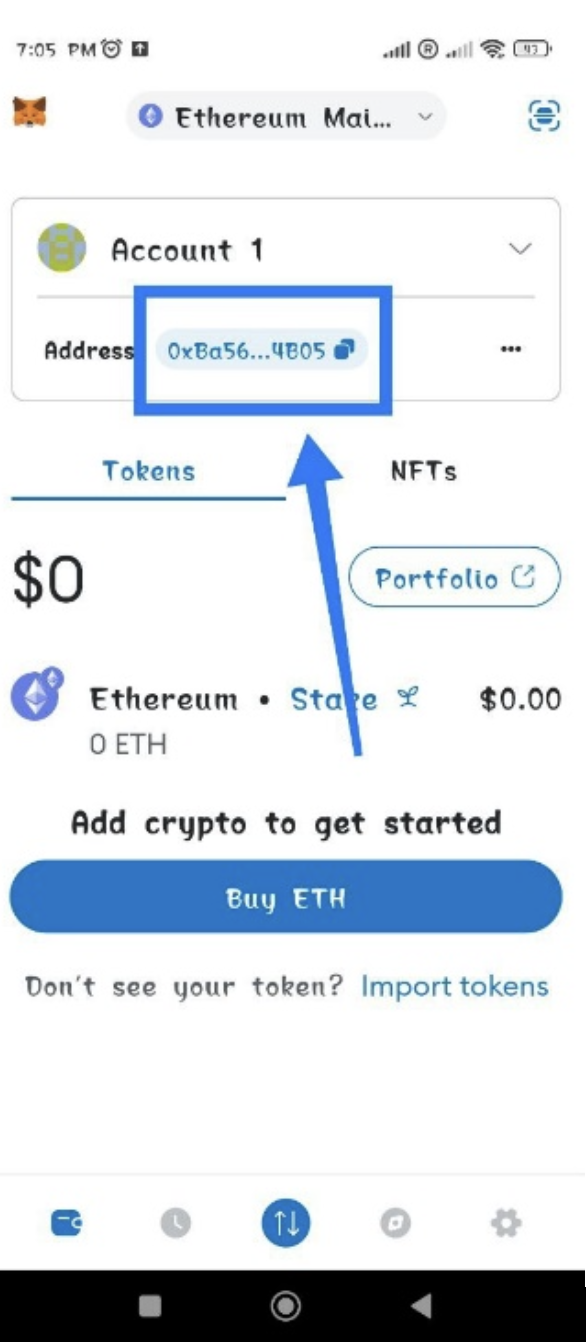
2. Then, log in into your Volet.com account and go to Buy Crypto. In the Digital Asset dropdown menu, choose Ethereum. MetaMask actually supports a few other tokens as well. With them, the steps are the same.
Always double check and make sure the token type and network are the same at both source and destination, to avoid losing your assets.
3. Paste the ERC-20 address you copied from MetaMask earlier.
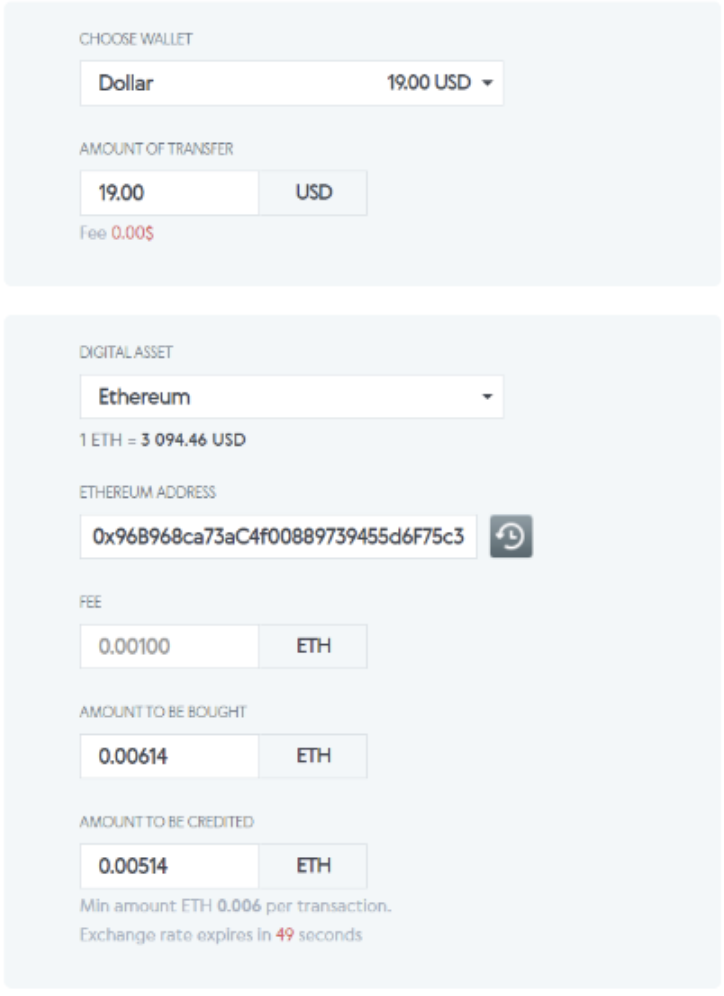
Confirm and complete the transaction, and that’s pretty much it! You just bought some ETH, it will arrive to your MetaMask address very soon. After that, on you go to the crypto world!
🔗 Send crypto assets to your MetaMask account now
Funding your Uniswap account with Volet.com
Uniswap is probably the most popular decentralized (DEX) exchange for Ethereum and ERC-20 tokens. You can connect your MetaMask wallet to Uniswap, or add assets directly to your Uniswap deposit address. Let’s take a look.
- Open the Uniswap app on your device and copy the address shown on the home page of the app.
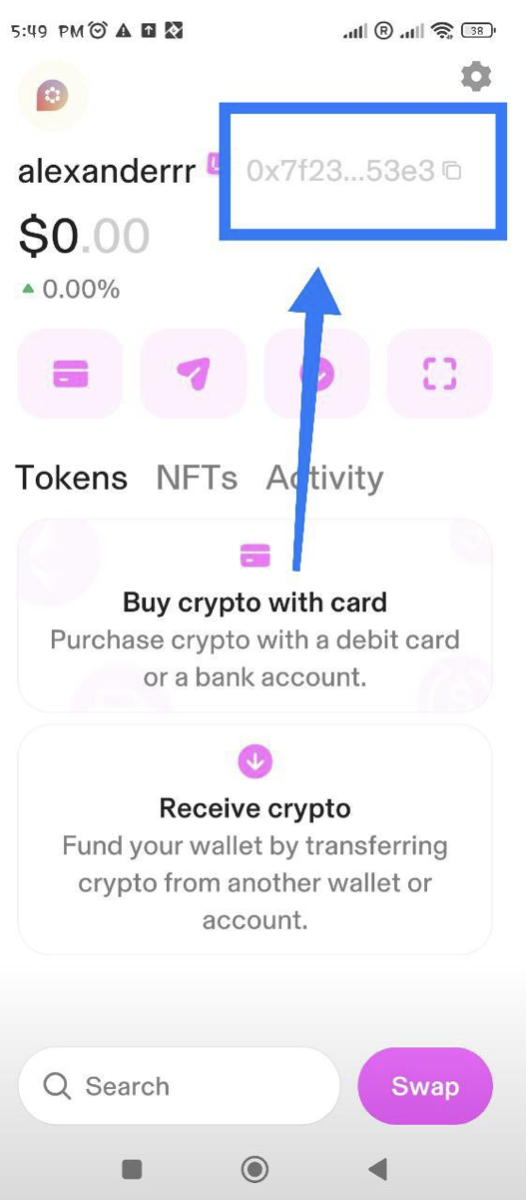
2. Then, log in into your Volet.com account and go to Buy Crypto. In the Digital Asset dropdown menu, choose Ethereum. Uniswap actually supports a few other tokens as well. With them, the steps are the same.
Always double check and make sure the token type and network are the same at both source and destination, to avoid losing your assets.
3. Paste the address and complete the payment.
Done! With funds in your Uniswap account, the thrilling crypto world is at your fingertips.
🔗 Send crypto assets to your Uniswap account now
Funding your KuCoin account with Volet.com
Check if KuCoin has Volet.com among their fiat deposit channels. If they do, you can move money from Volet.com to KuCoin in just a few clicks this way.
If fiat deposits are not available, this is what our workaround is meant for. Just like before, we will be buying digital assets in Volet.com and sending them to the crypto exchange, in this case, KuCoin:
- Go to Deposit from the home page of your KuCoin app.
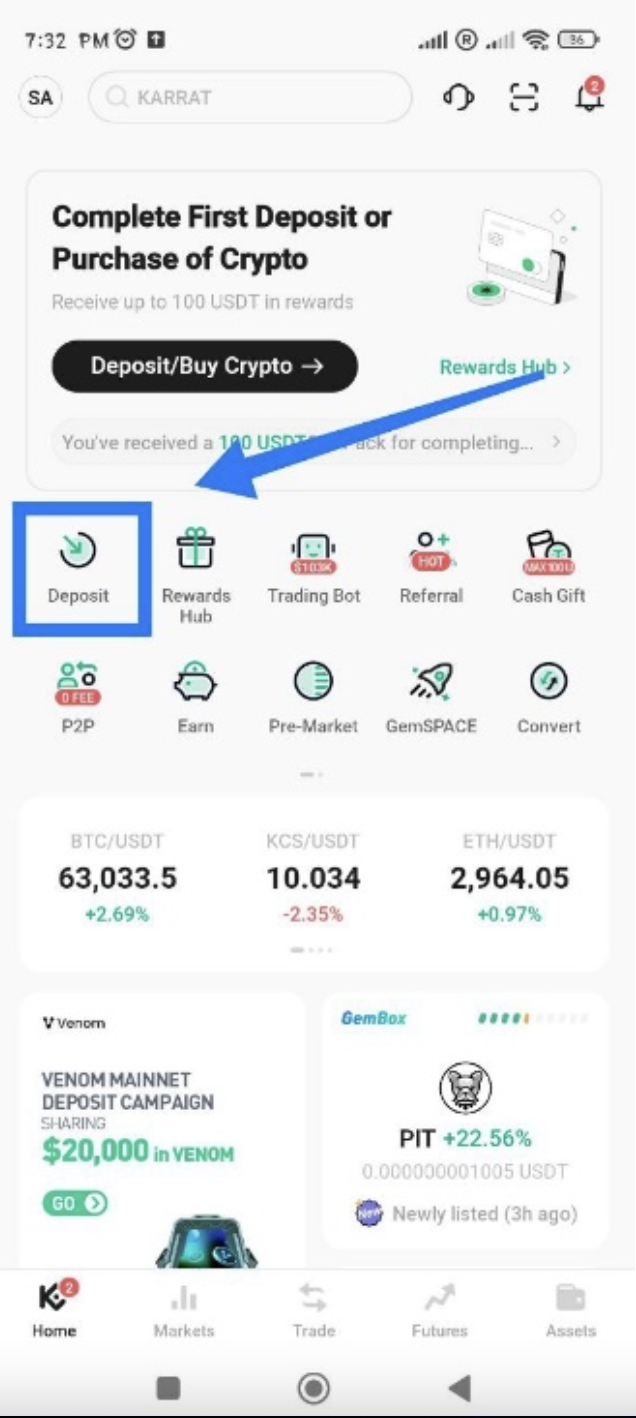
2. Choose the asset you will be using to transfer funds to the exchange, and the network.
Stablecoins like USDT or USDC are the easiest. USDT via the TRC-20 network is popular.
You can also send crypto like Bitcoin, but make sure you do your research first. Some assets may be easier and faster to send than others. Most people use stablecoins.
3. Copy your deposit address.
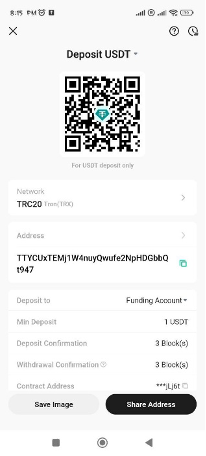
4. In your Volet.com account, go to Buy Crypto. Enter the amount you are sending and choose your asset, making sure it’s the same asset and network that you selected in KuCoin.
5. Paste the deposit address from KuCoin and complete the payment.
Funds sent, very soon you will see them in your KuCoin account. Time to start trading!
🔗 Send crypto assets to your KuCoin account now
Funding your Bybit account with Volet.com
Check if Bybit has Volet.com among their fiat deposit channels. If they do, you can move money from Volet.com to Bybit in just a few clicks this way.
If fiat deposits are not available, this is what our workaround is meant for. Just like before, we will be buying digital assets in Volet.com and sending them to the crypto exchange, in this case, Bybit:
- Go to Assets in the app and choose Deposit
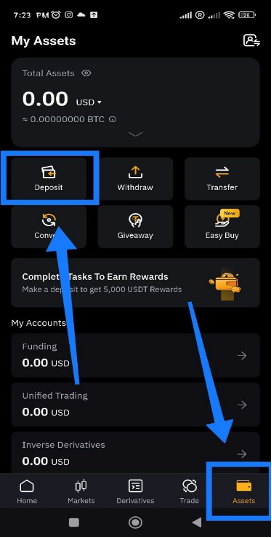
2. Go to Deposit Crypto.
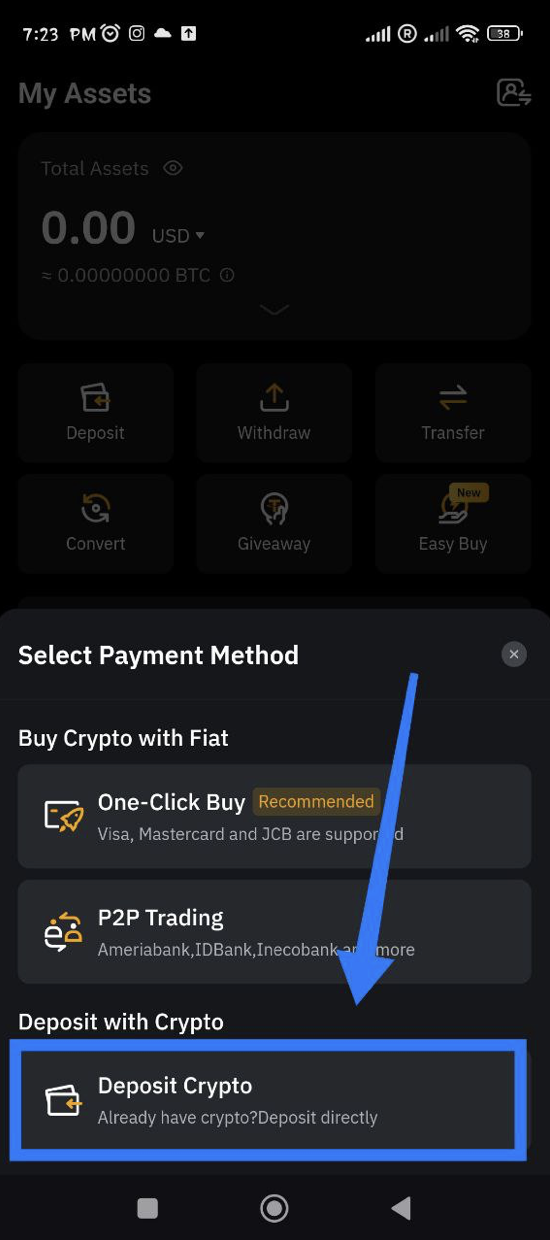
3. Choose the asset you will be using to transfer funds to the exchange, and the network.
Stablecoins like USDT or USDC are the easiest. USDT via the TRC-20 network is popular.
You can also send crypto like Bitcoin, but make sure you do your research first. Some assets may be easier and faster to send than others. Most people use stablecoins.
4. Copy the deposit address.
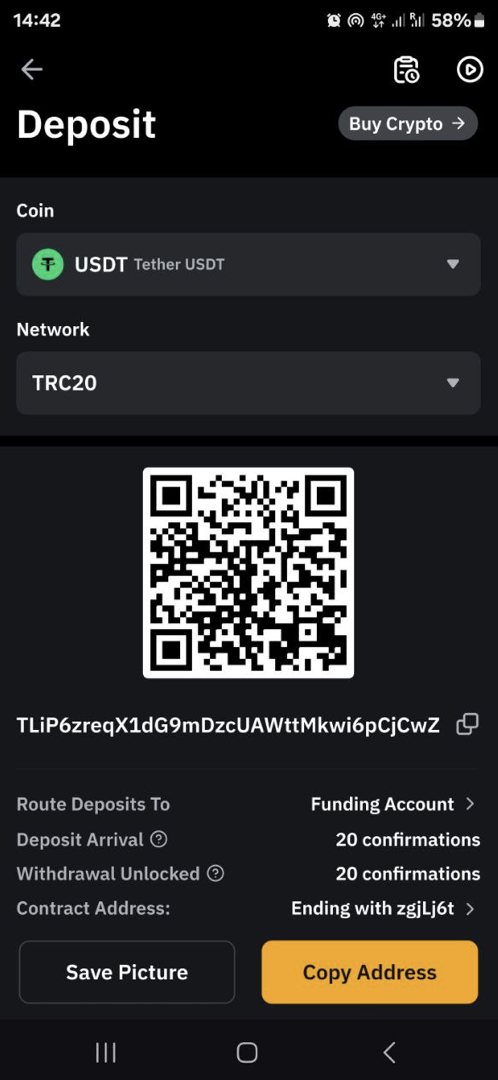
5. In your Volet.com account, go to Buy Crypto. Enter the amount you are sending and choose your asset, making sure it’s the same asset and network that you selected in Bybit.
6. Paste the deposit address from Bybit and complete the payment.
Done! Very soon you will see the funds in your Bybit account. Time to start trading!
🔗 Send crypto assets to your Bybit account now
Funding your OKX account with Volet.com
Check if OKX has Volet.com among their fiat deposit channels. If they do, you can just move money from Volet.com to OKX in just a few clicks.
If fiat deposits are not available, this is what our workaround is meant for. Just like before, we will be buying digital assets in Volet.com and sending them to the crypto exchange, in this case, OKX:
- Choose Deposit on your OKX homepage.
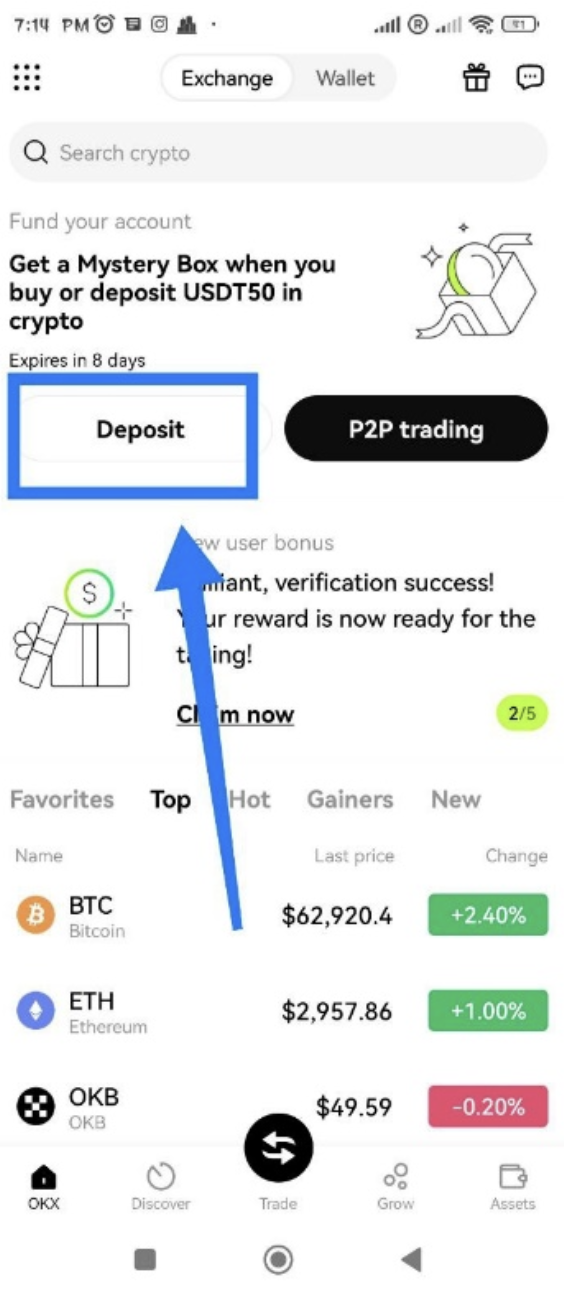
2. Choose the asset you will be using to transfer funds to the exchange, and the network.
Stablecoins like USDT or USDC are the easiest. USDT via the TRC-20 network is popular.
You can also send crypto like Bitcoin, but make sure you do your research first. Some assets may be easier and faster to send than others. Most people use stablecoins.
3. Copy the deposit address.
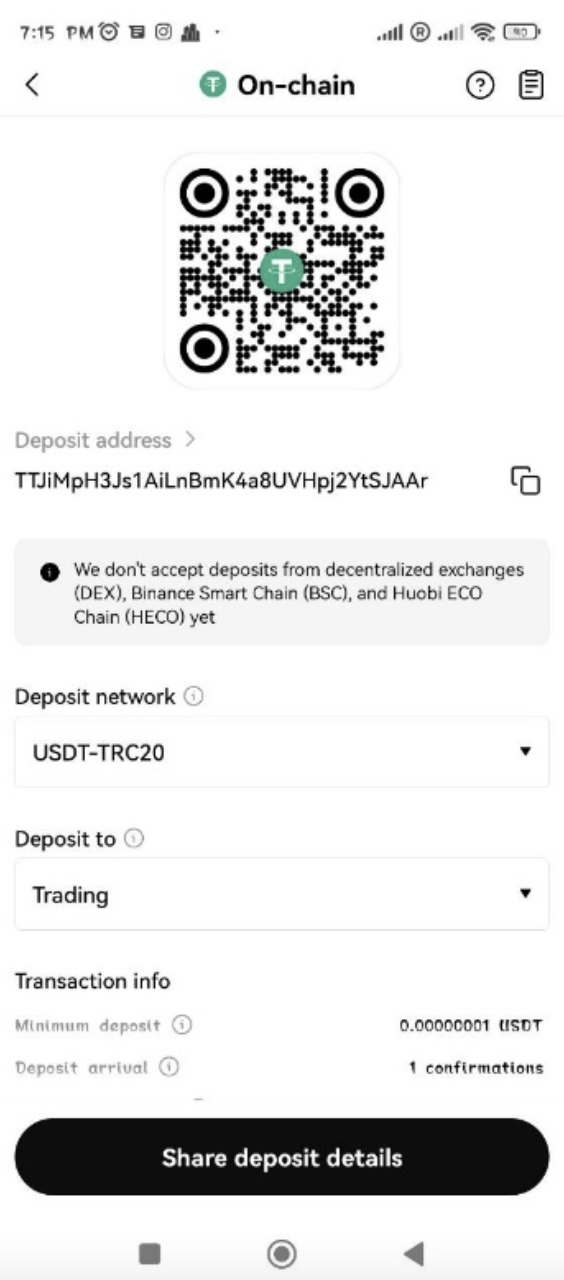
4. In your Volet.com account, go to Buy Crypto. Enter the amount you are sending and choose your asset, making sure it’s the same asset and network that you selected in OKX.
5. Paste the deposit address from OKX and complete the payment.
Done! Very soon you will see the funds in your OKX account. Time to start trading!
🔗 Send crypto assets to your OKX account now
Summary
Volet.com is a great starting point for your crypto journey. To move funds from Volet.com to a crypto exchange, you can use the Volet.com fiat (cash) channel that the exchange has. If the exchange does not have it, you can buy crypto in Volet.com and send it to your deposit address on the exchange. Both are easy ways to load your crypto exchange account fast and start trading!
Stay tuned for more crypto tips and tricks!