AbhiX ROG Gaming Edition RN6P
@sashn9bot
AbhiX ROG Gaming Edition : Android-Q Miui-13
♨️ This is a China Beta Miui13 ROM with GApps,
♨️ Designed on the base of AbhiX ROG Edition,
♨️ For our beloved device Redmi Note 6 Pro,
♨️ With better Gaming Performance.
Changes on 'tulip' (by S A Sohan):-
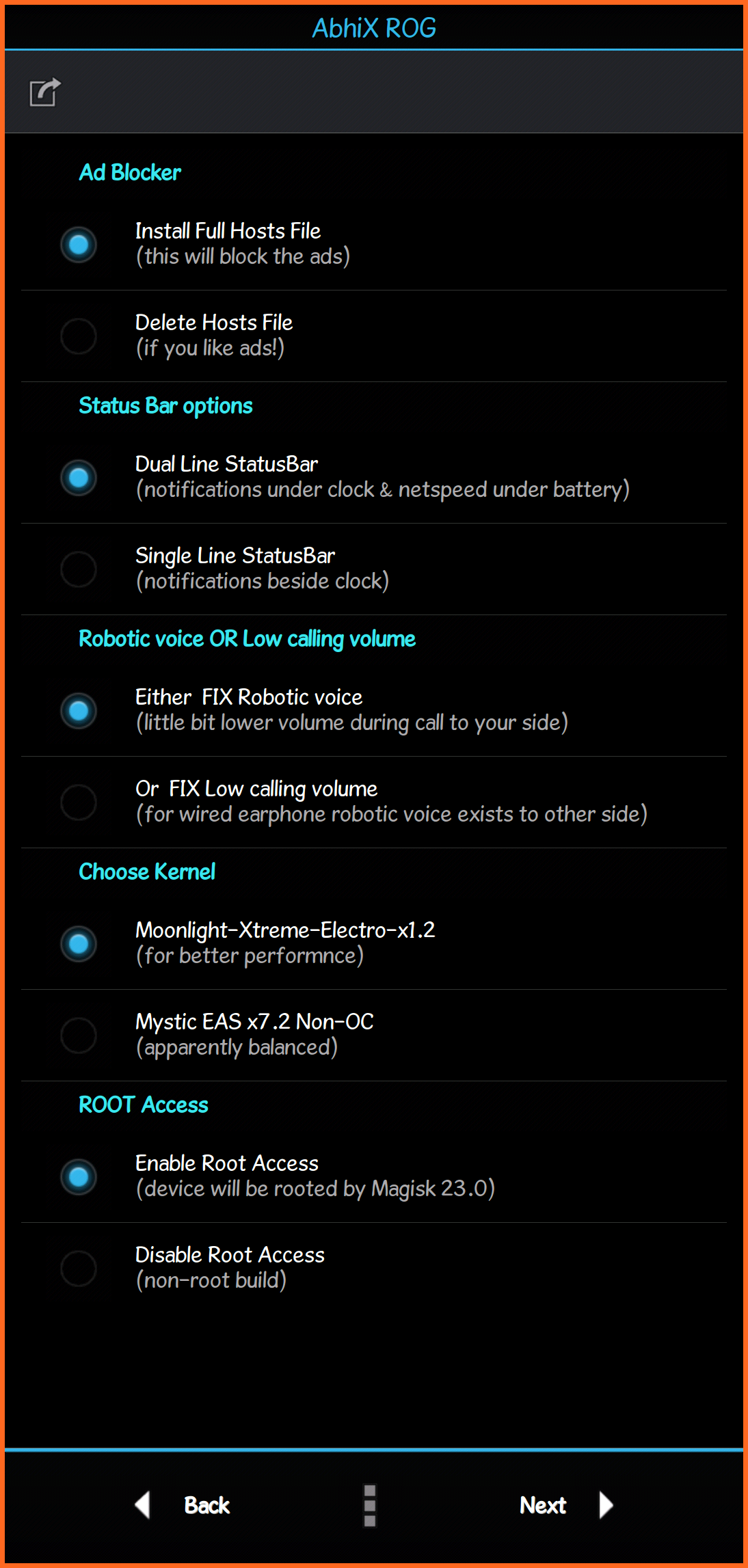
🔥 Added AROMA Installer :
-- Add / Remove Ads Blocker;
-- Single / Dual Line Statusbar;
-- FIX: Robotic Voice / Low Call Vol;
-- Change Kernel- Moonlight / Mystic;
-- Root (by Magisk 23.0) / No-Root.
01🔥 Integrated with MIUI-13.
02🔥 Used Android10 vendor by Sumit.
03🔥 Removed unnecessary apps (debloated).
04🔥 Added New ROG Logo.
05🔥 Added New ROG Wallpapers.
06🔥 Added Miui-13 Wallpapers & Media.
07🔥 Added iOS-15 Emojis.
08🔥 Added Latest Game Turbo.
09🔥 Added Voice Changer (it's working).
10🔥 Added MiSans (miui-13) Fonts.
11🔥 Added Battery Performance Toggle.
12🔥 Added Speaker Cleaner.
13🔥 Added GBoard Theme.
14🔥 Added Latest Security App.
15🔥 Added New Charging Animations.
16🔥 Added Some Useful Tweaks.
17🔥 Added Blur Notification Panel [android 11 feature].
18🔥 Changed media vol steps to 30 & calling vol steps to 15.
19🔥 Changed default home and lock screen wallpapers.
20🔥 Used MIUI11 Camera (portrait & panorama are working).
21🔥 Fixed AI mode on Miui11 Camera (thanks- North21).
22🔥 'Ok Google' / 'Hey Google' works (allow Permissions).
23🔥 SafetyNet passed with (turn on Magisk Hide) or without Magisk.
24🔥 All banking apps work properly (allow 'Get device info' Permission).
25🔥 Play Store is certified.
26🔥 Improved Performance.
27🔥 Improved Smoothness.
28🔥 Improved Animations.
29🔥 Improved Booting Time.
🔸 ...umm maybe more, I've forgotten 🙃
💕 Special Thanks to-
Lolo666, Sonyw, SidYuri, Ashit, Jai, Sumit, Hasib, Avinash, FenFren, PinMonyvichea, Faizan, Izhar Chaudhary, BlassGO, all the Tulip devs & users community, also some unknown helpers & devs.
⚠️ NB:
➤ Recommended to use the latest OrangeFox Recovery.
➤ Clean flash (wipe: dalvik, cache, data, system, vendor, cust) is required.
➤ To enable 'Ok Google', download Google app from PlayStore. Turn on Autostart and allow all Permissions of Google app. Now go to: Settings > Apps > Manage Apps > Default apps (from 3dots) > Assist & voice input > Assist app > set Google.
➤ To increase the Reading Mode warm effect, slide the bar to the left.
➤ If you wanna use any xiaomi apps which are removed from rom, download them from ApkMirror.
➤ Try Himanjjp's trick "Connect any wire/wireless earphone and call any number then turn on Loudspeaker Mode". Thus, (low) calling volume may increase..!
➤ To use Banking apps with Magisk, change app name to any (from 'Hide the Magisk app') and turn on 'MagiskHide' from magisk Settings. Also turn on Magisk Hide of that banking app (from 'Superuser' tab).
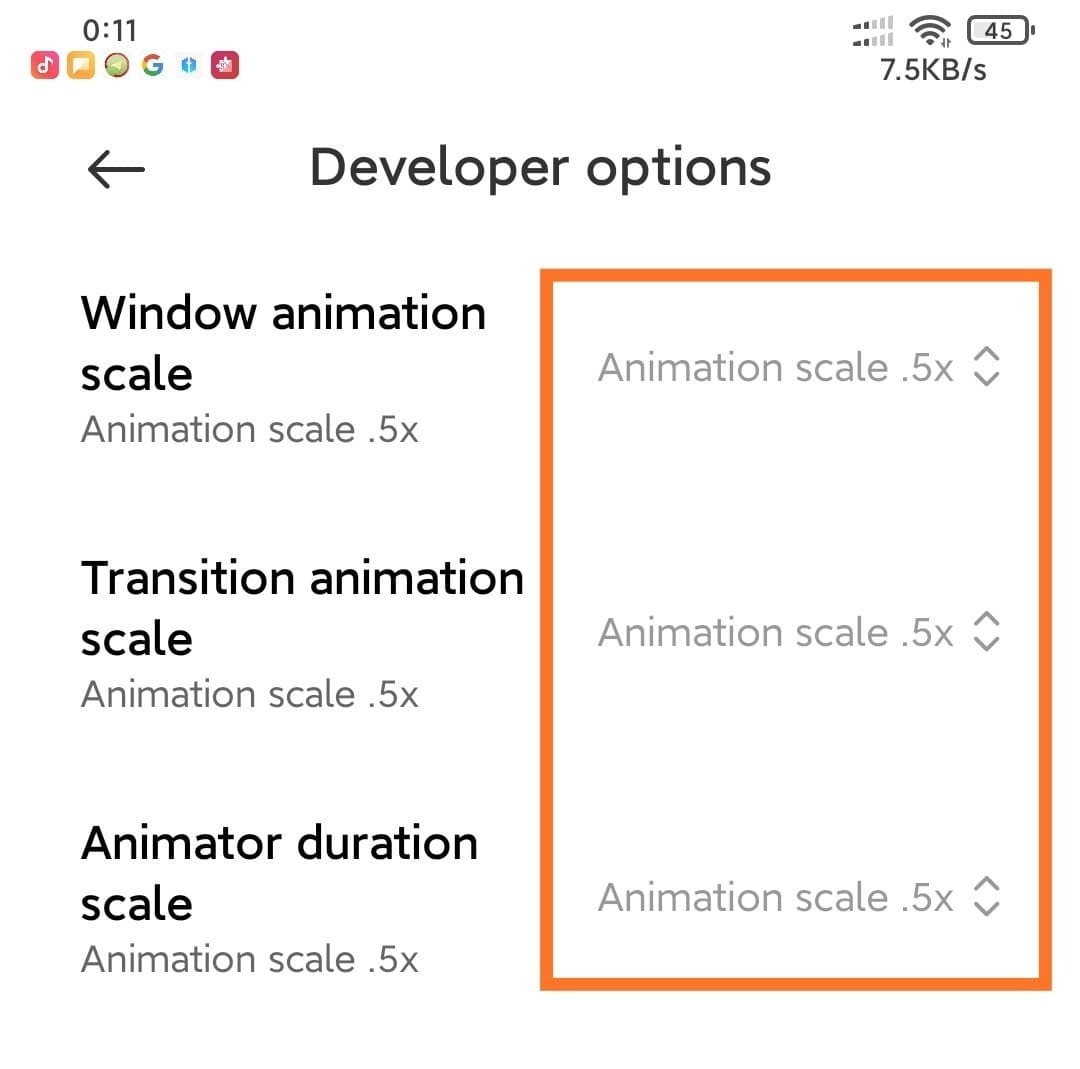
➤ To speed-up miui animations, from Developer options, set the Windows animation, Transition animation & Animation duration scale to 0.5x
📱 Screenshots:- See Here.
📥 DOWNLOAD Link:- Click Here.
How to get download link? - Watch there.
[ Please DO NOT Mirror to Support ]
📂 File Size: 1.82 GB
Why the file size is big? - Because of Aroma installer, it contains all other files like DSB, Kernel, Magisk, aroma config files, etc...
〽️ MD5: 2d0f7d3792c9a083afbf5d4ab257631c.
⏰ Released on: 23-May-2022
🛠 FIX: To disable the pop-up "There's an internal problem with your device...." in every reboot, please flash the fix file via Recovery. File link is Here.
Yes! It is high time to Unlock the Beast!
Follow 👉 XCRUOBD.