APatch Telegram Group Frequently Asked Questions (FAQ)
Captain_ThrowbackThis FAQ will NOT cover anything that is discussed in the official APatch documentation, which can be found at apatch.dev. Please read that information in its entirety before reviewing this page.
Q1: Can APatch use Magisk modules?
A: See here.
Q2: What is the difference between APatch and KernelSU?
A: See here.
Q3: What is a KPModule?
A: See here.
Q4: How to install kpm?
A: See here. NOTE: You should always first Load a kpm to ensure it won't cause issues on your device. Once confirmed, then you can Embed it so it persists across reboots.
Q5: Where do I find the SuperKey?
A: You don't find the SuperKey; you create it. If it's the first time you're opening the APatch app, and you see the below screen:
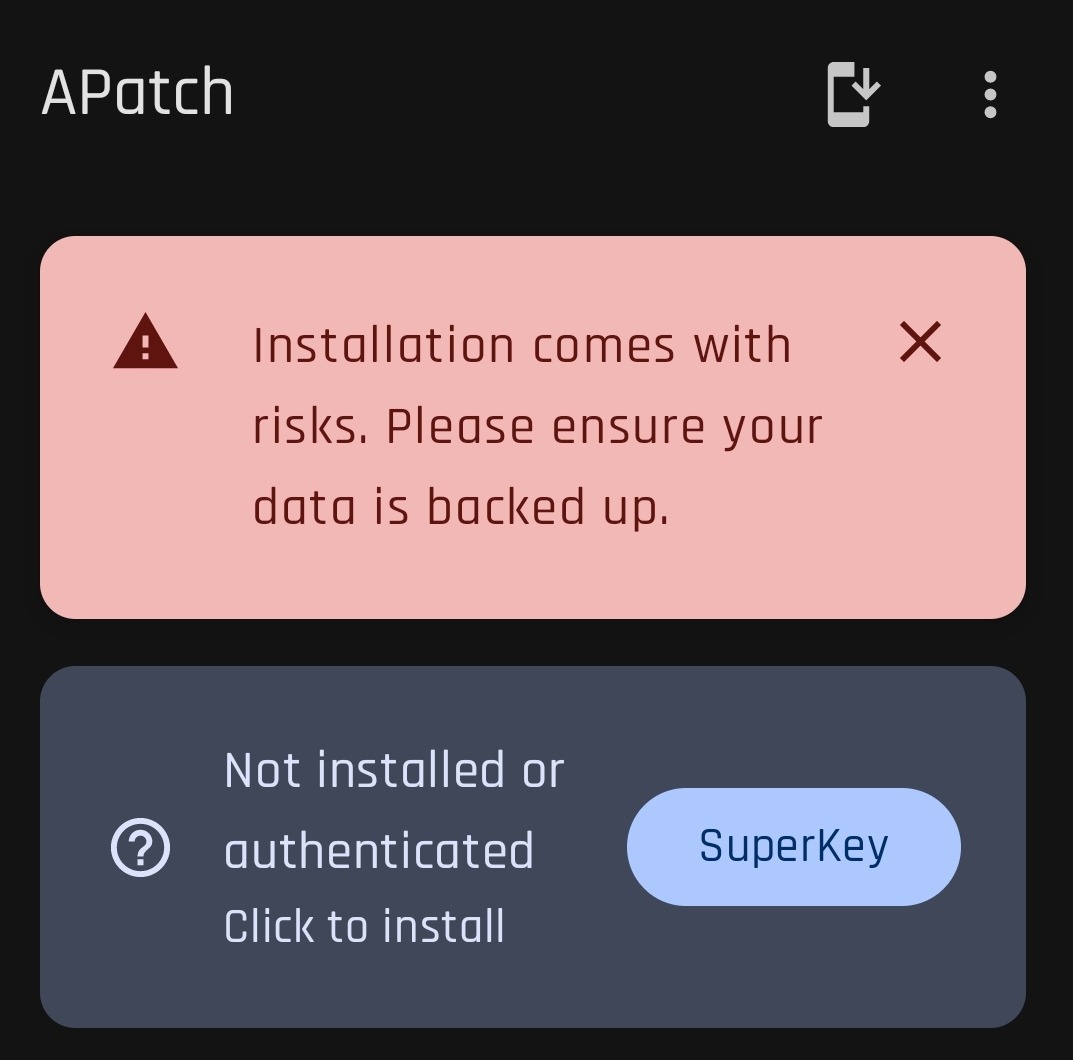
Then that means that you need to follow the instructions here to patch your boot.img.
Q6: Do I patch boot or init_boot?
A: See here.
Q7: How do I install Shamiko/What version of Shamiko is supported?
A: First, see here. That being said, an older version of Shamiko can be used with APatch (the newest is 0.7.4), and if using the shamiko_helper kpm (which can be found in the APatch TG Group files), along with a specific version of Zygisk Next (1.0.2 ONLY), then it is possible to "trick" Shamiko into detecting APatch as KernelSU, and 1.0.x versions of Shamiko can be used (versions 1.1+ have a different compression method and will not install in APatch).
The bottom line is that Shamiko would either need to directly add support for APatch, or communicate with the APatch devs what is needed for APatch to support it. Neither of those scenarios is likely, so it's better to just not use Shamiko.
Q8: If I can't use Shamiko, then how can I hide root?
A: Using Zygisk Assistant or Cherish Peekaboo (see below).
Q9: What is Cherish Peekaboo?
A: Cherish Peekaboo is a closed-source kpm (originally developed by GarfieldHan, part of the APatch dev team) that was designed to automatically hide APatch and LSPosed mounts. Version 1.3.1_test also solves the "Abnormal Environment" detection in Native Test v25 (Minotaur). Version 1.4.2 solves "Abnormal Environment" in Holmes 1.0 (but brings back the detection in Minotaur). These releases can be downloaded in the APatch Telegram group (filenames: cherish_peekaboo_1.3.1_test.kpm, cherish_peekaboo_1.4.2.kpm)
Q10: What is a CI build, and how do I access it?
A: Continuous Integration (CI) builds refer to the automatic builds run in the official APatch Github repo. Every commit that is merged to the repo will trigger a new build. These builds should be considered Beta releases, and as such, may have issues or bugs that need to be fixed. Each new build is posted to the Telegram channel by Apatch_bot. If you would like to download the builds directly from Github, first make sure that you are logged in to Github (otherwise the build artifacts will not be displayed for download). Then open the APatch repo, and go to the "Actions" tab. Click on the name of the job in the list to see the artifacts (in this case, zips) that are associated with each CI run. There will be a "debug" zip and a "release" zip. If you would like to help test, and provide logs if issues are found, then install the "debug" version. If you just want to try out the latest bleeding edge build for yourself, then the "release" version is fine.
NOTE: If you already have a Github Actions link for the artifact that you want to download, but don't want to login to Github, you can alternatively use nightly.link.
Q11: How do I know what version the CI builds are? They all seem to start with the same number?
A: The numbering convention for CI builds is based on the most recent stable release. For example, if the last stable release is build 10763, then all CI builds after it will start with that build number, and increment it in the latter part of the filename for each merged commit afterwards.
Stable release filename: APatch_10763_10763-release-signed.apk
First CI build after release filename: APatch_10763-3-gc309991_10766-release.apk
In the above filename, "10763" is the last stable release, "3" is the number of commits merged since that release, and "10766" is the current build version (10763+3=10766).
This is the naming convention for all CI builds.
Q12: Can I use both KernelSU and APatch together? If so, how?
A: It is technically possible, but not advisable. Both root solutions are complete, so there is no need to use them together.
Q13: How do I solve the root detection in Native Test/Native Detector/Hunter/Securify/Memory Detector/Holmes or whatever new detection app comes out?
A: See here.
Q14: How do I get out of a bootloop after installing an APModule?
A: See here.