ALL ABOUT ICAAN
⭕🔱🇰🇦🇱🇮™🔱⭕The Internet Corporation for Assigned Names and Numbers is an American multistakeholder group and nonprofit organization responsible for coordinating the maintenance and procedures of several databases related to the namespaces and numerical spaces of the Internet, ensuring the network's stable and secure operation.
Who controls ICANN?
ICANN is governed by a board of Directors made up of 16 voting members (including ICANN's CEO) and four non-voting liaisons.
#its_me_kali
While ICANN began in the U.S. government, it is now and continues to be, an international, community-driven organization independent of any one government.
Role of ICANN
ICANN helps coordinate the Domain Name System (DNS), often referred to as “the phone book of the Internet” because it matches domain names with appropriate IP address numbers. ICANN also operates part of the DNS, and manages IP addresses and other protocol numbers.
What ICANN can do?
There is a group of nerds called ICANN- The Internet Corporation for Assigned Names and Numbers. So, ICANN can easily say, ... With those special keys, you can shut down and reboot the whole internet system.
WHO OWNS THAT KEYS?
The Guardian reports the key holders, part of an organization called the Internet Corporation for Assigned Names and Numbers (ICANN), meet four times a year in the U.S over pepperoni pizza and beer for an official key ceremony.

Key Signing Ceremonies
Ceremonies are usually conducted four times a year to perform operations using the Root Key Signing Key, and involving Trusted Community Representatives. In a typical ceremony, the KSK is used to sign a set of operational ZSKs that will be used for a three month period to sign the DNS root zone.
There are seven physical keys, held by individuals across the world, that keep the internet glued together. They look after the system at the heart of the web: the domain name system, or DNS. It is run by US-based non-profit organisation Internet Corporation for Assigned Names and Numbers, or Icann.
Now let's learn how internet shutdown works!!
An internet shutdown happens when someone — usually a government — intentionally disrupts the internet or mobile apps to control what people say or do. ... An internet shutdown may be limited to mobile internet that you use on smartphones, or the wired broadband that usually connects a desktop - or both at the same time.
In order to shutdown internet government order to ISPs provider to shutdown internet of that specific region.
Now let's learn what are ISP and how it works ?
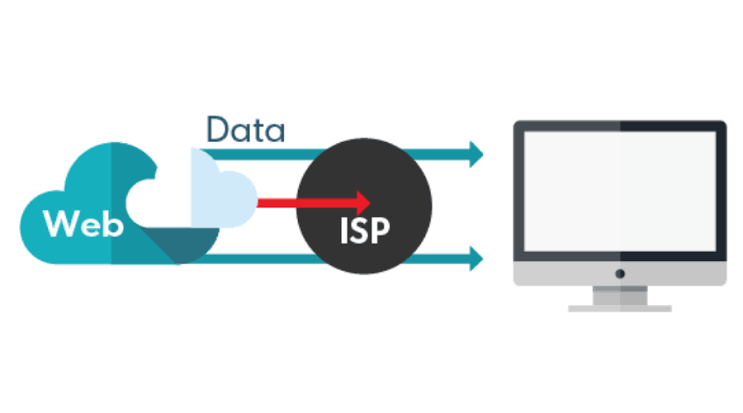
Internet Service Providers (ISPs) can see everything you do online. They can track things like which websites you visit, how long you spend on them, the content you watch, the device you’re using, and your geographic location. Depending on where you are in the world, this information is used for a variety of purposes, including to build a consumer profile for sale to third-party advertisers or impose online censorship on behalf of governments.
You can use VPNs Virtual Private Network to get rid of ISP tracking .
NOW LET'S CHECK HOW DOES INTERNET WORKS:

How does the Internet work?
There are two main concepts that are fundamental to the way the Internet functions: packets and protocols.
Packets
In networking, a packet is a small segment of a larger message. Each packet contains both data and information about that data. The information about the packet's contents is known as the "header," and it goes at the front of the packet so that the receiving machine knows what to do with the packet. To understand the purpose of a packet header, think of how some consumer products come with assembly instructions.
When data gets sent over the Internet, it is first broken up into smaller packets, which are then translated into bits. The packets get routed to their destination by various networking devices such as routers and switches. When the packets arrive at their destination, the receiving device reassembles the packets in order and can then use or display the data.
Compare this process to the way the United States' Statue of Liberty was constructed. The Statue of Liberty was first designed and built in France. However, it was too large to fit onto a ship, so it was shipped to the United States in pieces, along with instructions about where each piece belonged. Workers who received the pieces reassembled them into the statue that stands today in New York.
While this took a long time for the Statue of Liberty, sending digital information in smaller pieces is extremely fast over the Internet. For instance, a photo of the Statue of Liberty stored on a web server can travel across the world one packet at a time and load on someone's computer within milliseconds.
Packets are sent across the Internet using a technique called packet switching. Intermediary routers and switches are able to process packets independently from each other, without accounting for their source or destination. This is by design so that no single connection dominates the network. If data was sent between computers all at once with no packet switching, a connection between two computers could occupy multiple cables, routers, and switches for minutes at a time. Essentially, only two people would be able to use the Internet at a time — instead of an almost unlimited number of people, as is the case in reality.
Protocols
Connecting two computers, both of which may use different hardware and run different software, is one of the main challenges that the creators of the Internet had to solve. It requires the use of communications techniques that are understandable by all connected computers, just as two people who grew up in different parts of the world may need to speak a common language to understand each other.
This problem is solved with standardized protocols. In networking, a protocol is a standardized way of doing certain actions and formatting data so that two or more devices are able to communicate with and understand each other.
There are protocols for sending packets between devices on the same network (Ethernet), for sending packets from network to network (IP), for ensuring those packets successfully arrive in order (TCP), and for formatting data for websites and applications (HTTP). In addition to these foundational protocols, there are also protocols for routing, testing, and encryption. And there are alternatives to the protocols listed above for different types of content — for instance, streaming video often uses UDP instead of TCP.
Because all Internet-connected computers and other devices can interpret and understand these protocols, the Internet works no matter who or what connects to it.
#source=L⭕⭕⭕WIKI
Thankyou !!