AIRDROP INSTRUCTION
Ammy Heart ❤
How to get EXL airdrop
On December 17, a withdraw airdrop button will appear in @Exiloninfobot. There will be NO Automatic accrual of token on a wallet!
You need to click the button to get tokens to your wallet.
❗❗❗ The minimum withdrawal amount of an airdrop to your wallet is $1 (right now it is ~ 10 000 000 EXL).
What to do if the amount of your airdrop is less:
- Be active in the project, participate in competitions, invite more friends to register (Now there is a chance to participate in the competition Exilon Ambassador and get 55 million EXL)
- Wait when EXL rate goes up, your accruals will be more than 1$ and withdraw them to your wallet.
❗ Accrued in a bot airdrop does not disappear and is not zeroed, you can accumulate it permanently.
EXL token Withdrawal
1. How will it work: at 7:00 GMT you click on withdraw airdrop button, your request goes into processing. We understand that on this day there will be a lot of you and we will try to process requests every 4 hours. Give us 24 hours to do this. And give some time for the transaction to pass. It also happens that the transaction went through, but it shows up late on the wallet. Let's agree to wait 24 hours and then write that something is wrong.
Do not panic and do not flood the chat with questions: I clicked on the withdrawal, but the tokens did not come, where is my airdrop. Such messages will only distract us from our work and create panic.
2. Airdrop will be commission-free, will come to your wallet exactly as much as you withdraw. (This does not apply to referral program with 2% per turnover, output referral bonuses for turnover is fully described here).
3. Before you write to the chat that you have not received EXL tokens, check this in two ways:
- Make sure EXL token is added to your wallet. Add the EXL token to your list of tokens, otherwise even though the EXL tokens have been sent and arrived, they will not appear in your balance. This is important, because very often people have written that they did not receive anything, when in fact the token was simply not listed in the wallet. How to add a token to the wallet is described in detail here, for those who know here is the contract address 0x5648d13ad81c569fe36d2a4a73996bcb34f661dd.
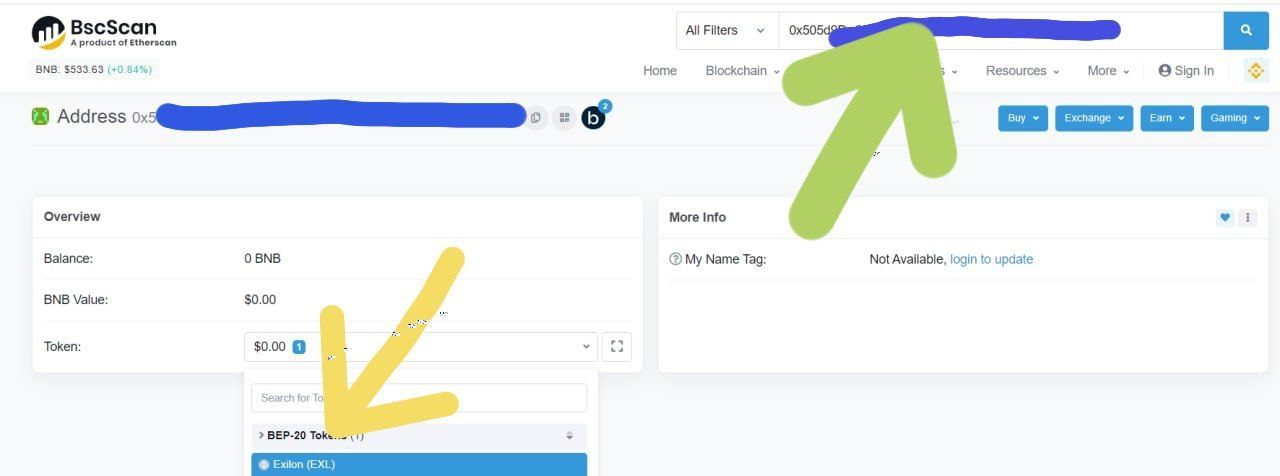
- Check out the transaction at https://bscscan.com/. How to check if you got airodrop through this site. Go to the site enter into the search box wallet, which specified in the bot. You will be shown all the transactions of this wallet. See Token, choose EXL:
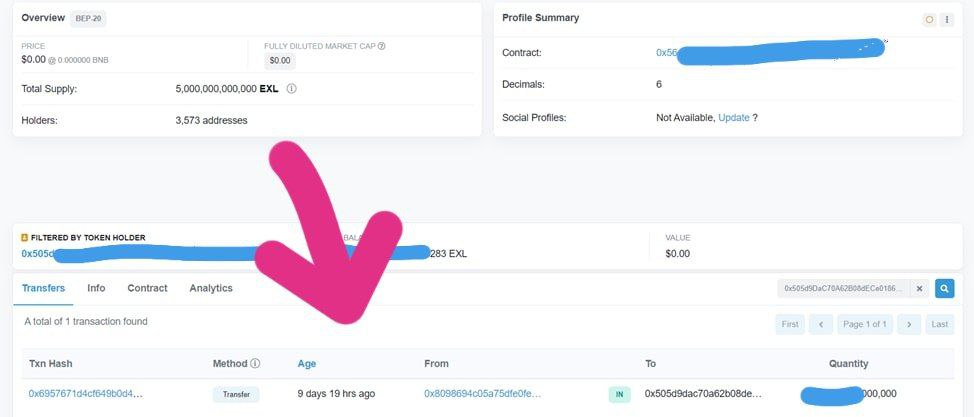
Next tab Transfers. If there is a transfer, it means the token on the wallet, put it in the list as indicated in the previous paragraph:
If you think that it is better to ask in a chat let me explain everything separately, I assure you, you will still be asked to go through all of the above steps first.
4. Make sure you give the bot a hot wallet metamask or trustwallet in bsc network. Exchange wallets will not be able to accept our EXL tokens. Do not worry if you gave the wrong wallet, it can be changed by contacting support service bot menu-> support. But take into account the load on the support team these days. Your airdrop will not disappear.
5. After receiving tokens we advise you not to rush to part with them, because the interest is accrued on tokens (1% of all transactions is distributed between the tokens), and you will see how your balance increases when you hold. Plus with the release of the project's products, its value will increase significantly.
6. Do not devalue received for free, any amount greater than "0" is the sum and who knows what it will be in a couple of months. Do not devalue and be thankful for what you have is generally good advice.
Regards, Exilon team