A guide to using the Crypto Alert bot
@osp_CryptoAlert_botFirst, let's look at the cases when a bot can be useful.
- You bought any cryptocurrency and are afraid of a sharp dump.
- You bought a cryptocurrency and don't want to miss the pump.
- You participate in IEO and do not want to wake up in the morning and see that the value of the token has dropped 10 times while you were sleeping.
- You need to keep track of a lot of trading pairs and you don't want to waste a lot of time.
In all these cases, @osp_CryptoAlert_bot will be an indispensable assistant.
How does the bot work?
For example, on the Binance exchange, you bought 1000 EXAMPLE coins at a price of 0.001 BTC and do not want to miss the moment when the EXAMPLE coin price rises above 0.0015 BTC. What to do?
- Send the bot the command add, Binance, EXAMPLE/BTC, H, 0.0015
Yes, just send 1 command to the bot. When the price in the EXAMPLE / BTC trading pair rises above 0.0015, the bot will immediately send you a notification.
How to use?
- Launch the bot using the link https://t.me/osp_CryptoAlert_bot, select the language.
- Go to the Notifications -> Create notification
- Send a command to create a notification
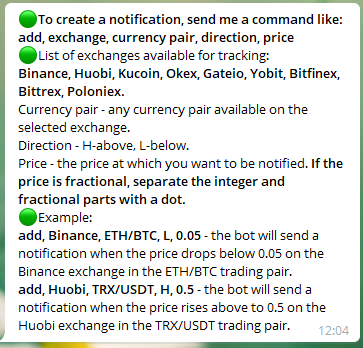
You can view the created notifications and, if desired, delete them in the My notifications
Testing
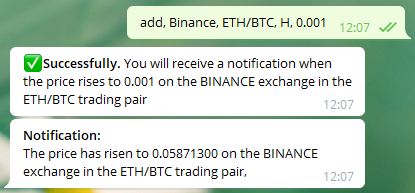
To see how the bot works, send it, for example, the following command: add, Binance, ETH/BTC, H, 0.001 Which means that the bot will send a notification when the price in the ETH/BTC pair rises above 0.001 on the Binance exchange. Since the price in the ETH/BTC pair is now higher than this value, you will receive a notification instantly
The bot is completely free and does not collect any data.
Developer: https://t.me/osp_dev