A Guide to Group Restrictions
Calsi
A simple guide to the new restrictions and what exactly they do.
Telegram recently released an update to the Group Moderation system. Now that CalsiBot has a /restict command which helps admins to manage these restrictions, I thought that it'd be nice to create a short guide.
There are now five possible restrictions that Admins can enable:
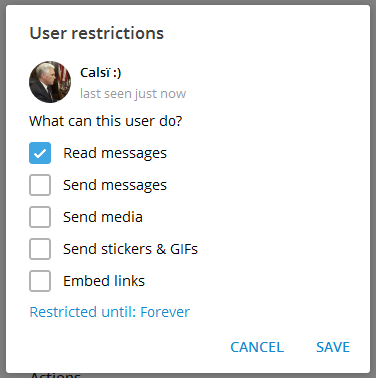
Read messages
This controls whether or not the member can view any group messages at all. If this option is unchecked, the user is considered to be banned, and will not be able to join the group until the restriction is removed.
Send messages
This controls whether or not a member can send messages into your chat.

Send media
If this is unchecked, the member will not be able to send any of the following: audio files, documents, photos, videos, video notes and voice notes.
Send stickers & GIFs
If this is unchecked, the member will be unable to send any of the following: animations, games and stickers. They will also be unable to use inline bots in general.
Embed links
I've renamed this option to "Link Previews" in CalsiBot, because what this actually prevents is the generation of the "Link Preview" - show in the photo below:

With CalsiBot, you can change these settings without having to open annoying menus.
The Read Messages restriction can be managed by using the /deport and /realdeport commands. For the rest, you can send /restrict to quickly adjust them:
That's all for now! Thank you for reading. If you'd like, you can join CalsiBot's channel to keep up with updates here: