A Business Card App Workflow for Cleaner Conference Follow-Ups
BizConnectAfter a busy conference, the useful part of a business card is the conversation it helps you remember. A pile of cards becomes less useful when nobody knows which contact needs a reply or what was discussed. A business card app such as BizConnect can support a clearer routine: capture the details, check them, add context, and decide the next action while the meeting is still fresh.
This guide explains how to build that routine without treating every scanned card as a qualified lead. It focuses on practical choices for individuals and small teams, from preparing an event folder to reviewing an exported contact list. The objective is an accurate, usable record that supports a relevant response, with enough context to avoid sending the same generic message to everyone you met.
Set up the business card app before the event
Start by deciding how you will identify the event in your contact records. A simple label that includes the event name and month is usually easier to interpret than an abbreviation nobody else understands. Use a consistent naming pattern across the team. If colleagues use different labels for the same exhibition, later searches and exports may produce incomplete groups even when the individual contact details are correct.
Define the minimum information you need alongside the printed details. That might include the topic discussed, the person responsible for replying, and a realistic follow-up date. Avoid collecting extra personal information simply because there is space for it. A useful note describes the professional context, such as a requested demonstration or a question about a product category, rather than making assumptions about the person's budget or authority.
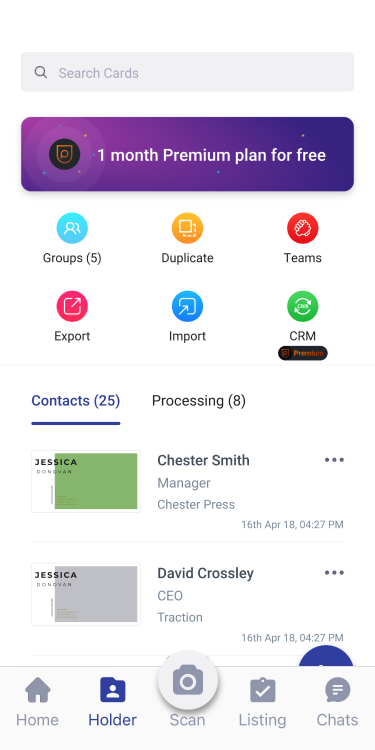
Check that the app is working on the device you will use and that you understand its current export options. BizConnect's official website describes contact grouping, tasks, and exports to tools including Excel, Google Contacts, and Outlook. Availability can depend on your account and plan, so inspect the features in your own workspace before relying on them for an event. A short practice run can reveal problems before a busy day begins. BizConnect's earlier guide to evaluating a business card reader app offers related considerations for judging whether a contact tool supports work after the initial scan.
Capture carefully and check the important fields
When you receive a card, take a clear image under even lighting. Keep the edges visible and avoid glare on glossy printing. If the reverse side contains relevant information, capture that too. Optical character recognition can reduce typing, but it should be treated as a starting point. Unusual fonts, closely spaced characters, decorative backgrounds, and international telephone formats can all make extracted details harder to interpret.
Review the name, company, email address, and telephone number against the original card before saving. A single incorrect character in an email address can make the record unusable. Confirm that a mobile number has not been placed in the company switchboard field, and preserve the relevant country code. If the card contains more than one office, make sure the location you record matches the conversation rather than whichever address appears first.
For names with accents or unfamiliar ordering, retain the original spelling instead of guessing a simplified form. When a printed job title is ambiguous, record it as printed and clarify later if needed. You do not need to resolve every detail during the meeting. You do need to distinguish confirmed information from a note that still requires checking, so another colleague does not mistake an assumption for a fact.
Add context and assign a realistic next action
A contact record should explain why a future conversation would be useful. Immediately after the meeting, add a short note about the issue discussed and any next step the person requested. Keep that note factual. For example, a request for a product overview is different from an agreement to buy, and a friendly introduction does not establish permission for an ongoing promotional campaign.
If several colleagues attend the same event, agree who owns the next response before handing the contact over. Two representatives sending separate introductions can make the team appear disconnected. A named owner and a short next-action note give everyone a shared starting point. Use task reminders where available, while checking that the timing reflects the actual request and your team's capacity to respond usefully.
Prioritize by the substance of the conversation rather than the number of cards collected. Someone who asked a precise question may need a faster reply than someone who exchanged details during a broad networking session. Review the event group at the end of each day, identify missing information, and separate contacts that need a specific response from those that only need to remain searchable for a later professional conversation.
Review exports and measure useful outcomes
Before moving contacts into a spreadsheet or another system, export a small sample and inspect the result. Check column names, telephone formats, and whether notes or group labels transfer in the way you expected. Open the file in the tool your team actually uses. Long telephone numbers and leading zeros can change when spreadsheet software interprets values automatically, so inspect those fields before importing a larger list.
Deduplicate carefully. Matching company names alone is not enough because several people may work at the same business, while one person may use more than one email address. Compare the relevant fields and keep the useful context from both records. Establish which system holds the working version of the contact, and document the direction of any transfers so later edits are not overwritten by an older export.
When evaluating the workflow, look beyond scans per day. More useful measures include how many records required correction, whether promised replies were sent, and how easily colleagues could understand the meeting notes.
Build a short review into the week after the event. Remove redundant copies where your retention rules allow, correct details confirmed during follow-up, and close tasks that no longer have a relevant next action. Keep access appropriate to the people doing the work. Contact information should stay in the approved business workflow rather than being copied into unrelated personal lists or distributed without a clear purpose.
A reliable process is deliberately simple: capture a clear card, verify the fields, preserve the conversation, assign one owner, and check the destination before exporting. Repeat that process consistently and the contact list becomes easier to use. For questions about the app's current features or a team workflow, use the official Contact Us page to reach BizConnect.