8-Minute Crash Course on Kotlin Programming Language.
pavanLet us understand the basics of Kotlin programming language.
What is Kotlin and where is it used?
Kotlin is a cross-platform, statically typed and general-purpose programming language. I know that I have used some vague terms let me clarify it.
Cross-platform: It means that the system or the product can work across multiple platforms or operating system environments. For example Microsoft Excel, Word, Powerpoint works on both Windows and Macintosh Operating systems.
Statically typed: Statically typed means that the variables used in the program must explicitly be declared along with their types (data type). For example, C, Java, Kotlin and many more are statically typed. Consider the below C programming code for statically typed programming.
// C programming code

# include <stdio.h>
void main()
{
  int num;    // Explicitly declaring the type of the variable
  num = 10;
  print(num);
}
The inverse of the statically typed is dynamic typing, here you don’t have to explicitly specify the type of the data. One of the best dynamically typed programming language is python. Consider the following python code below:
# Python Code

num = 10   # No explicit declaration
print(num)
General Purpose programming: As the name suggests it is broadly applicable across all the domains. For example, Java, Python, C, C++ and many more are all general-purpose programming languages.
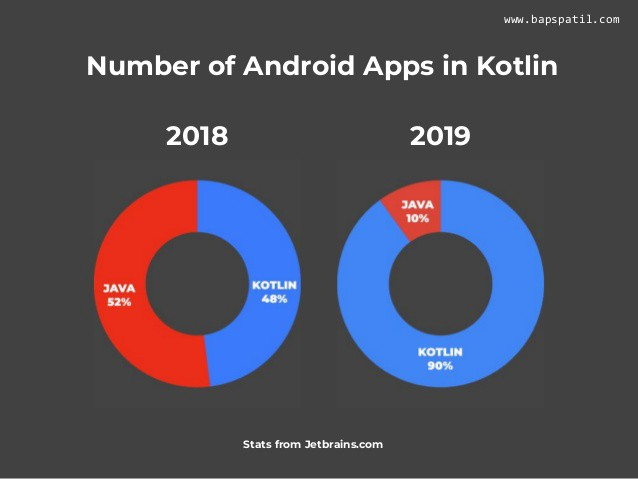
Getting back to the definition I think by now you have understood the definition of Kotlin and the next step is where is it used? Kotlin is used for Android development, in order to create android applications. Previously Java was used to create android apps but a few years back Kotlin just took over Java’s place and is currently dominating the programming world.
Let us begin to code.
Firstly I have used IntelliJ IDEA to write my code. IntelliJ IDEA is a Java integrated development environment for developing computer software. It is developed by JetBrains.

In order to download IntelliJ click here. Download whichever version compatible with your laptop and get started.
Below listed are some of the main concepts that are required for you to understand to get you started.
1) Main function
In Kotlin just as other programming languages, main function is a must. That is where the compiler starts to compile the program. In Kotlin the main function can be written as follows:
fun main() {
    println("Hello Kotlin")   //Printing "Hello Kotlin"
}

I included a print statement inside the main function to make it more understandable. On executing the main function I got “Hello Kotlin” as the output.
2) Variable declaration
In Kotlin variables can be declared using two keywords namely val and var.
val: It is used for variables whose value never changes.
var: It is used for variable whose value can change.
In val you cannot reassign the value whereas in var you can reassign the value.
The syntax for declaring the variables in Kotlin are:
keyword variable_name: data_type = value
a) Below is the code snipped for keyword val declaration:
val number: Int = 10

fun main() {
    println(number)    // 10
}

Also when I try to reassign the variable value I will get an error indicating variable value cannot be reassigned because I using val keyword.
val number: Int = 10

fun main() {
    number = 20
    println(number)   // Error
}

b) Below is the code snipped for keyword var declaration:
var number: Int = 10

fun main() {

    println(number)  // 10
}

Also when I try to reassign the variable value I will not get an error this time because variable values can be reassigned because I using var keyword.
var number: Int = 10

fun main() {
    number = 20
    println(number)   //20
}

In the same way, you can declare Strings, Boolean, Float, and many more data types.
In general, var is called read-write reference and val is called a read-only reference. We will not be able to reassign the value but we can modify the properties.
fun main() {
    val list = mutableListOf<Sring>("a", "b", "c", "d")
    println(list)
    list = mutableListOf("d", "e)"    // Error

    list.remove("a")
    println(list)
}

Type Inference
Type inference refers to automatically detect the data type of the variable during the compilation time. In Kotlin the type is defined after variable name:
var title: String
For example, if you assign a type for a variable then you cannot reassign a different type for the same variable by doing so you will get an error:
fun main() {
    var name: String = "Tanu"
    name= 12
    println(name)     // Error
}

However, using the keyword “Any” you can assign an Int to a String or vice-versa as follows:
fun main() {
    var name: Any = "Tanu"
    name = 12
    println(name)      //12
}

3) Null Safety
Kotlin variables cannot hold null variables by default so in order to hold null variables you have to use a different syntax as shown below, all you have to do is you have to add a “?” in front of the variable declaration.
var number: Int? = null

fun main() {

    println(number)   // null
}

In case if you fail to do so, you will get an error saying “Null can not be a value of non-null type int”.
4) Conditional Statements
Like many programming languages Kotlin also has several conditional statement mechanisms. The most common conditional statements are if-else statements. If the condition is true then the if part gets executed and if the condition is false then the else part gets executed.
var num: Int = 10

fun main() {

    if(num == 10)
    {
        num = num + 10
        println(num)   //20
    }

    else
    {
        num = 10
        println(num)
    }

}

You can also use multiple if-else and else if statements together as shown below:
var num: Int = 30

fun main() {

    if(num == 10)
    {
        num = num + 10
        println(num)
    }

    else if (num >= 10)
    {
        num = num + 20
        println(num)     //50
    }
    else if(num >= 20)
    {
        num = num + 30
        println(num)
    }
    else
    {
        print(num)
    }
}

I think I don’t have to explain the working of the code, all you have to do is take a pencil and start tracing then code and you will eventually get the output. In kotlin you can also use a when expression to replace multiple if-else as see below:
val number: Int = 100
val answer = when {
    number == 42 -> "Best"
    number > 35 -> "Good"
    else -> "Worst"
}

fun main() {
    println(answer)    //Good
}

5) Functions
Functions are a block of organized and reusable code that is used to perform a single task. In Kotlin in order to create a function you have to use the fun keyword, and next defining the data types of input that the function takes, and then finally you have to return the output of the function. The syntax of the function is as shown below:
fun function_name(): data_type{
statement 1
statement 2
-
-
-
statement n
return function_name
}
The statement 1, 2 and n are just executable statements or also called the body of the function which must be placed within the function. Consider an example:
fun add_two_numbers(): Int{
    val num1: Int = 10
    val num2: Int = 20
    val num3: Int = num1 + num2

    return num3
}

fun main() {
    println(add_two_numbers())
}

Function taking two parameters as input
In this case all you have to do pass two parameters or arguments to the function and then declare their types, and then you can call the function by passing the values as inputs:
fun add_two_numbers(num1: Int, num2: Int ): Int{

    val num3: Int = num1 + num2

    return num3
}

fun main() {
    println(add_two_numbers(10, 20))    // 30
}

6) Classes and its properties
In Kotlin in order to declare a class you need to use the keyword class and then its properties. The syntax of the class and its properties are as shown below:
class class_name{

    properties of a class
}
Classes represent state using properties. A property is a class-level variable that can include a getter, a setter, and a backing field. An object is an instance of a class, with the help of an object we can access the variables of the class. For example:
class dog {
    var name: String = "Danny"
    var breed: String = "Boxer"
    var color: String = "White"
}

fun main() {
    var d = dog()
    println(d.name)      //Danny
    println(d.breed)     //Boxer
    println(d.color)     //White
}

7) Getting the input from the user
In order to get the input from the user, Kotlin provides a special method called readline which reads the line entered by the user. For example:
fun main() {
    var name: String? = null
    println("Enter your name")

    name = readLine()
    println("Your name is: $name")  // Tanu Nanda Prabhu
}

The above are some basic and important concepts of Kotlin programming that you need to know. However, this is not the end of Kotlin, this is just the beginning. I will try to upload more tutorials about Kotlin Programming and help you guys in mastering the language. For more details about Kotlin, I recommend you to go through the official Kotlin documentation, and try to understand furthermore. Anyway, I wish you guys good luck in practicing Kotlin language. Stay tuned.