3 Steps To Get Yandex Mail For Your Domain With 1000 Users FREE!!!
Blog HacksSometimes 10, 20, or 50 email accounts might not be enough for your company or organization. But even then, you might not want to invest in email hosting and increase your IT budget. In this condition, Yandex Mail for domains could be your solution.
Definitely, many people do not want to rely on Russian or Chinese services for some reason. If your organization is small or does not need more than 25 email accounts, I will recommend the Zoho Mail service. Using your own web hosting service could be an option, but it will come with some risks.
Yandex is 4th largest search engine in the world. It is the most popular email and search engine provider in Russia. Its email service is reliable. If you want a completely free solution for more than hundreds or thousands of accounts, then this could possibly be the best solution.
However, the signup process is actually in Russian, but using Google Translate, you can easily do all the steps in your preferred language. Try Google Chrome for the best experience. [After completing all of the following steps, you will be able to change your language to English or one of the other 10 languages.]
Step 1: Visit https://pdd.yandex.ru/domains_add/ and add your domain name.

Yandex will ask you to log in (or sign up) for a free @yandex.ru email ID. At this level, you will need to verify your mobile number (otherwise, you will have to solve the captcha in Russian).
Verify your mobile number and proceed with the signup process. It will be simply filling out your first and last name, desired (available) username, password (twice), and security questions. [You may also use Facebook, Twitter, Google, or VK Single Sign-in for this purpose. But I prefer you not to use it.]
Step 2: Verify domain name: You may verify domain ownership either by uploading an HTML file OR by adding a CNAME record.
1. Add CNAME record: I prefer this method. Simply add a cname record and wait until it propagates. It will take from a few minutes to a few hours.
2. OR, upload an HTML file: It will be instant if you opt to upload a file to your root domain.
Here, you should not change your DNS as they suggested. Simply add the CNAME or Upload the file for domain verification.
Step 3: Add an MX record and create your first email account.
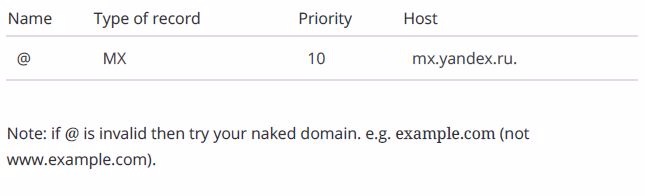
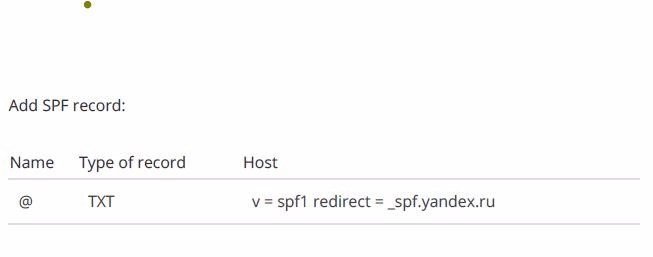
Step 4: Once you verify your domain and setup MX records, they will ask you to create a new email account with a password.
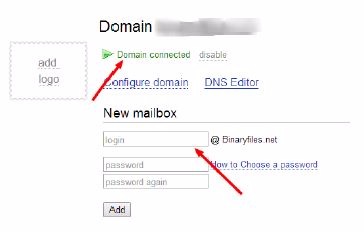
On first sign-in, users will have to accept T&C and fill in some simple information. Once you log in to your account, you may change your preferred language from Russian to English. You will find a flag icon on the bottom-right of the mailbox you just signed in.
Benefits over other providers:
1. Yandex is the most popular site in Russia and holds 10 million email accounts. Otherwise, according to some personal preferences, the service is reliable and secure.
2. You will instantly get 1000 free accounts for your business.
3. You may also offer open registration to anyone from the public or your visitors, like Microsoft once did.