3 Smart Ways to Use Binary Search in Coding Interviews
Arslan AhmedBinary search, as we all know, is the easiest difficult algorithm to get right.
It is also one of the smartest searching algorithms with a guaranteed running time of O(logN) for an input array containing N sorted elements.
In this post, I will share three smart modifications of the binary search algorithm that will help you solve dozens of coding problems. I will share a few of these problems in this post too.
Whenever we encounter a sorted Array, List, or Matrix in a coding problem and we are asked to find a specific number, we all know that the best algorithm we can use is the binary search.
Here are a few examples of such problems:
- Given an array of numbers, sorted in ascending order. Find the ceiling of a given number “
key”. The ceiling of thekeywill be the smallest element in the given array, greater than or equal to thekey. - Given an array of lowercase letters sorted in ascending order. Find the smallest letter in the given array, greater than a given
key. - Given an array of numbers sorted in ascending order. Find the element in the array that has the minimum difference with the given
key.
It is straightforward to realize that all the above problems can be solved with a few modifications to the basic binary search algorithm.
However, with some problems, it is not easy to understand that we can utilize binary search, especially when the given input is not an array (such as a Matrix or a List whose length we don’t know).
The three approaches that we will discuss in this post will explain how we can use binary search for different data structures and problem constraints.
We will name these approaches:
- Order-agnostic binary search
- Searching in an infinite
List - Searching in a sorted
Matrix
Let’s understand these approaches with real coding problems.
Approach 1: Order-Agnostic Binary Search | Easy
Problem statement
Given a sorted array of numbers, find out if a given number key is present in the array.
Though we know that the array is sorted, we don’t know if it’s sorted in ascending or descending order. You should assume that the array can have duplicates.
Write a function to return the index of the key if it is present in the array, otherwise return -1.
Example-1: Input: [1, 2, 3, 4, 5, 6, 7], key = 5, Output: 4
Example-2: Input: [10, 6, 4], key = 10, Output: 0
Solution
To make things simple, let’s first solve this problem assuming that the input array is sorted in ascending order.
These are the steps for binary search:
Step 1
Let’s assume start points to the first index and end points to the last index of the input array (let’s call it arr). This means: int start = 0; int end = arr.length — 1;
Step 2
First, we will find the middle of start and end.
An easy way to find the middle would be: middle=(start+end)/2.
For Java and C++, this equation will work most of the time, but when start or end is large, this equation will give us the wrong result due to integer overflow.
Imagine that start is equal to the maximum range of an integer (e.g., for Java: int start = Integer.MAX_VALUE). Now, adding anything to start will result in an integer overflow. As we need to add both numbers first to evaluate our equation, an overflow might occur.
The safest way to find the middle of two numbers without getting an overflow is as follows: middle = start + (end-start)/2.
The above discussion is not relevant to Python, as we don’t have the integer overflow problem in pure Python.
Step 3
Next, we will see if the key is equal to the number at the index middle. If it is equal, we return middle as the required index.
Step 4
If the key is not equal to the number at the index middle, we have to check two things:
- If
key < arr[middle], then we can conclude that thekeywill be smaller than all the numbers after the indexmiddle, as the array is sorted in ascending order. Hence, we can reduce our search toend = mid - 1. - If
key > arr[middle], we can conclude that thekeywill be greater than all numbers before the indexmiddle, as the array is sorted in ascending order. Hence, we can reduce our search tostart = mid + 1.
Step 5
We will repeat steps 2 to 4 with new ranges of start to end.
If, at any time, start becomes greater than end, this means that we can’t find the key in the input array, and we must return -1.
Here is the visual representation of the Binary Search for the first example:

If the array is sorted in descending order, we have to update step 4 above because:
- If
key > arr[middle], then we can conclude that thekeywill be greater than all the numbers after the indexmiddle, as the array is sorted in descending order. Hence, we can reduce our search toend = mid - 1. - If
key < arr[middle], then we can conclude that thekeywill be smaller than all the numbers before the indexmiddle, as the array is sorted in descending order. Hence, we can reduce our search tostart = mid + 1.
Finally, how can we figure out the sort order of the input array?
We can compare the numbers pointed out by start and end indexes to find the sort order. If arr[start] < arr[end], it means that the numbers are sorted in ascending order; otherwise, they are sorted in descending order.
Code
Here is the Python code to solve this problem:
def binary_search(arr, key):
  start = 0
  end = len(arr) - 1
  is_ascending = arr[start] < arr[end]

  while start <= end:
    # calculate the middle of the current range
    mid = start + (end - start) // 2

    if key == arr[mid]:
     return mid

    # ascending order
    if is_ascending:
     if key < arr[mid]:
      end = mid - 1 # "key" can be the first half
     else:
      start = mid + 1 # "key" can be the second half
    # descending order
    else:
     if key > arr[mid]:
      end = mid - 1 # "key" can be in the first half
     else:
      start = mid + 1 # "key" can be in the second half

  return -1

binary_search([4, 6, 10], 10)
binary_search([1, 2, 3, 4, 5, 6, 7], 5)
binary_search([10, 6, 4], 4)
Time and space complexity
As we are reducing the search range by half at every step, it means that the time complexity of our algorithm will be O(logN) where N is the total number of elements in the given array.
The algorithm runs in constant space O(1).
Approach 2: Searching in an Infinite List | Hard
Problem statement
Given an infinite sorted array (or an array with an unknown size), find out if a given number key is present in the array.
Write a function to return the index of the key if it is present in the array, otherwise return -1.
As it is not possible to define an array with infinite (unknown) size, you will be provided with an interface ArrayReader to read elements of the array.
ArrayReader.get(index) will return the number at the index; if the array’s size is smaller than the index, it will return Integer.MAX_VALUE.
Example: Input: [4, 6, 8, 10, 12, 14, 16, 18, 20, 22, 24, 26, 28, 30], key = 16
Output: 6., Explanation: The key is present at index ‘6’ in the array.
Solution
As binary search helps us find a number in a sorted array efficiently, we can use a modified version of the binary search to find the key in an infinite sorted array.
The only issue with applying Binary Search to this problem is that we don’t know the bounds of the array. To handle this situation, we will first find the proper bounds of the array where we can perform a binary search.
An efficient way to find the proper bounds is to start at the beginning of the array with the bound’s size as 1 and exponentially increase the bound’s size (i.e., double it) until we find the bounds that can have the key.
Consider the example mentioned above:

Once we have searchable bounds, we can apply the binary search.
Code
Here is the Python code to solve this problem:
import sys

class ArrayReader:
  def __init__(self, arr):
    self.arr = arr

  def get(self, index):
    if index >= len(self.arr):
      return sys.maxsize
    return self.arr[index]

class SearchInfiniteSortedArray:
  def search(self, reader, key):
    # find the proper bound first
    start = 0
    end = 1

    while(reader.get(end) < key):
      new_start = end + 1
      end += (end - start + 1) * 2 # increase to double the bound size
      start = new_start
    return self.binary_search(reader, key, start, end)

  def binary_search(self, reader, key, start, end):
    while(start <= end):
      mid = start + (end - start) // 2
      if key < reader.get(mid):
        end = mid - 1
      elif key > reader.get(mid):
        start = mid + 1
      else:
        return mid
    return -1

arr = [4, 6, 8, 10, 12, 14, 16, 18, 20, 22, 24, 26, 28, 30]
reader = ArrayReader(arr)
print(SearchInfiniteSortedArray().search(reader, 11)
)
print(SearchInfiniteSortedArray().search(reader, 16)
)

arr2 = [1, 3, 8, 10, 15]
reader = ArrayReader(arr2)
print(SearchInfiniteSortedArray().search(reader, 15)
)
print(SearchInfiniteSortedArray().search(reader, 200)
)
Time and space complexity
There are two parts of the algorithm.
In the first part, we keep increasing the bound’s size exponentially (double it every time) while searching for the proper bounds. Therefore, this step will take O(logN) assuming that the array will have maximum N numbers.
In the second step, we perform the binary search, which will take O(logN), so the overall time complexity of our algorithm will be O(logN + logN) which is asymptotically equivalent to O(logN).
The algorithm runs in constant space O(1).
Approach 3: K-th Smallest Number in a Sorted Matrix | Medium
Problem statement
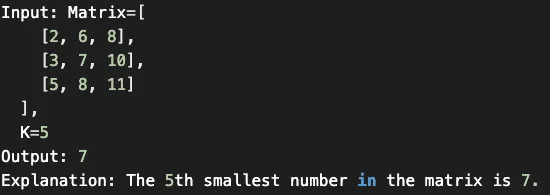
Given an N * N matrix where each row and column is sorted in ascending order, find the K-th smallest element in the matrix.
Solution
As each row and column of the matrix is sorted, is it possible to use binary search to find the K-th smallest number?
The biggest problem using binary search, in this case, is that we don’t have a straightforward sorted array, instead, we have a matrix.
As we remember, in binary search, we calculate the middle index of the search space (1 to N) and see if our required number is pointed out by the middle index. If not, we either search in the lower half or the upper half.
In a sorted matrix, we can’t really find a middle. Even if we do consider some index as middle, it is not straightforward to find the search space containing numbers bigger or smaller than the number pointed out by the middle index.
An alternative could be to apply the binary search on the “number range” instead of the “index range.”
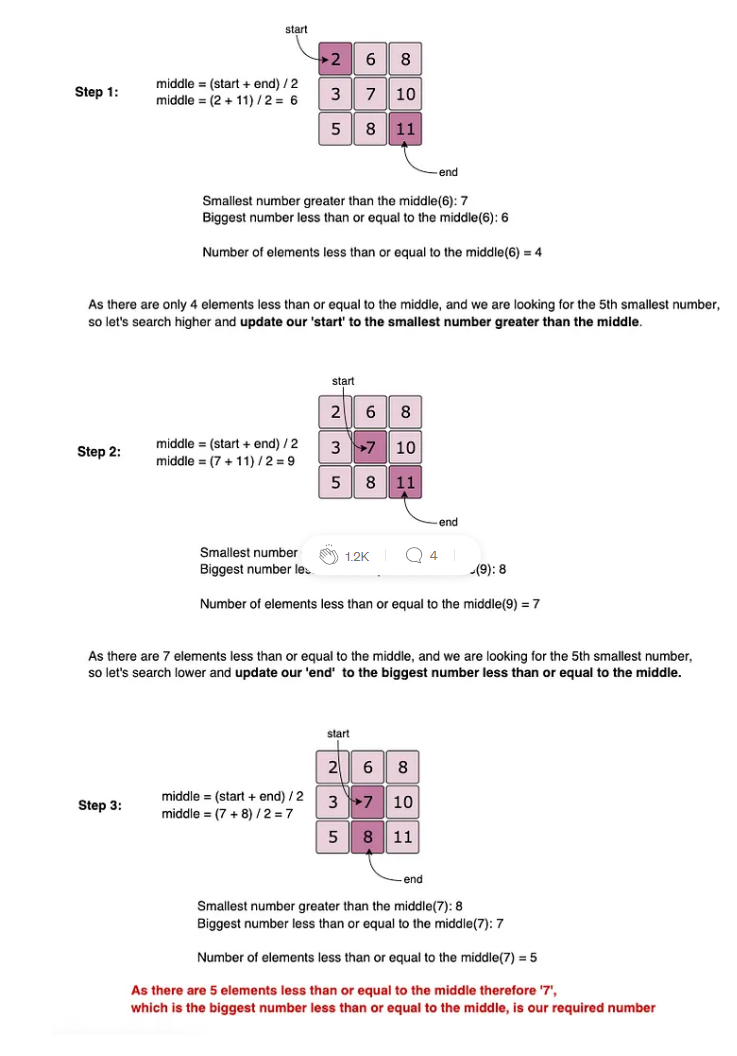
As we know, the smallest number of our matrix is at the top left corner, and the biggest number is at the bottom lower corner. These two numbers can represent the range, i.e., the start and the end for the binary search.
Here is how our algorithm will work:
- Start the binary search with
start = matrix[0][0]andend = matrix[n-1][n-1]. - Find the
middleof thestartand theend. Thismiddlenumber is not necessarily an element in the matrix. - Count all the numbers smaller than or equal to
middlein the matrix. As the matrix is sorted, we can do this inO(N). - While counting, we can keep track of the “smallest number greater than the
middle” (let’s call itn1) and, at the same time, the “biggest number less than or equal to themiddle” (let’s call itn2). These two numbers will be used to adjust the number range for the binary search in the next iteration. - If the count is equal to
K,n1will be our required number as it is the “biggest number less than or equal to themiddle” and is definitely present in the matrix. - If the count is less than
K, we can updatestart = n2to search in the higher part of the matrix and if the count is greater thanK, we can updateend = n1to search in the lower part of the matrix in the next iteration.
Code
Here is the Python code to solve this problem:
class KthSmallestInSortedMatrix:
  def findKthSmallest(self, matrix, k):
    n = len(matrix)
    start = matrix[0][0]
    end = matrix[n-1][n-1]

    while start < end:
      mid = start + (end - start) // 2
      # first number is the smallest and the second number is the largest
      small_larger_pair = [ matrix[0][0], matrix[n-1][n-1] ]
      count = self.count_less_equal(matrix, mid, small_larger_pair)

      if count == k:
        return small_larger_pair[0]

      if count < k:
        start = small_larger_pair[1] # search higher
      else:
        end = small_larger_pair[0] # search lower

    return start

  def count_less_equal(self, matrix, mid, small_larger_pair):
    count = 0
    n = len(matrix)
    row = n - 1
    column = 0

    while row >= 0 and column < n:
      if matrix[row][column] > mid:
        # as matrix[row][col] is bigger than the mid, let's keep track of the
        # smallest number greater than the mid
        small_larger_pair[1] = min(small_larger_pair[1], matrix[row][column])
        row -= 1
      else:
        # as matrix[row][col] is greater than or equal to the mid,
        # let's keep track of the biggest number less than or equal to the mid
        small_larger_pair[0] = max(small_larger_pair[0], matrix[row][column])
        count += row + 1
        column += 1

    return count

matrix = [
  [1, 4],
  [2, 5]
]
result = KthSmallestInSortedMatrix().findKthSmallest(matrix, 2)   print("Kth smallest number is: " + str(result))

matrix2 = [
  [2, 6, 8],
  [3, 7, 10],
  [5, 8, 11]
]
result = KthSmallestInSortedMatrix().findKthSmallest(matrix2, 5)
print("Kth smallest number is: " + str(result))

matrix3 = [
  [-5]
]
result = KthSmallestInSortedMatrix().findKthSmallest(matrix3, 1)
print("Kth smallest number is: " + str(result))

matrix4 = [
  [1, 5, 9],
  [10, 11, 13],
  [12, 13, 15]
]
result = KthSmallestInSortedMatrix().findKthSmallest(matrix4, 8)
print("Kth smallest number is: " + str(result))
Time and space complexity
The binary search could take O(log(max−min)) iterations where max is the largest and min is the smallest element in the matrix, and in each iteration, we take O(N) for counting.
Therefore, the overall time complexity of the algorithm will be O(N∗log(max−min)). The algorithm runs in constant space O(1).
Conclusion
The three approaches for using binary search, discussed in this post, have helped me solve a lot of coding problems and also helped me to apply binary search to different data structures, like Matrix and Lists.